Introduction
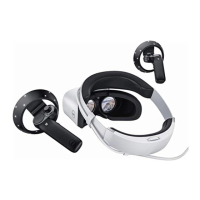
The Dell Visor VR118 Mixed Reality Headset is a head-mounted device that enables you to experience an immersive Virtual/Mixed Reality
when connected to a compatible Dell Desktop/Laptop/Gaming system.
NOTE: You can also pair the Dell Visor VR118 with the Dell Visor Controllers VRC100 (sold separately) for a more immersive and
interactive experience.
The Windows Mixed Reality is a platform of experiences, where you can:
• Easily set up the headset in 10 minutes or less
• Pick up and move the PC and headset to a dierent room
• Listen to high-quality audio (headphones required)
• Navigate the virtual world using the Dell Visor Controllers VRC100 (sold separately)
• Play VR games
• Watch 360° videos
• Interact and play games with friends and family in social applications (separate software application purchase required)
• Watch Live events
• Talk to Cortana as a personal assistant (Cortana with voice-certied microphone required)
• Take Mixed Reality capture and share experiences with friends and family (separate software application purchase required)
• Watch commercially available, professional-quality Virtual Reality experiences (separate software application purchase required)
1
4 Introduction


 To Next Page