Home
Dell
Laptop
Vostro 1400
Page 80 (S-Video and S;PDIF Digital Audio)
Dell Vostro 1400 - S-Video and S;PDIF Digital Audio
248 pages
Manual
Save Page as PDF
To Next Page
To Next Page
To Previous Page
To Previous Page
Loading...
80
Using Multimed
ia
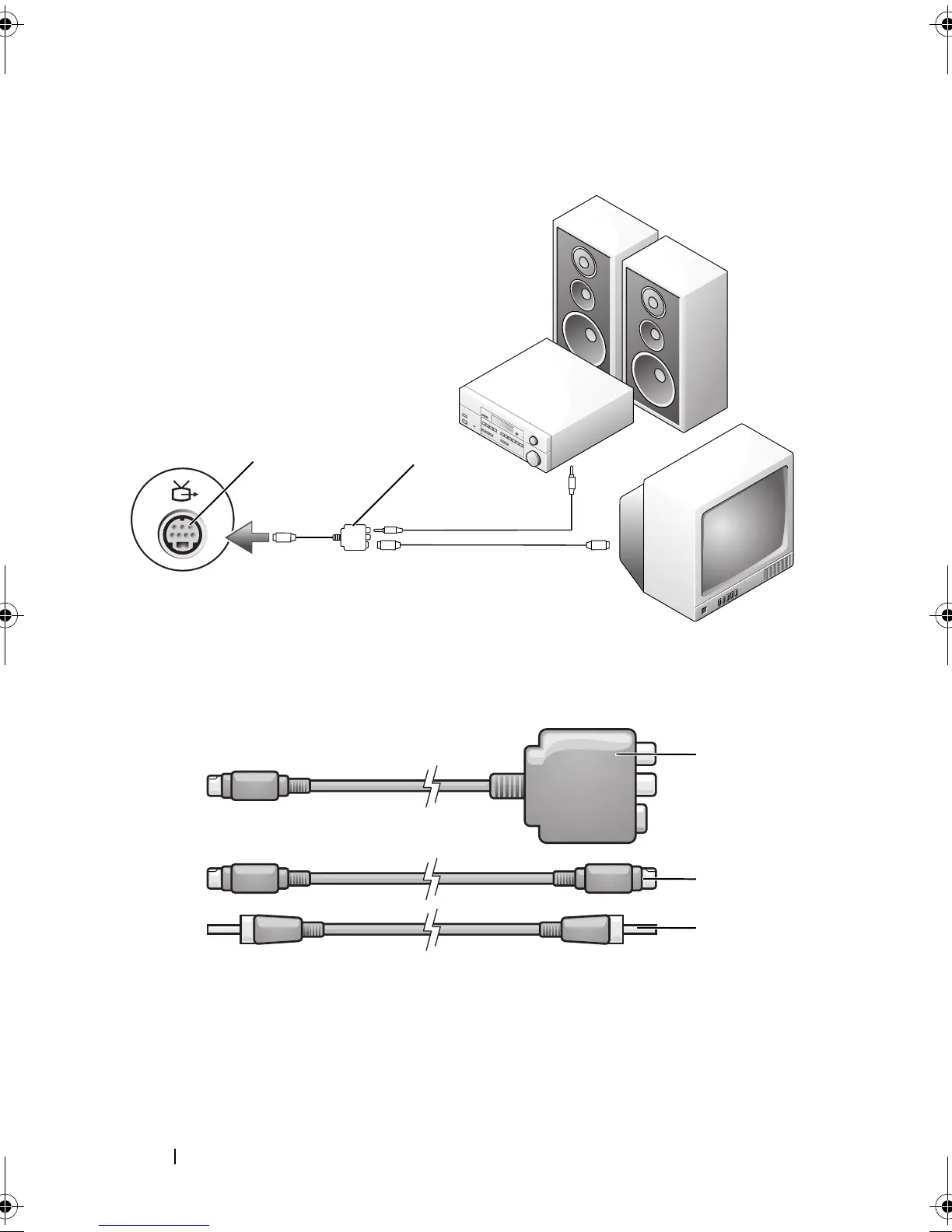
S-V
ideo and S/PDIF Digital Audio
1
S-video TV-out connector
2
composite video adapter
1
composite video adapter
2
S-video cable
3
S/PDIF digital audio cable
1
2
1
2
3
book.book Page 80 Wednesday
, September 16, 2009 11:12 AM
79
81
Table of Contents
Main Page
Default Chapter
3
Table of Contents
3
1 Finding Information
15
2 About Your Computer
23
Determining Your Computer's Configuration
23
Front View
24
Left Side View
30
Right Side View
31
Back View
32
Bottom View
34
3 Setting up Your Computer
37
Connecting to the Internet
37
Setting up Your Internet Connection
38
Transferring Information to a New Computer
39
Microsoft ® Windows ® XP
39
Microsoft Windows Vista
43
Setting up a Printer
43
Printer Cable
44
Connecting a USB Printer
44
Power Protection Devices
45
Surge Protectors
45
Line Conditioners
46
Uninterruptible Power Supplies
46
4 Using the Display
47
Adjusting Brightness
47
Switching the Video Image from Your Computer Display to a Projector
47
Setting Display Resolution and Refresh Rate
47
Microsoft ® Windows ® XP
48
Windows Vista
48
5 Using the Keyboard and Touch Pad
49
Numeric Keypad
49
Key Combinations
50
System Functions
50
Display Functions
50
Battery
50
Power Management
50
Microsoft ® Windows ® Logo Key Functions
50
Dell™ Quickset Key Combinations
51
Adjusting Keyboard Settings
51
Touch Pad
52
Customizing the Touch Pad
53
6 Using a Battery
55
Battery Performance
55
Checking the Battery Charge
56
Dell Quickset Battery Meter
56
Charge Gauge
57
Low-Battery Warning
58
Microsoft ® Windows ® XP Battery Meter
58
Microsoft ® Windows ® Vista Battery Meter
58
Conserving Battery Power
58
Power Management Modes
59
Standby and Sleep Mode
59
Hibernate Mode
59
Configuring Power Management Settings
60
Accessing Power Options Properties
60
Charging the Battery
61
Replacing the Battery
61
Storing a Battery
62
7 Using the Optional Camera
63
Accessing the Camera's Help File
63
Manually Adjusting the Camera Settings
64
Creating a Picture or a Video
64
8 Using Multimedia
67
Playing Media
67
Playing Media Using Dell Express Card Remote Control
69
Copying CD and DVD Media
71
How to Copy a CD or DVD
71
Using Blank CD and DVD Media
72
Helpful Tips
72
Adjusting the Volume
73
Adjusting the Picture
74
Using Dell Media Experience™ and Dell Mediadirect
74
If the Computer Is Turned on or in Standby or Sleep Mode
75
If the Computer Is Turned off or in Hibernate Mode
75
Dell Mediadirect and Dell Media Experience Help
76
Connecting Your Computer to a TV or Audio Device
76
S-Video and Standard Audio
78
S-Video and S/PDIF Digital Audio
80
Composite Video and Standard Audio
82
Composite Video and S/PDIF Digital Audio
84
Component Video and Standard Audio
86
Component Video and S/PDIF Digital Audio
88
Enabling the Display Settings for a TV
91
9 Using Expresscards
93
Expresscard Blanks
93
Installing an Expresscard
94
Removing an Expresscard or Blank
95
10 Using the Memory Card Reader
97
Memory Card Blanks
97
Installing a Memory Card
97
Removing a Memory Card or Blank
98
11 Setting up and Using Networks
99
Connecting a Network or Broadband Modem Cable
99
Setting up a Network in the Microsoft Windows XP Operating System
100
Setting up a Network in the Microsoft Windows Vista™ Operating System
100
Wireless Local Area Network
101
What You Need to Establish a WLAN Connection
101
Checking Your Wireless Network Card
101
Setting up a New WLAN Using a Wireless Router and a Broadband Modem
102
Connecting to a WLAN
103
Windows XP Operating System
104
Mobile Broadband (or Wireless Wide Area Network)
106
What You Need to Establish a Mobile Broadband Network Connection
106
Checking Your Dell Mobile Broadband Card
107
Connecting to a Mobile Broadband Network
107
Enabling/Disabling the Dell Mobile Broadband Card
108
Dell Wi-Fi Catcher™ Network Locator
108
12 Securing Your Computer
111
Security Cable Lock
111
Passwords
111
If Your Computer Is Lost or Stolen
112
13 Troubleshooting
115
Dell Technical Update Service
115
Dell Diagnostics
115
Dell Support Center
120
Dell Support 3
120
Dell PC Tune-Up
121
Dell PC Checkup
122
Dell Network Assistant
122
Dellconnect
122
Drive Problems
123
Optical Drive Problems
124
Hard Drive Problems
124
E-Mail, Modem, and Internet Problems
125
Error Messages
127
Expresscard Problems
132
IEEE 1394 Device Problems
133
Keyboard Problems
133
External Keyboard Problems
133
Unexpected Characters
134
Lockups and Software Problems
135
The Computer Does Not Start
135
The Computer Stops Responding
135
A Program Stops Responding or Crashes Repeatedly
135
A Program Is Designed for an Earlier Microsoft ® Windows ® Operating System
136
A Solid Blue Screen Appears
136
Dell Mediadirect Problems
136
Other Software Problems
137
Memory Problems
138
Network Problems
139
Mobile Broadband (Wireless Wide Area Network [WWAN])
139
Power Problems
140
Printer Problems
141
Scanner Problems
142
Sound and Speaker Problems
143
No Sound from Integrated Speakers
143
No Sound from External Speakers
143
No Sound from Headphones
144
Remote Control Problems
144
Touch Pad or Mouse Problems
145
Video and Display Problems
146
If the Display Is Blank
146
If the Display Is Difficult to Read
146
If Only Part of the Display Is Readable
147
Drivers
147
What Is a Driver
147
Identifying Drivers
148
Reinstalling Drivers and Utilities
149
Using the Drivers and Utilities Media
150
Manually Reinstalling Drivers
151
Troubleshooting Software and Hardware Problems
152
Restoring Your Microsoft ® Windows Vista
153
Operating System
153
Using Windows Vista System Restore
153
Restoring the Computer to the Default Factory Configuration
155
Using the Operating System Media
156
Restoring Your Microsoft ® Windows ® XP Operating System
158
Using Microsoft Windows System Restore
158
Starting System Restore
158
Using Dell™ PC Restore
159
Using the Operating System Media
161
14 Adding and Replacing Parts
163
Before You Begin
163
Recommended Tools
163
Turning off Your Computer
164
Before Working Inside Your Computer
164
Hard Drive
166
Removing the Hard Drive
166
Replacing the Hard Drive
168
Returning a Hard Drive to Dell
168
Optical Drive
169
Removing the Optical Drive
169
Replacing the Optical Drive
170
Central Control Cover
170
Removing the Central Control Cover
171
Replacing the Central Control Cover
171
Keyboard
172
Removing the Keyboard
172
Replacing the Keyboard
173
Memory
174
Removing the Memory Module
174
Replacing the Memory Module
176
Modem
177
Subscriber Identity Module
179
Wireless Mini-Cards
179
Removing a WLAN Card
180
Replacing a WLAN Card
181
Internal Card with Bluetooth ® Wireless Technology
182
Removing a Mobile Broadband or WWAN Card
184
Replacing a WWAN Card
185
Flash Cache Module
186
Removing the FCM
186
Replacing the FCM
187
Coin-Cell Battery
188
Removing the Coin-Cell Battery
188
Replacing the Coin-Cell Battery
189
15 Dell™ Quickset Features
191
16 Traveling with Your Computer
193
Identifying Your Computer
193
Packing the Computer
193
Travel Tips
194
Traveling by Air
194
17 Getting Help
195
Obtaining Assistance
195
Technical Support and Customer Service
196
Dellconnect
196
Online Services
196
Autotech Service
197
Automated Order-Status Service
197
Problems with Your Order
197
Product Information
198
Returning Items for Warranty Repair or Credit
198
Before You Call
199
Contacting Dell
201
18 Specifications
203
19 Appendix
213
Using the System Setup Program
213
Viewing the System Setup Screen
214
System Setup Screen
214
Commonly Used Options
214
Cleaning Your Computer
216
Computer, Keyboard, and Display
216
Touch Pad
217
Mouse
217
Media
218
Dell Technical Support Policy (U.S. Only)
218
Definition of "Dell-Installed" Software and Peripherals
219
Definition of "Third-Party" Software and Peripherals
219
FCC Notice (U.S. Only)
219
FCC Class B
219
Macrovision Product Notice
221
Other manuals for Dell Vostro 1400
Service Manual
45 pages
Quick Setup
2 pages
Related product manuals
Dell Vostro 1440
78 pages
Dell Vostro 14-5459
34 pages
Dell Vostro 14 5410
79 pages
Dell Vostro 14 3430
147 pages
Dell Vostro 14-5468
76 pages
Dell Vostro 14 3435
158 pages
Dell Vostro 14 5415
77 pages
Dell Vostro 14 3440
129 pages
Dell Vostro 14–3468
79 pages
Dell Vostro 14-5459 P68G
35 pages
Dell Vostro 14 3000 Series
2 pages
Dell Vostro 1510
116 pages





 To Next Page