8
User Instruction
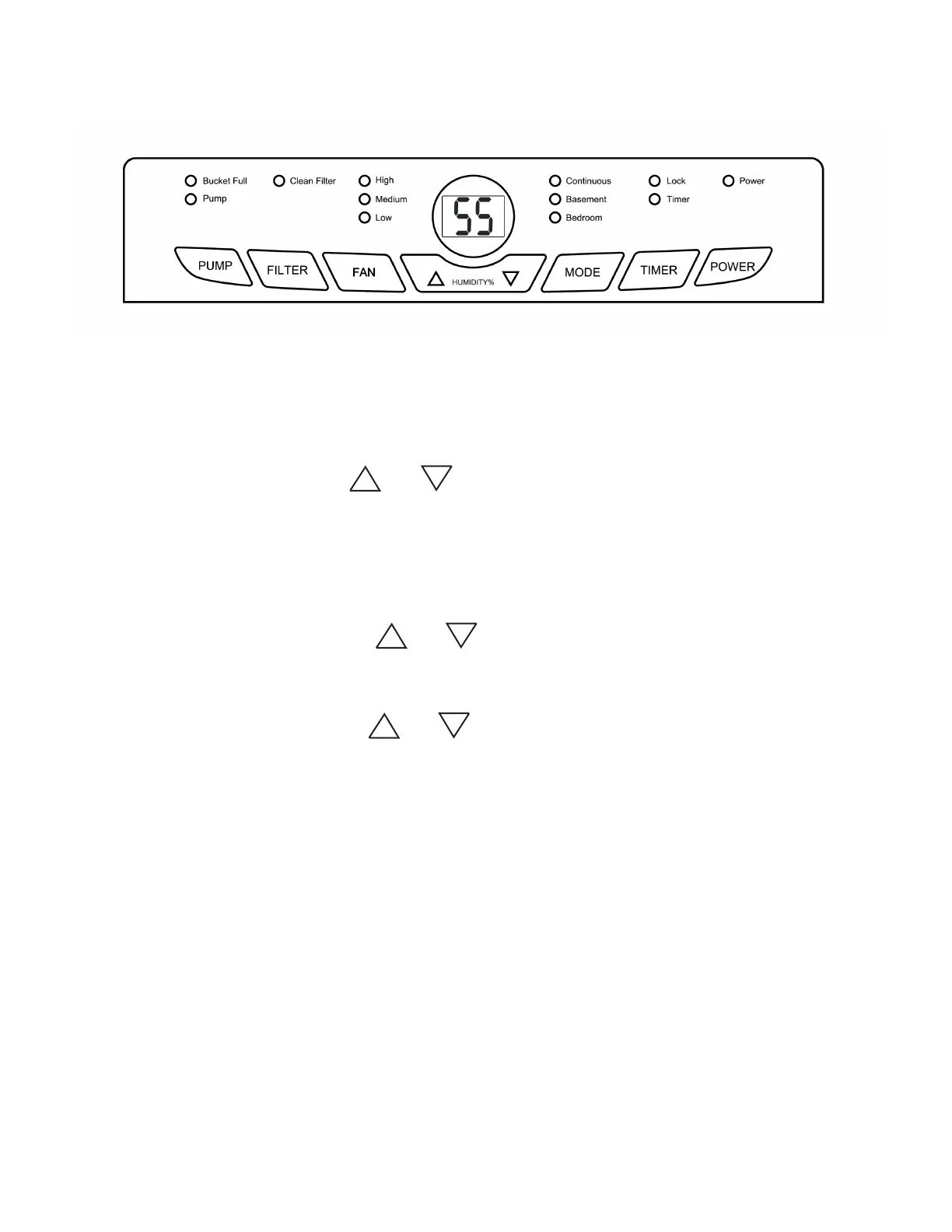
Control Panel
FUNCTION:
Power ON/OFF:
Humidity Selection:
Fan Speed Control:
Timer Auto On:
Timer Auto O:
Mode:
Child-Lock:
Press the POWER button to turn on and o the unit
Press the or button to set the desired humidity in the room from
35% to 80% with a 5% interval.
Press the FAN button to rotate and select dierent fan speed: High, Medium,
Low.
To program the unit to automatically turn on, press TIMER button when the unit
is OFF. Press or to increase or decrease the timer in 30 mins interval
for the rst 10 hours, and 1 hour interval from 10 - 24 hours.
To program the unit to automatically turn o, press TIMER button when the unit
is ON. Press or to increase or decrease the timer in 30 W interval for
the rst 10 hours, and 1 hour interval from 10 - 24 hours.
Press MODE button to choose between Continuous operation, Basement mode,
or Bedroom mode.
Basement mode:
Preset mode for better performance in basement use.
Bedroom mode:
Preset mode for best comfort in bedroom use.
Continuous operation:
Disable the unit from cycling ON and OFF and allow the unit to operate
continuously.
Press and hold TIMER button for 3 seconds will enable child lock and prevent
someone from accidentally changing the setting. The lock indicator will me on.
Press and hold TIMER button for 3 seconds to disable child-lock.



 To Next Page