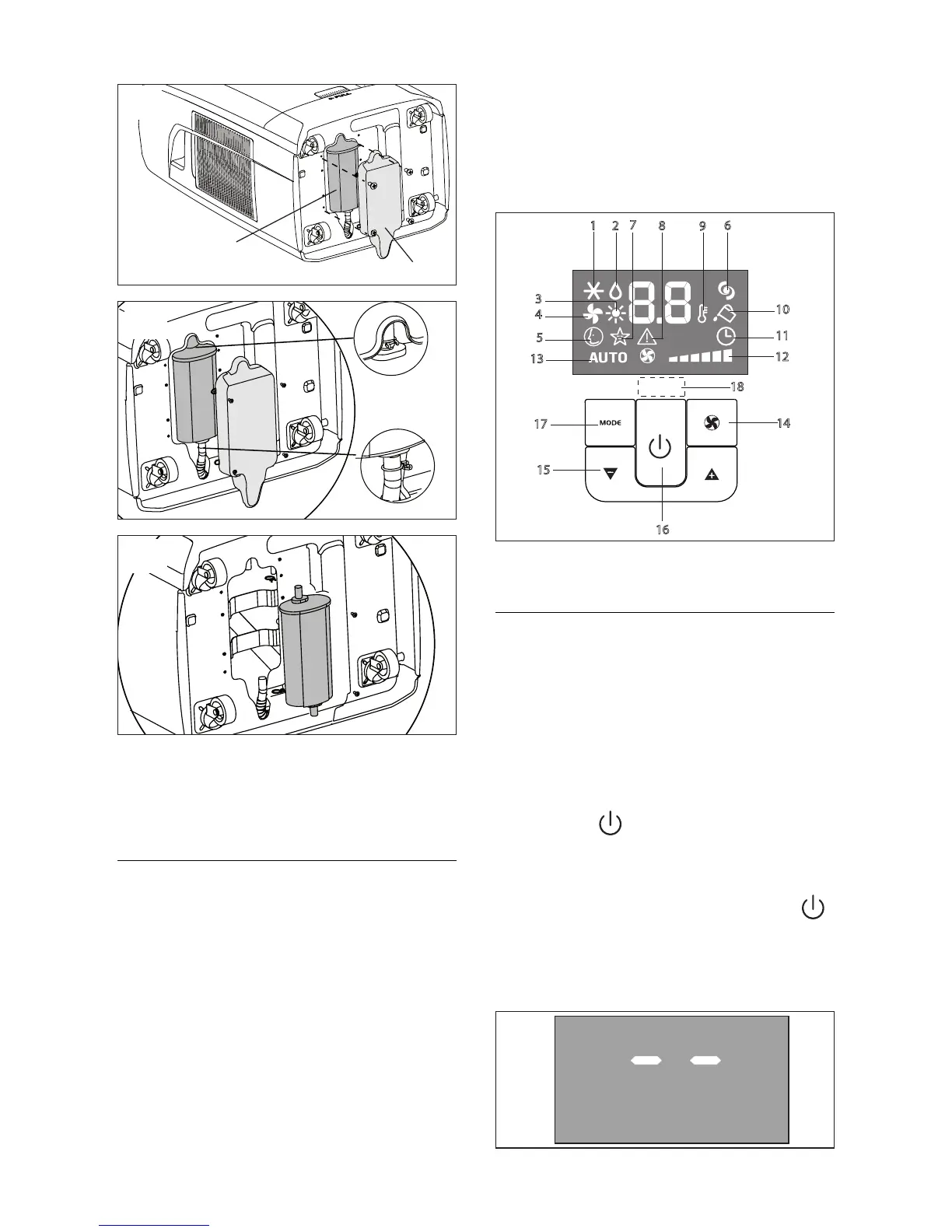
DESCRIPTION OF THE CONTROL
PANEL WITH ADVANCED LCD
DISPLAY
1 Air conditioning symbol
2 Dehumidifying symbol
3 Heating symbol
4 Fan symbol
5 SMART symbol
6 BOOST symbol
7 SLEEP symbol
8 Alarm symbol
9 Temperature indicator
10 “No water” symbol
11 Timer symbol
12 Speed indicator
13 AUTOFAN indicator
14 FAN button
15 Increase (+) and decrease (-) temperature
button
16 ON/Standby button
17 MODE button (selects the modes)
18 Signal receiver
OPERATING FROM THE CONTROL
PANEL
Thecontrolpanelenablesyoutomanageallthe
mainfunctionsoftheappliance.Tofullyexploit
its potential, you must use the remote control
unit.
Turning the appliance on
• Plugintothemainssocket.
Two lines appear on the display indicating
thattheapplianceisinstandby(g.20).
• Pressthebuttonuntiltheapplianceco-
meson.Thelastfunctionactivewhenitwas
turnedoffwillappear.
• Neverturntheairconditioneroffbyunplug-
gingfromthemains.Alwayspressthe
button,thenwaitforafewminutesbefore
unplugging.Thisallowstheappliancetoper-
formacycleofcheckstoverifyoperation.




 To Next Page