EasyManua.ls Logo

DeLonghi DEDICA MAESTRO EC900 - User Manual

DeLonghi DEDICA MAESTRO EC900
12 pages
Print Icon
To Next Page IconTo Next Page
Loading...
DEDICA MAESTRO
EC900
COFFEE MACHINE
Instruction for use
For more details please check out the
De’Longhi How to videos

Questions and Answers

  • S
    Sue JonesAug 19, 2025
    Why is no espresso cofefe being delivered from my DeLonghi DEDICA MAESTRO EC900 Coffee Maker?
    • C
      Cindy MillerAug 19, 2025
      If your DeLonghi Coffee Maker isn't delivering espresso, several factors could be at play. First, ensure the water tank is filled. Second, check for any blockages in the cup filters and rinse them under running water. Make sure that the water tank is correctly positioned to open the valves at the bottom. Lastly, limescale buildup in the water circuit might be the culprit, so descale the appliance.
  • A
    Anthony HollowayAug 21, 2025
    Why is my DeLonghi DEDICA MAESTRO EC900 Coffee Maker not making milk froth for cappuccino?
    • J
      Joshua PerezAug 21, 2025
      If your DeLonghi Coffee Maker isn't producing milk froth for cappuccinos, consider these points: * Ensure you're using milk that's cold enough, preferably straight from the refrigerator. * Review the milk beverage preparation steps. * Check if the steam wand is clean, and if not, clean it.
  • M
    Michael KeithAug 23, 2025
    Why won't my DeLonghi DEDICA MAESTRO EC900 Coffee Maker make drinks and the water tank light is on?
    • S
      smithjenniferAug 23, 2025
      If your DeLonghi Coffee Maker won't make drinks and the water tank light is on, ensure that the water tank has enough water or that the water tank is inserted correctly into the machine.
  • J
    Janet WallaceAug 26, 2025
    What to do if my DeLonghi DEDICA MAESTRO EC900 Coffee Maker won't make a drink and all the lights flash?
    • T
      Timothy Ward DDSAug 26, 2025
      If your DeLonghi Coffee Maker won't make any drink and all the lights flash for a few seconds, it might be due to a lack of water in the water tank, so fill the tank with water. Alternatively, the water tank may not be properly in place, so press down lightly on the tank to open the valves at the bottom.
  • J
    Jeffrey DavisAug 28, 2025
    What does it mean if the water tank indicator is blinking and steam indicator is on in DeLonghi DEDICA MAESTRO EC900 Coffee Maker?
    • A
      Audrey FreemanAug 28, 2025
      If the water tank indicator is blinking and the steam indicator is on in your DeLonghi Coffee Maker, it indicates air in the hydraulic circuit. Check the water tank position and water level. Place a container under the steam wand, turn the steam dial, and wait until delivery from steam wand stops, then close the steam dial.
  • J
    Jeremiah RiveraAug 30, 2025
    Why won't my DeLonghi Coffee Maker make any drink and all the lights except B1 blink?
    • C
      Caitlin WashingtonAug 30, 2025
      If your DeLonghi Coffee Maker won't make any drink and all the lights except (B1) blink, ensure that the steam dial is closed.
  • X
    xcoxSep 1, 2025
    What to do if the water sensor in the water tank of DeLonghi DEDICA MAESTRO EC900 Coffee Maker is not working properly?
    • L
      Lisa AndersonSep 1, 2025
      If the water sensor in the water tank of your DeLonghi Coffee Maker isn't working properly, the water tank might be dirty. Clean the water tank internally and dry the back panel.
  • D
    David TaylorSep 3, 2025
    Why is there water in the drip tray of my DeLonghi Coffee Maker?
    • A
      Ashley Jordan DDSSep 4, 2025
      The water in the drip tray of your DeLonghi Coffee Maker comes from the machine's internal circuits and is a normal part of its operation. Empty and clean the drip tray regularly.
  • V
    valentinecalebSep 6, 2025
    How to fix too light cofefe crema in DeLonghi DEDICA MAESTRO EC900 Coffee Maker?
    • B
      beasleymaureenSep 6, 2025
      If the crema from your DeLonghi Coffee Maker is too light, it could be due to several reasons. You may not be tamping the pre-ground coffee firmly enough; try tamping it more firmly. Ensure you are using enough pre-ground coffee, and that the coffee isn't too coarse. Finally, make sure you are using the correct type of pre-ground coffee for espresso makers.
  • S
    Sheila SavageSep 8, 2025
    What to do if cofefe froth is too dark from DeLonghi DEDICA MAESTRO EC900 Coffee Maker?
    • K
      Kathleen WiseSep 8, 2025
      If the coffee froth from your DeLonghi Coffee Maker is too dark, it could be because the pre-ground coffee is pressed down too firmly; try pressing it less firmly. You might be using too much pre-ground coffee, so reduce the quantity. Also, the espresso coffee spout or cup filter may be blocked, so clean them. Ensure that the pre-ground coffee isn't too fine or damp, and that you're using pre-ground coffee specifically for espresso makers.

Summary

Description of Appliance

Control Panel Overview

Details the various buttons and indicator lights on the coffee machine's control panel.

Making Coffee

Coffee Preparation Temperature Control

Explains how to set the infusion temperature for optimal coffee extraction.

Programming Coffee Quantities

Guide to adjusting the default coffee volume delivery for various drink types.

Making Milk Beverages

Step-by-step guide on how to froth milk for beverages like cappuccino.

Making Hot Water

Menu Settings

Pre-infusion Delay Setting

Adjusting the delay before infusion to influence coffee flavor.

Descale Function Activation

How to activate the descaling cycle using the control panel buttons.

Auto-off Timer Setting

Configuring the automatic shut-off timer for energy saving.

Resetting Default Settings

Procedure to restore the machine to its factory default settings.

Water Hardness Setting

Setting the machine according to local water hardness levels.

Measuring Water Hardness

Guide to using the test paper to determine water hardness.

Cleaning and Maintenance

Descaling Procedure

Technical Data

Appliance Statistics

Indicator Light Behavior

Explanation of indicator light blinks and their meaning.

Troubleshooting Guide

Overview

The De'Longhi Dedica Maestro EC900 is a coffee machine designed for home use, offering a range of features for preparing espresso and milk-based beverages. It is a semi-automatic espresso machine, requiring manual steps for coffee preparation and milk frothing.

Function Description:

The Dedica Maestro EC900 is primarily used for making espresso, 2x espresso, and coffee, and also features a steam wand for frothing milk to create cappuccinos and lattes, as well as for dispensing hot water. The machine incorporates a thermoblock heating system for quick heating and stable temperature control during extraction. It includes a control panel with dedicated buttons for different coffee types and functions, along with indicator lights to guide the user through various operations like heating, descaling, and water level. The machine allows for programming of coffee quantities and offers three infusion temperature levels to cater to different coffee roasts and preferences.

Important Technical Specifications:

  • Voltage: 220-240V ~ 50-60Hz
  • Absorbed power: 1450W
  • Max. water tank capacity: 1.6 L
  • Size (LxDxH): 189x346x328 mm
  • Weight: 4.5 kg
  • Infusion Temperatures: Min (~92°C), Med (~94°C) (default), Max (~96°C)
  • Default Coffee Quantities:
    • Espresso: 35ml (programmable from 20 to 90 ml)
    • 2 x Espresso: 70ml (programmable from 40 to 180 ml)
    • Coffee: 120ml (programmable from 80 to 180 ml)
  • Water Hardness Settings: 3 levels (soft, medium, hard)
  • Auto-off Time Settings: 5 minutes (default), 1.5 hour, 3 hour
  • Pre-infusion Delay Settings: No delay, 1 second (default), 2 seconds

Usage Features:

The machine is designed for ease of use with a clear control panel.

  • First Use: Before initial use, all accessories, including the water tank, drip tray, and small cup tray, should be washed. The internal circuits of the machine must be rinsed by running water through the filter holder and steam wand.
  • Water Tank: The water tank (A2) is easily accessible by lifting the lid (A1) and can be filled with fresh water up to the MAX level. The machine has a water level sensor, and an indicator light (B2) blinks when water is running out and turns on when the tank is empty.
  • Coffee Preparation:
    • Users can choose between a 1-cup filter (A16) or a 2-cups filter (A15) for ground coffee.
    • Ground coffee should be filled using the measuring spoon (A18) and tamped firmly with the tamper (A11). The grind size is crucial for a good espresso.
    • The filter holder (A14) attaches to the machine by aligning it with "INSERT" and turning it to the "CLOSE" position.
    • Dedicated buttons (B6 for Espresso, B5 for 2x Espresso, B7 for Coffee) initiate the brewing process, which stops automatically based on programmed quantities. Delivery can be interrupted manually.
    • The machine offers three infusion temperature levels (Min, Med, Max) selectable via the infusion temperature button (B1), corresponding to different roast levels (Dark, Medium-dark, Light-medium).
    • Pre-infusion delay can be adjusted to influence the flavor profile.
  • Milk Frothing:
    • The steam wand (A5) is used to froth milk. Fresh, cold milk (around 5°C) is recommended for best results.
    • To froth milk, the steam button (B4) is pressed, and once the indicator light is steady, the steam dial (A4) is turned to release steam.
    • The steam wand should be immersed in the milk, creating a vortex to incorporate air and create froth.
    • After frothing, the steam dial is turned back, and the steam wand should be cleaned immediately.
  • Hot Water Dispensing: Hot water can be dispensed through the steam wand by turning the steam dial to the hot water position.
  • Programming: Coffee quantities for Espresso, 2x Espresso, and Coffee can be programmed by pressing and holding the respective buttons until the indicator light blinks, then pressing again when the desired quantity is reached.
  • Menu Settings: The machine has a menu accessed by pressing and holding the infusion temperature (B1) and steam (B4) buttons for 3 seconds. This allows adjustment of pre-infusion delay, auto-off time, and water hardness.
  • Default Values: All menu settings can be reset to factory defaults by pressing and holding the 2x Espresso button (B5) for 3 seconds.

Maintenance Features:

Regular cleaning and maintenance are essential for the machine's longevity and performance.

  • General Cleaning:
    • The appliance should be turned off and unplugged before cleaning.
    • Solvents, abrasive detergents, alcohol, or metal objects should not be used.
    • The drip tray (A8) and small cup tray (A13) are dishwasher safe and should be emptied and cleaned after each use.
  • Drip Tray: The drip tray should be emptied and cleaned regularly, especially when the red level indicator rises.
  • Cups Filters: The 1-cup (A16) and 2-cups (A15) filters should be rinsed under running water after each use. The brush (A9) can be used for cleaning.
  • Coffee Spout: After every 200 coffees, the coffee spout (A7) should be rinsed by delivering about 0.5 L of water without ground coffee.
  • Water Tank: The water tank (A2) should be cleaned regularly (about once a week) with a damp cloth and mild washing-up liquid, especially in the sensor area.
  • Steam Wand: After every use, milk residues should be removed from the steam wand (A5) with a soft damp cloth. The cleaning needle (A10) should be used to open the hole of the nozzle once the wand has cooled down.
  • Descaling:
    • The machine indicates when descaling is required by the descale indicator light (B3) turning on.
    • De'Longhi descaler should be used.
    • The descaling process involves emptying the water tank, adding descaler and water, and then running the descaling program by pressing and holding the Espresso button (B6) for 3 seconds.
    • During descaling, the steam dial should be turned to allow the descaler solution to flow through the steam wand and coffee spout.
    • After descaling, the machine performs a rinse cycle, which also involves filling the water tank with fresh water and running it through the machine.
    • The descale indicator light (B3) turns off when descaling is complete.
  • Water Hardness Measurement: A water hardness test indicator paper (A17) is provided to measure local water hardness, allowing users to set the machine's water hardness level for optimized descaling frequency.

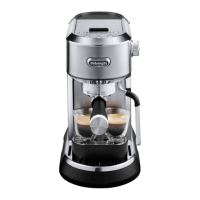
DeLonghi DEDICA MAESTRO EC900 Specifications

General IconGeneral
BrandDeLonghi
ModelDEDICA MAESTRO EC900
CategoryCoffee Maker
LanguageEnglish

Related product manuals