9
9. SETTINGS MENU
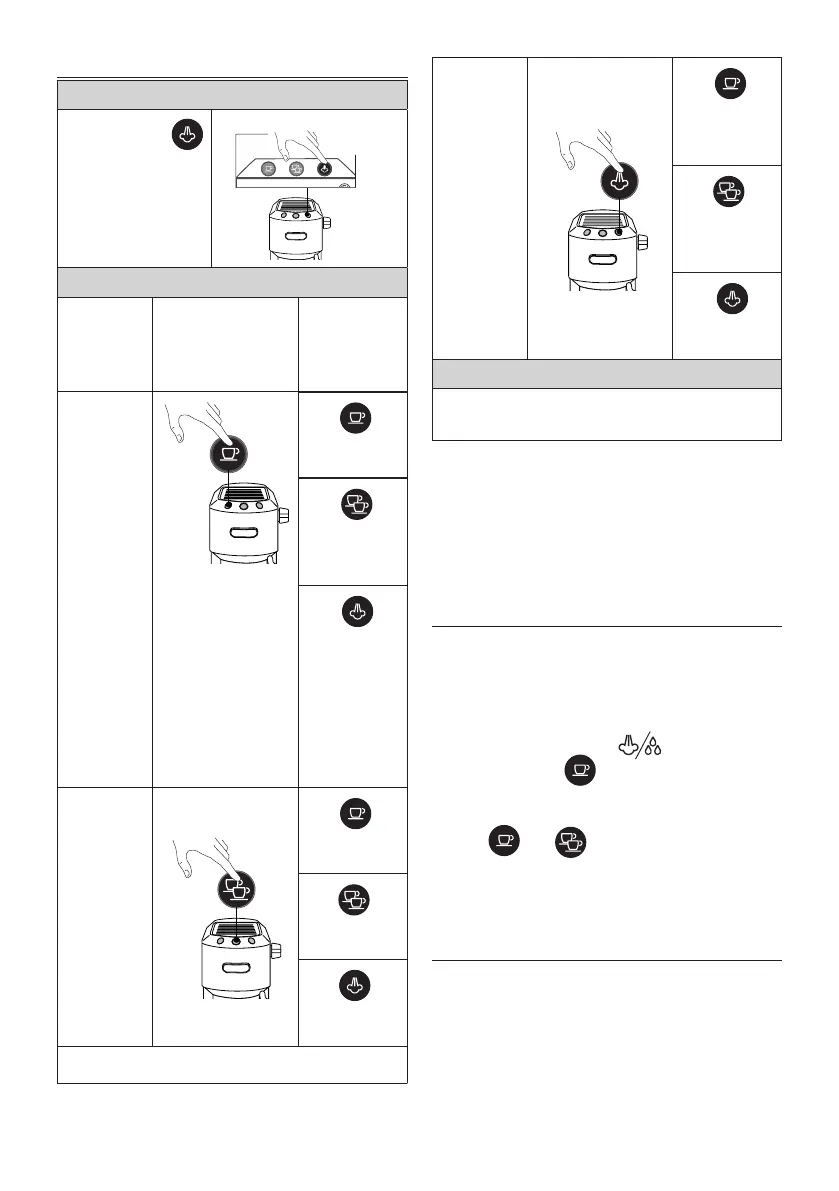
1. Access the menu:
Press and hold the
button for 10 seconds
until the three buttons
ash in sequence:
10
seconds
2. Select the setting to be adjusted
Correspond-
ing setting
Press to select the
setting
Press to
change the
setting
Brewing
temperature
This is the temperature
of the water in the ther-
moblock. It is therefore
not the temperature
of the beverage in the
cup or the temperature
of the beverage at the
moment of release from
the outlets of the lter
holder.
Press
to select Low
temperature
Press
to select
Medium
temperature
Press
to select High
temperature
Water
hardness
Press
to select Low
hardness
Press to
select Medi-
um hardness
Press to
select High
hardness
→
Auto-o
Press
to select 9
minutes
(* 5 min)
Press
to select 30
minutes
(* 90 min)
Press
to select 3
hours
3. Exit the menu
After 15 seconds of inactivity, the machine automatically
exits the settings menu.
(*) Only for models EC685 EX4, EC685 EX4, EC785 EX4
Please note:
• The light corresponding to the changed setting ashes
quickly to conrm the change.
• After 15 seconds of inactivity, the machine automatically
exits the settings menu and is ready for use.
10. DEFAULT VALUES (RESET)
This resets the machine to the default values.
Proceed as follows:
1. Position the hot water/steam dispenser on the drip tray
(A9);
2. Access the settings menu.
3. Turn the steam dial (A11) to ;
4. Press the button . The three lights ash simulta-
neously to conrm that the original settings have been
restored.
5. The and lights ash to indicate that the
steam dial must be closed again (○ symbol).
When the steam dial has been closed, the appliance is ready for
use.
11. CLEANING THE MACHINE
The following parts of the machine must be cleaned regularly:
• drip tray (A9)
• coee lters (C2), (C3) and (C4);
• coee spout (A5);
• water tank (A3);
• the hot water/steam dispenser as indicated in chapter “7.2
Cleaning the frother after each use”;



 To Next Page