21
5554
B
A
A
B
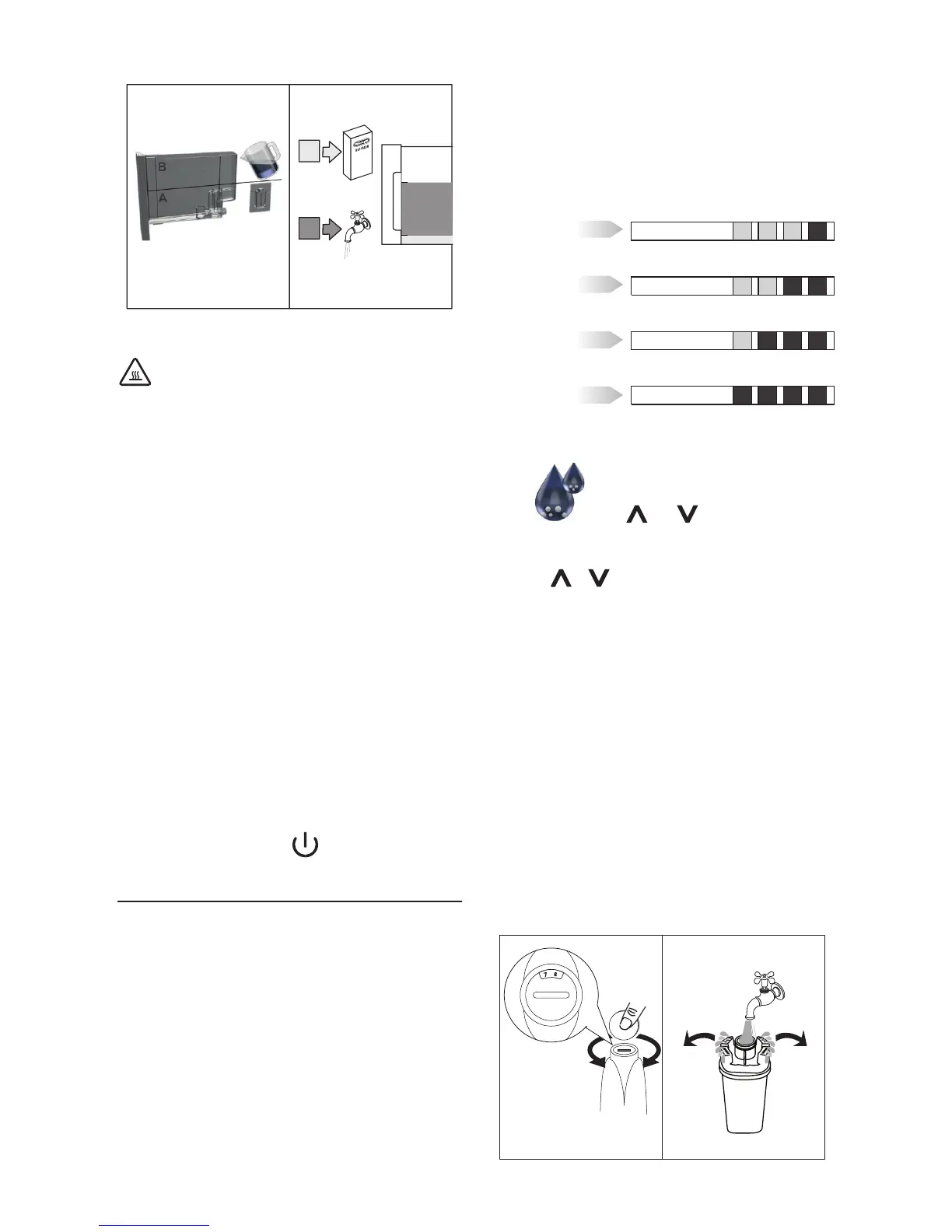
Place an empty container with a minimum capacity of 1.5
litres under the hot water spout.
Important! Danger of burns
Hot water containing acid ows out of the hot water spout.
Avoid contact with splashes of water.
6. Start descaling by pressing the OK icon.
7. The descale programme starts and the descaler liquid
comes out of the water spout. The descale programme au-
tomatically performs a series of rinses and pauses at regu-
lar intervals to remove limescale deposits from inside the
machine. The cycle lasts about 30 minutes and is indicated
by a progress bar which lls and empties.
8. “Rinsing” “FILL WATER TANK”. The appliance is now ready
for rinsing through with clean water. Remove the water
tank, empty, rinse under running water, ll with clean
water and replace.
9. Empty the container used to collect the descaler solution
and replace it under the hot water spout.
10. Press the OK icon to start rinsing. Hot water comes out of
the spout.
11. When “Descaling complete” “PRESS OK” is displayed, press
the OK icon. The appliance goes o.
12. Put the water softener lter (if present) back and ll the
tank.
To use the appliance, press the button.
SETTING WATER HARDNESS
Descaling is requested after a period of time established accor-
ding to water hardness.
The machine is set by default for a hardness value of 4 (very hard
water).
The machine can also be programmed according to the actual
hardness of the mains water in the various regions, varying the
frequency with which the message is displayed.
Measuring water hardness
1. Remove the “TOTAL HARDNESS TEST” indicator paper from
its pack.
2. Immerse the paper completely in a glass of water for one
second.
3. Remove the paper from the water and shake lightly.
After about a minute, 1, 2, 3, or 4 red squares form, depen-
ding on the hardness of the water. Each square corresponds
to one level.
LEVEL 1
soft water
LEVEL 2
slightly hard water
LEVEL 3
hard water
LEVEL 4
very hard water
Set water hardness
1. Access the settings menu by pressing the
MENU icon. Scroll through the menu pressing
the and icons to select “Water
hardness”.
2. Conrm the selection by pressing the OK icon.
3. Press or to set the water hardness identied using
the indicator paper (see gure in the previous section).
4. Press the OK icon to conrm the setting.
5. Press the ESC icon to exit the menu.
The machine is now reprogrammed with the new water
hardness setting.
WATER SOFTENER FILTER
Certain models are tted with a water softener lter. If this is not
the case with your model, you are recommended to purchase
one from De’Longhi Customer Services. To use the lter correctly,
follow the instructions below.
Installing the lter
1. Remove the lter from the packaging.
2. Turn the date indicator disk until the next two months of
use are displayed (g. 56).
5756



 To Next Page