EasyManua.ls Logo

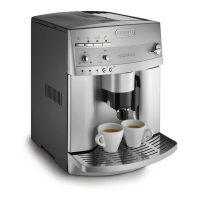
DeLonghi Magnifica ESAM3500N - User Manual

DeLonghi Magnifica ESAM3500N
24 pages
Print Icon
To Next Page IconTo Next Page
Loading...
IMPORTANT INSTRUCTIONS
SAVE THESE INSTRUCTIONS
MODE D’EMPLOI IMPORTANT
CONSERVEZ LES PRESENTES INSTRUCTIONS
INSTRUCIONES IMPORTANTES
REPASE Y GUARDE ESTAS INSTRUCCIONES
LEA ESTE INSTRUCTIVO ANTES DE UTILIZAR EL APARATO
ISTRUZIONI IMPORTANTI
CONSERVARE LE ISTRUZIONI
COFFEE MAKER TYPE ESAM3500/CAFETERIE MODÈLE ESAM3500/
CAFETERA ELECTRICA MODELO ESAM3500/ MACCHINA DA CAFFÈ ESAM3500
Register this product on-line and receive a free trial issue of Cook's Illustrated. Visit http://registration.delonghi-csservi-
ce.com. Visit www.delonghi.com for a list of service centers near you. (U.S. and Canada only)
Enregistrez ce produit en ligne et recevez un numéro gratuit de Cook's Illustrated. Visitez http://registration.delonghi-csser-
vice.com. Visitez www.delonghi.com pour y voir une liste des centres de réparation proches de chez vous. (É.-U. et
Canada).
Registre este producto en línea y reciba un ejemplar gratis de Cook's Illustrated. Visite http://registration.delonghi-csser-
vice.com. Visite www.delonghi.com para ver la lista de centros de servicios cercanos a usted. (Estados Unidos y Canada)
Registra questo prodotto "on-line" per ricevere una copia omaggio della rivista. Visita http://registration.delonghi-csservi-
ce.com.
Visita www.delonghi.com per una lista dei centri di servizio a te piu vicini. (Stati Uniti e Canada)
ELECTRONIC CHARACTERISTICS: CARACTÉRISTIQUES ÉLECTRIQUES: CARACTERISTICAS ELECTRICAS:
CARATTERISTICHE ELETTRICHE: 120V
˜
60HZ 1350W

Questions and Answers

  • W
    William LopezAug 17, 2025
    Why does my DeLonghi Magnifica ESAM3500N say 'DESCALE'?
    • L
      Logan MarshallAug 17, 2025
      The 'DESCALE' message on your DeLonghi Coffee Maker indicates there is lime scale buildup inside the appliance. You should perform the descaling procedure as soon as possible.
  • P
    peter47Aug 19, 2025
    What to do if my DeLonghi Magnifica ESAM3500N Coffee Maker says 'FILL TANK'?
    • J
      james64Aug 19, 2025
      If your DeLonghi Coffee Maker displays 'FILL TANK', it means either the water tank is empty or not positioned correctly. Make sure to fill the water tank completely and insert it properly. Also, the tank might be dirty or have lime scale buildup, so rinse or descale it.
  • S
    Susan SmithAug 22, 2025
    What to do if my DeLonghi Coffee Maker says 'EMPTY GROUNDS CONTAINER'?
    • N
      Nicole WagnerAug 22, 2025
      If your DeLonghi Coffee Maker shows 'EMPTY GROUNDS CONTAINER', it means that the grounds container is either full or missing. Empty the container, clean it, and then replace it.
  • D
    Dr. Kyle CrossAug 25, 2025
    Why does my DeLonghi Magnifica ESAM3500N say 'FILL BEANS CONTAINER'?
    • J
      Jeff DavisAug 26, 2025
      The 'FILL BEANS CONTAINER' message on your DeLonghi Coffee Maker indicates that the coffee beans have run out. Simply refill the bean container.
  • D
    Daniel YoungAug 27, 2025
    What to do if my DeLonghi Coffee Maker says 'INSERT GROUNDS CONTAINER'?
    • S
      sullivandanielAug 28, 2025
      If your DeLonghi Coffee Maker displays 'INSERT GROUNDS CONTAINER', it means that the grounds container was removed for cleaning and hasn't been replaced. Open the service door and reinsert the grounds container.
  • D
    Dr. Jessica Todd MDAug 30, 2025
    Why is there 'LESS COFFEE' coming from my DeLonghi Magnifica ESAM3500N?
    • R
      Richard WongAug 30, 2025
      If you notice 'LESS COFFEE' being produced by your DeLonghi Coffee Maker, it could be due to a clogged ground coffee funnel. Empty the funnel with the help of a plastic knife. It can also happen if too many coffee beans or too much ground coffee has been added. Select a milder taste or reduce the quantity of ground coffee, then deliver the coffee again.
  • S
    Sarah ParkerSep 2, 2025
    What to do if my DeLonghi Coffee Maker displays 'GROUND TOO FINE ADJUST MILL AND INSERT WATER SPOUT AND PRESS OK'?
    • R
      Rebecca MurphySep 2, 2025
      If your DeLonghi Coffee Maker displays 'GROUND TOO FINE ADJUST MILL AND INSERT WATER SPOUT AND PRESS OK', insert the hot water spout, press the button, and deliver water from the spout for a few seconds. Also, turn the grinding regulator one click clockwise.
  • V
    Victor WellsSep 5, 2025
    What to do if my DeLonghi Magnifica ESAM3500N Coffee Maker displays 'ADD PRE-GROUND COFFEE'?
    • C
      Curtis BrownSep 5, 2025
      If your DeLonghi Coffee Maker displays 'ADD PRE-GROUND COFFEE', it means that when the function is selected, the pre-ground coffee has not been poured into the funnel. Add the ground coffee as described in the instructions.
  • Y
    ywareSep 7, 2025
    What to do if my DeLonghi Magnifica ESAM3500N displays 'CLOSE DOOR'?
    • W
      William GonzalezSep 7, 2025
      If your DeLonghi Coffee Maker displays 'CLOSE DOOR', it means that the service door is open. If the service door cannot be closed, check that the infuser is inserted correctly.
  • J
    James BlanchardSep 10, 2025
    What to do if my DeLonghi Magnifica ESAM3500N Coffee Maker says 'INSERT INFUSER ASSEMBLY'?
    • V
      Vincent HicksSep 10, 2025
      If your DeLonghi Coffee Maker displays 'INSERT INFUSER ASSEMBLY', it means that after cleaning, the infuser has probably been left out of the coffee maker. Insert the infuser.

Summary

Important Instructions

Product Identification and Registration

Details on product model, online registration, and service center information.

Electrical Characteristics

Technical specifications for the appliance's electrical operation, including voltage and power.

Contact and Service Information

Important Safeguards

Short Cord Instructions

Appliance Description

Control Panel Overview

Identification and function of all buttons and indicators on the control panel.

Safety Warnings

Installation Guide

First-Time Usage

Language Selection

Steps to select the user interface language for the appliance.

Initial Setup Steps

Instructions for filling the water tank and performing the initial rinse cycle.

Powering On and Preheating

Preparing Coffee with Beans

Selecting Coffee Taste

How to choose the desired coffee strength or taste profile.

Selecting Cup Quantity

Instructions for brewing one or two cups of coffee.

Adjusting Coffee Quantity per Cup

Regulating the Coffee Mill

Preparing Coffee with Ground Beans

Using Ground Coffee Function

How to prepare coffee using pre-ground coffee instead of beans.

Producing Hot Water

Adjusting Hot Water Quantity

Preparing Cappuccinos and Lattes

Milk Preparation and Lid Selection

Selecting the correct lid and preparing milk for frothing or steaming.

Cappuccino;Latte Execution

Steps to prepare a cappuccino or latte, including milk and coffee delivery.

Cleaning the Milk Frother

Instructions for cleaning the milk frother system after use.

Preparing Froth Milk Only

Adjusting Cappuccino Coffee;Milk Quantities

Cleaning and Maintenance

Cleaning the Coffee Maker

Procedures for cleaning the grounds container, water tank, and drip tray.

Cleaning the Infuser

Detailed steps for removing, cleaning, and reinserting the infuser unit.

Cleaning the Milk Container

Menu Parameters and Settings

Setting the Clock

Instructions for setting the appliance's internal clock.

Setting Auto-Start Time

Descaling Procedure

Rinsing After Descaling

Steps for rinsing the appliance after the descaling cycle.

Changing Coffee Temperature

Setting Appliance Auto-Off Time

Setting Water Hardness

Troubleshooting Guide

Troubleshooting Messages

Reference for appliance messages and their meanings.

Troubleshooting Common Issues

Problem-Solution Mapping

Table outlining common operational problems and their solutions.

Troubleshooting Milk System Issues

Milk Related Problems

Specific troubleshooting steps for issues related to milk frothing and dispensing.

Limited Warranty Information

DeLonghi Magnifica ESAM3500N Specifications

General IconGeneral
BrandDeLonghi
ModelMagnifica ESAM3500N
CategoryCoffee Maker
LanguageEnglish

Related product manuals