7
en
Control panel
O
P
N
I
L
M
S
T
H
G
Q
A
B
C
R D E F
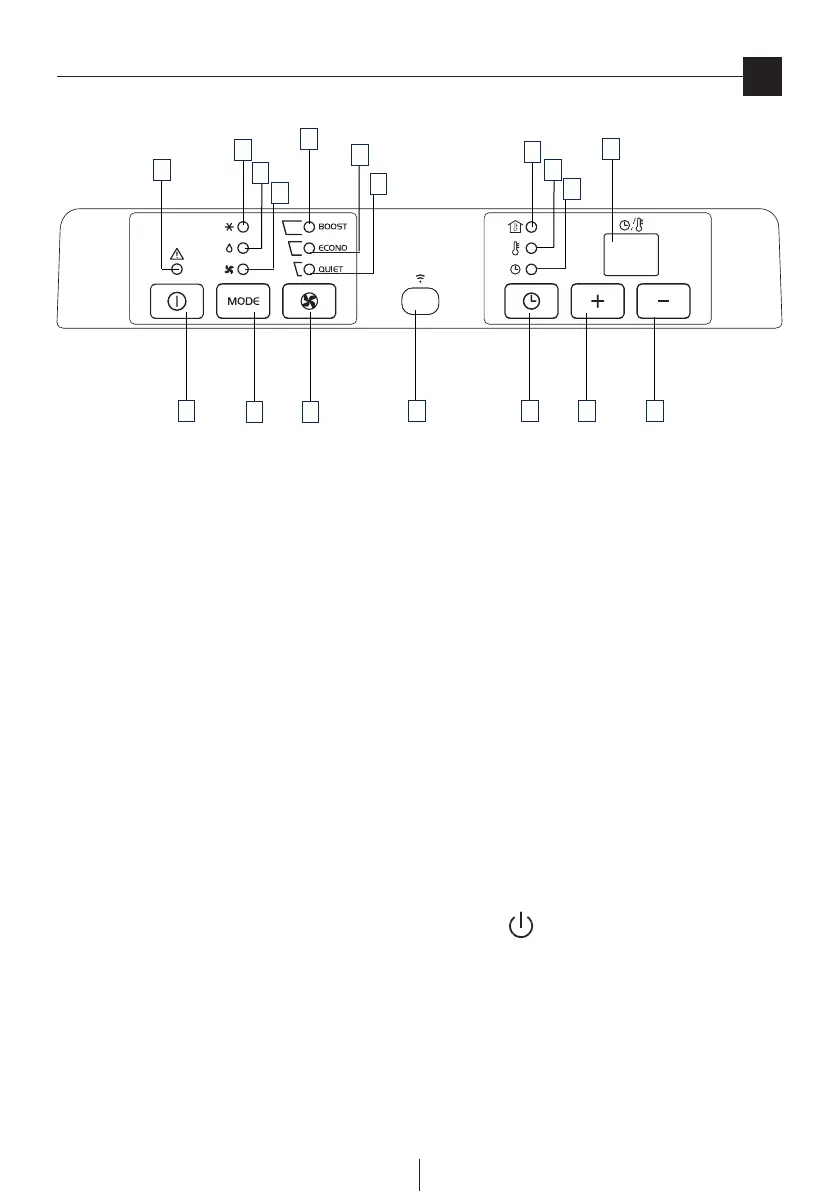
DESCRIPTION OF THE CONTROL PANEL
A ON/OFF button
B MODE selection button
Air conditioning, dehumidifying, fan.
C Fan speed selection button (BOOST/ECONO/QUIET)
D Timer button
E Programmed operation increase temperature/time button
F Programmed operation decrease temperature/time button
G Display Displays the temperature values set and the programmed operating time
H Timer in operation indicator light
I/L/M Fan speed lights
N Fan mode light
O Air-conditioning mode light
P Dehumidifying mode light
Q Alarm light
R Remote control receiver
S Light: the inner temperature is shown on the display
T Light: the set temperature is shown on the display
Never turn the air conditioner o by unplugging from the outlet. Always press the button, then wait for a few minutes before
unplugging.Thisallowstheappliancetoperformacycleofcheckstoverifyoperation.



 To Next Page