CANopen Communication Module DVPCOPM-SL
DVP-PLC Application Manual
20
z Program explanations:
1. The first 3 rows of the program set up the communication format between DVP-SA and IFD9503,
which is 115,200bps, 7E1-ASCII; communication port is COM2.
2. When M0 = On, send the input status of X20 ~ X28 on DVP-08ST to D256, and send the data in b0 ~
b15 of D0 to M10 ~ M25.
3. When D0 = 1, M10 will be On, and Y0 on DVP-SA MPU will output.
5 Sending SDO, NMT and Reading Emergency by Ladder Diagram
5.1 The Principle
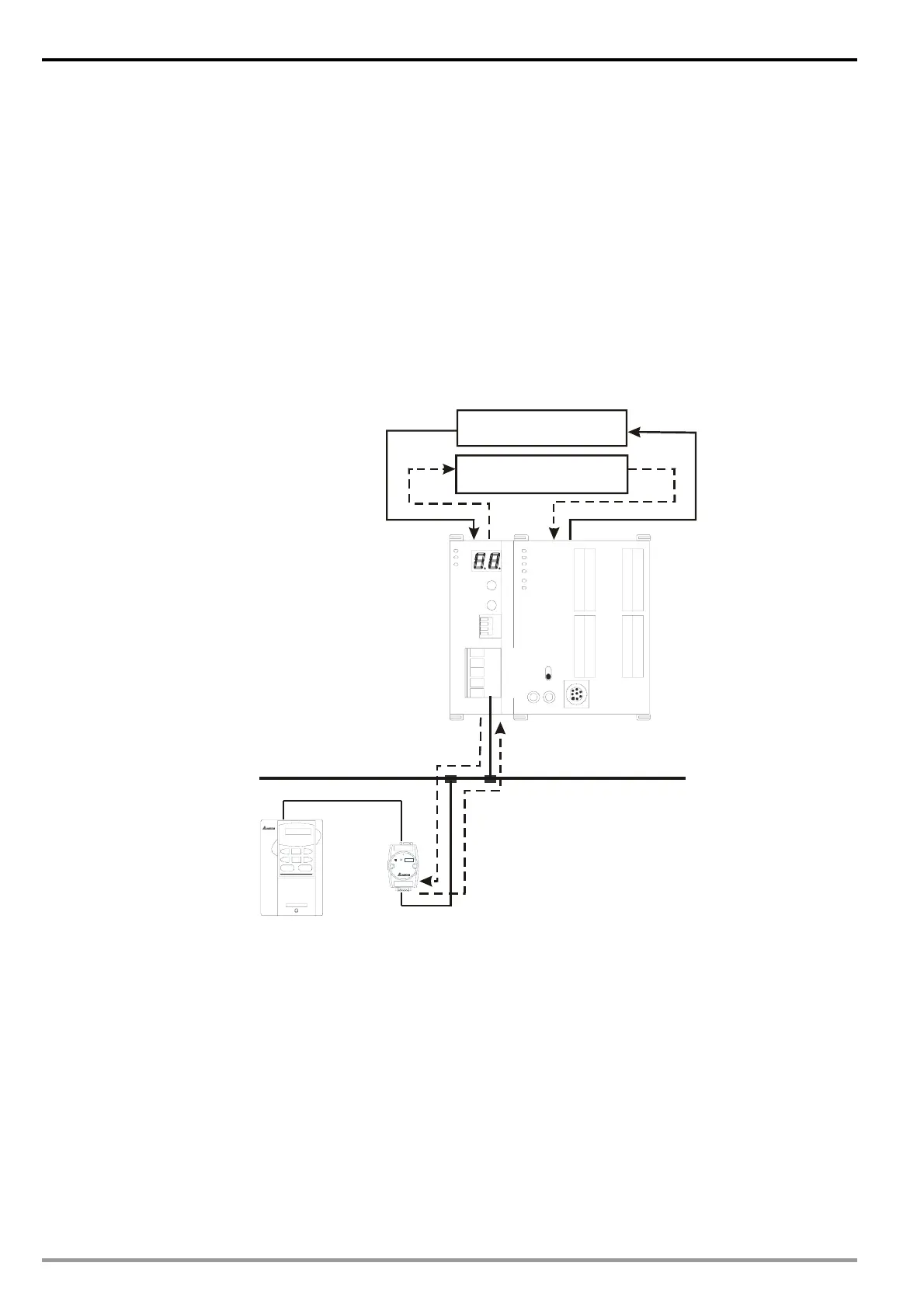
See the chart below for sending SDO by WPL program:
P
O
R
T
2
P
O
R
T
1
DVPCOPM DVP28SV
RUN
STOP
IFD9503
VFD-B
DVP28SVDVPCOPM-SL
SDO response message
(COPM -> PLC)
SDO request message
(PLC -> COPM)
A
D
C
B
SDO request message from master
SDO response message from slave
A: DVP-SV sends out request message to DVPCOPM-SL (master).
B: DVPCOPM-SL (master) sends out request message to the target equipment.
C: The target equipment processes the request message and sends the response message to
DVPCOPM-SL.
D: DVP-SV receives SDO, NMT and Emergency data.
5.2 Structure of SDO Request Message
You can edit SDO, NMT and Emergency in “request message editing area”. Take the first DVPCOPM-SL
master placed on the left hand side of DVP-SV for example. See the table below for the corresponding releation
between “request message editing area” and “response message editing area” and the devices in PLC.


 To Next Page