Ethernet Communication Module IFD9507
DVP-PLC Application Manual
53
12.4 Application of E-Mail
Application Sending E-Mail to notify the administrator when Alarm 1 is triggered.
Steps
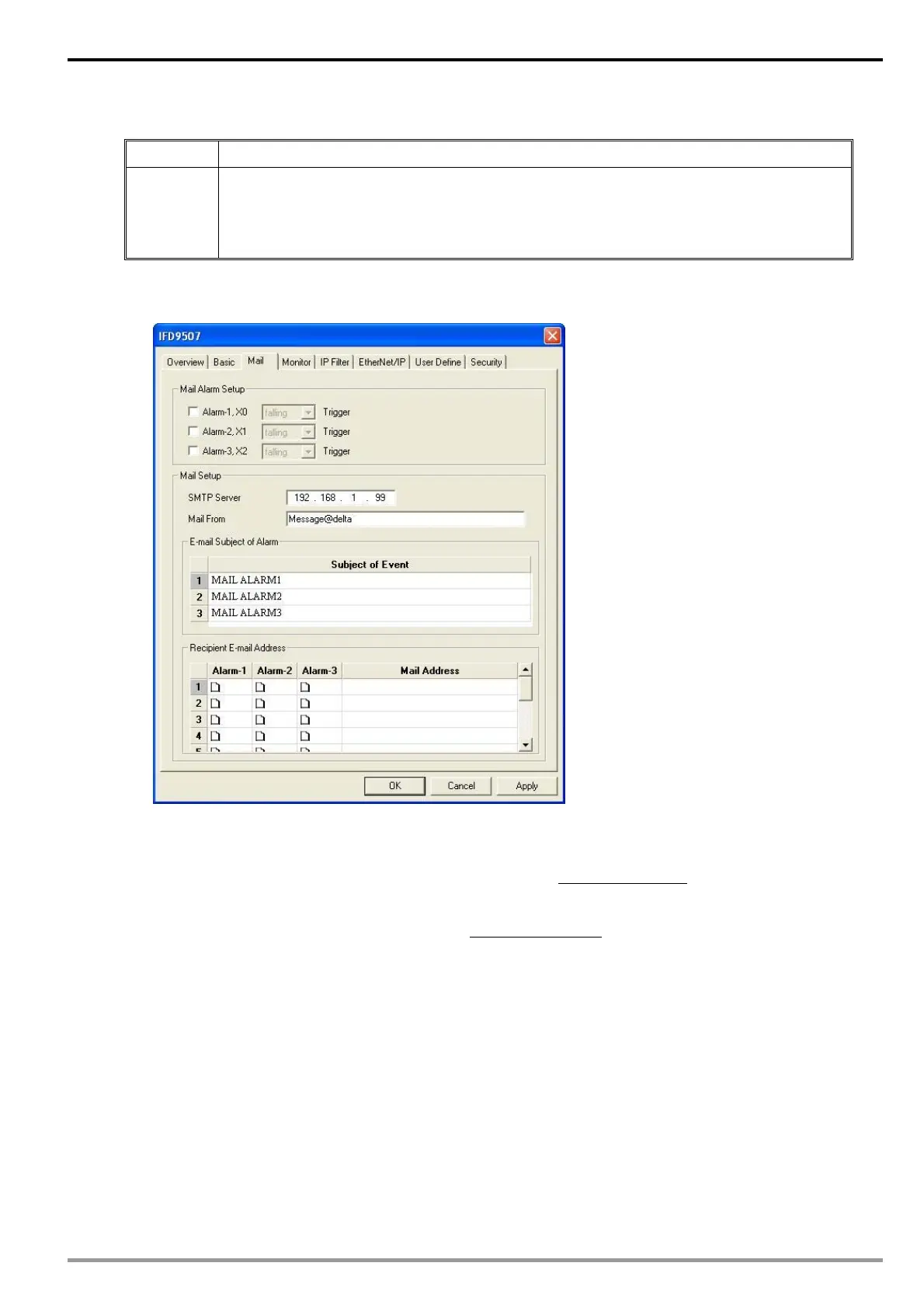
(1) Check “Alarm 1” to enable it.
(2) Set the IP of SMTP server to ” 192.168.1.99” and "Mail From” to “Message@Delta”
(3) Set the E-mail Subject of Event to “MAIL ALARM”.
(4) Set the E-mail address of administrator to test@Delta.com.tw
1. See 10.1 for the connection and how to set up the communication.
2. Open the setup page and switch to “Mail” page.
3. Setting up “Mail” page and check “Mail Alarm Setup”.
Enter SMTP server address, “Mail From” column, “Subject of Event” and “Recipient E-mail Address”. For
example, when Alarm 1 is triggered, the mail will be sent to test@sample.com
. Trigger Alarm 1 by “low”.
Enter 172.16.144.121 into “SMTP Server” column and Mail From Message@ENA01. Enter “MAIL EVENT”
as the subject and recipient e-mail address as test@delta.com.tw
. Check “Alarm 1” and press “OK” to
complete the settings.


 To Next Page