Chapter 5 Front Panel
13
Chapter 5 : Front Panel
1
2
3
4 5
6
78
1 2 3
4
5
TEST
O/P
S1 S1-ON
S2 S2-ON
NETWORK
RESET
LOCAL
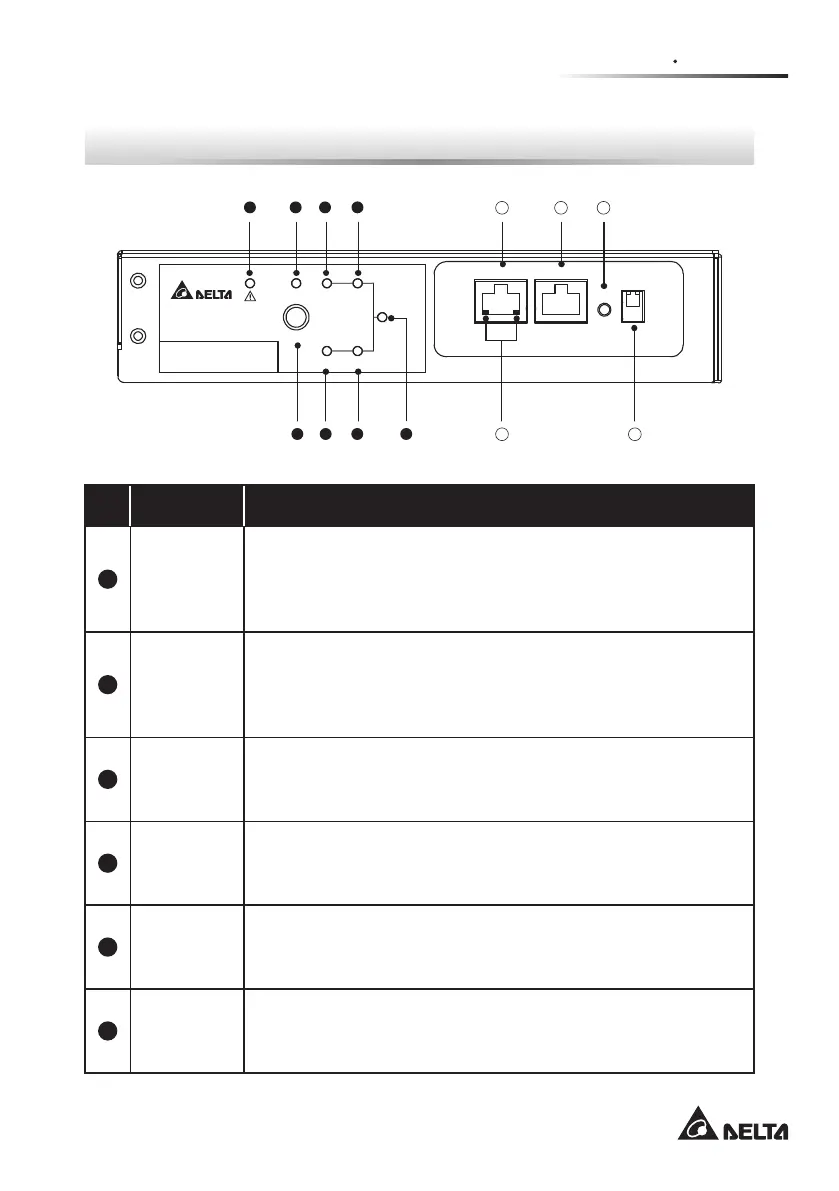
No. Item Description
1
S1 LED
Green. The LED indicates the condition of input source
1. If the input source 1 is within the acceptable range, the
LED will light up as green. If the input source 1 is out of the
acceptable range, the LED will be off.
2
S2 LED
Green. The LED indicates the condition of input source
2. If the input source 2 is within the acceptable range, the
LED will light up as green. If the input source 2 is out of the
acceptable range, the LED will be off.
3
S1_ON
LED
Green. If the rSTS uses input source 1 to supply power to the
output, the LED will light up as green. If not, the LED will be
off.
4
S2_ON
LED
Green. If the rSTS uses input source 2 to supply power to the
output, the LED will light up as green. If not, the LED will be
off.
5
O/P
LED
Green. The LED indicates the output condition (voltage is >
60Vac). If there is output, the LED will light up as green. If
not, the LED will be off.
6
Test
Button
Use the button to test the rSTS. Press the button once and
the rSTS will transfer to the 2
nd
source for 1 minute and then
transfer back to the original preferred source.



 To Next Page