26
Infrasuite Power Management
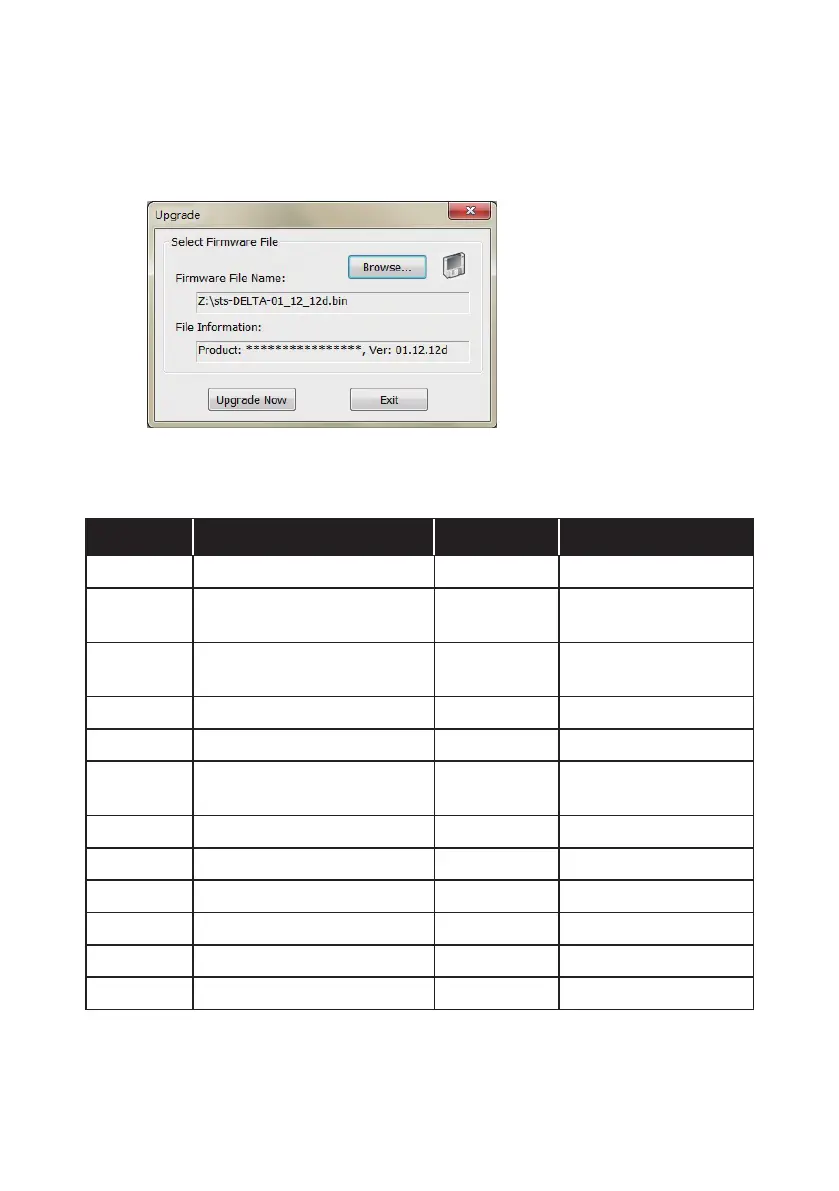
3. Click Upgrade. The upgrade dialog box pops up. Click Browse to select
a valid firmware binary file. Verify the firmware version shown under File
Information, and then click Upgrade Now to continue.
7.6 rSTS Command Settings
Command Description Parameter Response
Info Report summary information. N/A <Report>
TempF
Report internal rSTS
Fahrenheit temperature.
N/A #
TempC
Report internal rSTS Celsius
temperature.
N/A #
Age Report internal rSTS age. N/A # days hh:mm:ss
Time Report present time. N/A hh:mm:ss MM/DD/YYYY
XCount
Report number of times that
rSTS has transferred.
N/A #
FWVer Report rSTS FW version. N/A <version string>
FWDate Report rSTS FW release date. N/A YYYY-MM-DD
AgentVer Report SNMP IPv6 version. N/A AA.BB.XXX
Model Report the model name. N/A <Model name string>
Serial Report the unit’s serial number. N/A <Device serial string>
DevID Report the unit’s device ID. N/A <Device ID string>



 To Next Page