Need help?
Do you have a question about the DeltaTRAK FlashLink and is the answer not in the manual?
Fill out shipping info, press START until LED flashes 5 times, then observe delay and active modes.
Apply barcode label to shipping document and attach logger to pallet/package or carton.
Remove logger, insert into USB port, and view generated PDF/CSV reports once LEDs flash red-green.
Double-click PDF/CSV files from the pop-up folder; save or print before disconnecting logger.
Reports are created on first download. Stop Time is saved as last data point or when memory is full.
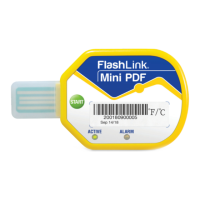
Diagram identifying USB Connector, Shipping Information Section, Barcode Label, START button, and LEDs.
 General
| Temperature Range | -40°C to 70°C (-40°F to 158°F) |
|---|---|
| Data Capacity | 16, 000 readings |
| Battery Life | 1 year (typical) |
| Interface | USB |
| IP Rating | IP67 |
| Model | FlashLink |
| Temperature Accuracy | ±0.5°C (±0.9°F) |
| Resolution | 0.1°C |
| Software | FlashLink Software |
| Software Compatibility | Windows 7, 8, 10 |
| Water Resistance | Water resistant |

 To Next Page