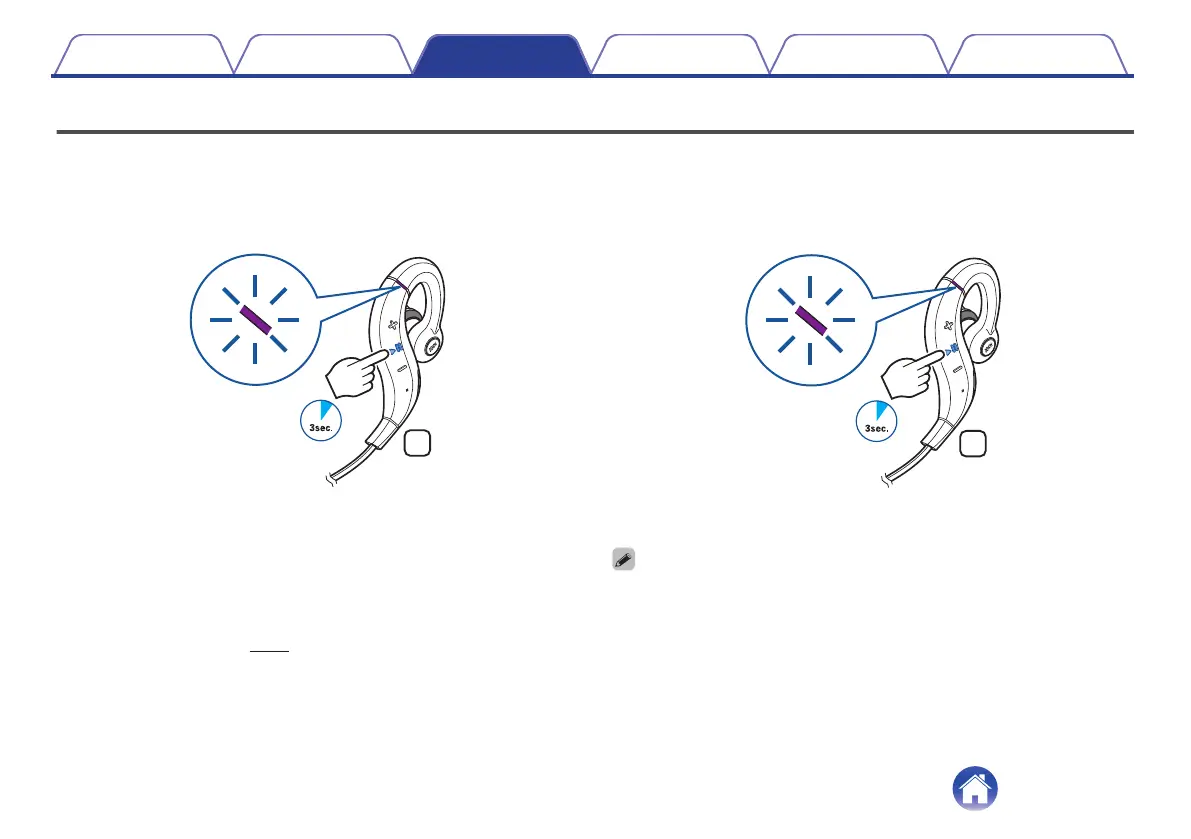
Turning the power on/off
Turn on the Bluetooth function of the Bluetooth device that you want to
connect to beforehand.
1
Press and hold the headphones' control button for
approximately 3 second.
.
0
When the pairing information is deleted, the headphones
automatically switch to pairing registration mode when the power
is turned on.
0
A beep sound is heard and the status indicator LED lights purple
for approximately 1 second.
0
The headphones automatically connect via Bluetooth to the
Bluetooth device when the device is already paired with the
headphones. (v p. 13)
o
Turning the power off
1
Press and hold the control button for approximately 3
seconds.
.
0
A beep sound is heard and the status indicator LED lights purple
for approximately 1 second.
0
A small amount of power is consumed even when the power is off.
Contents Preparation Connections Operation
Troubleshooting
Appendix
Connections
10


 To Next Page
 Loading...