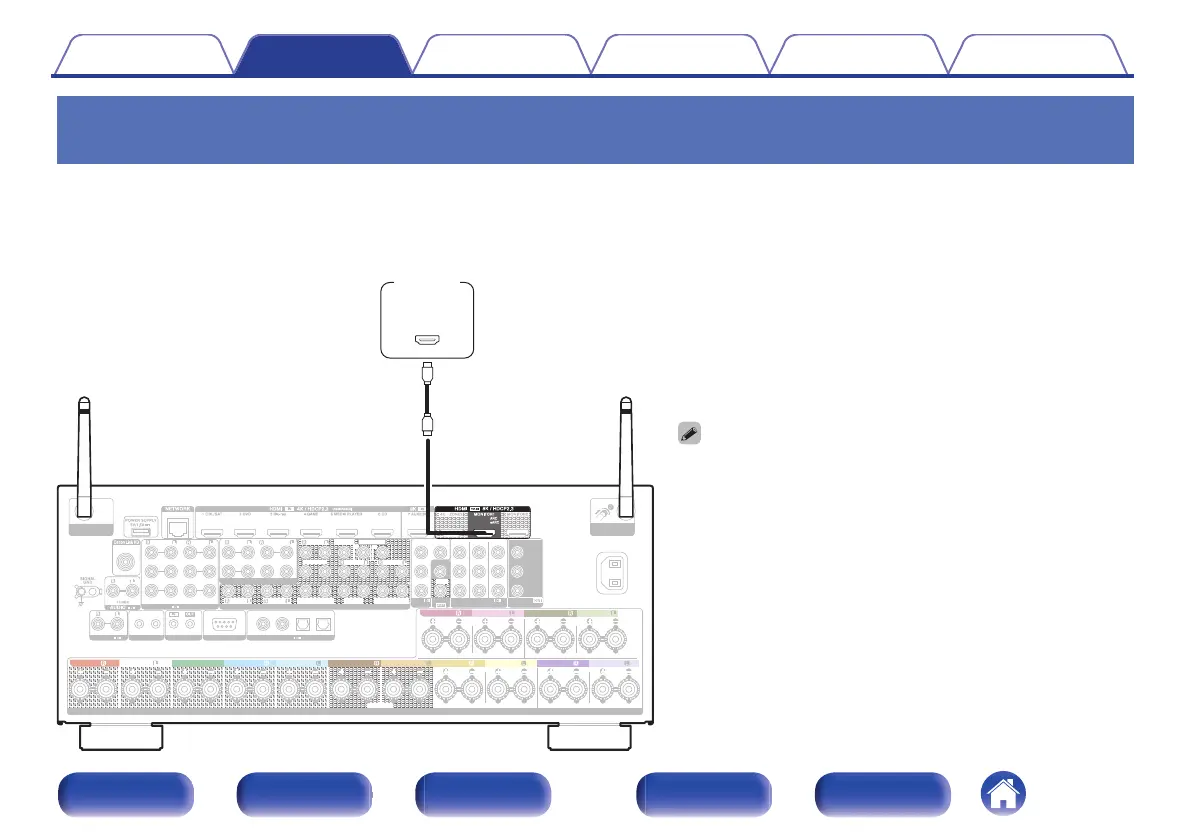
Connection 1 : TV equipped with an HDMI connector and compatible with the ARC
(Audio Return Channel) / eARC (Enhanced Audio Return Channel)
Use an HDMI cable to connect a TV that is compatible with the ARC / eARC function to this unit.
Set “HDMI Control” to “On” or “ARC” to “On” when using a TV that supports the ARC function. (v p. 199)
Using an eARC function-compatible television enables audio playback from the speaker connected to this unit, regardless of “HDMI Control” and “ARC”
settings in the menu.
0
When using the ARC / eARC function, connect to the HDMI MONITOR
1 connector.
0
eARC function settings may be required depending on the eARC
function-compatible television you are using. Make sure eARC is set to
on if this setting exists on your television. For more information, check
your television’s owner’s manual.
0
When an ARC and an eARC function-compatible televisions are
connected, the eARC function-compatible television is prioritized.
0
Use a “High Speed HDMI Cable with Ethernet” when using an ARC /
eARC function-compatible television.
0
Use an “Ultra High Speed 48 Gbps HDMI cable” to enjoy 8K video.
0
Set “4K/8K Signal Format” to “8K Enhanced” in the menu to enjoy 8K
video. (v p. 207)
1 CBL/SAT
PHONO
2
DVD
1
CBL/SAT
2
CD
1
TV
AUDIO
6 CD
2 DVD
12
3 Blu-ray
5 MEDIA PLAYER
4 GAME
1
CBL/SAT
1
CBL/SAT
2 DVD
2 DVD 3
Blu-ray
4 GAME
RS-232C
7.1CH IN
REMOTE CONTROL
TRIGGER OUT
PRE OUT
(ASSIGNABLE)
VIDEO
VIDEO
(ASSIGNABLE) (ASSIGNABLE)
COMPONENT VIDEO
COMPONENT VIDEO
MONITOR
MONITOR/ZONE3
ZONE2
3 Blu-ray
COAXIAL OPTICAL
STRAIGHT CABLE
I
R
DC12V 150mA MAX.
ZONE2 ZONE3
FRONT
FRONT
SURROUND
CENTER
SUBWOOFER
SURROUND BACK
CENTER
SURROUND BACK
SURROUND
HEIGHT2
HEIGHT4/FRONT WIDE
1
AUDIO
(ASSIGNABLE)
AUDIO
DIGITAL AUDIO
(ASSIGNABLE)
2
ASSIGNABLE ASSIGNABLE
ASSIGNABLE ASSIGNABLE
ASSIGNABLE
Bluetooth
/
Wi-Fi
ANTENNA
Bluetooth
/
Wi-Fi
ANTENNA
AC IN
Y
P
B/
C
B
PR/
C
R
SPEAKERS
SUBWOOFER
HEIGHT1
HEIGHT3
FRONT
HEIGHT4/FRONT WIDE
HEIGHT3 HEIGHT3
FRONT
CENTER
SURROUND SURROUND
SURROUND BACK SURROUND BACK
HEIGHT1 HEIGHT1 HEIGHT2 HEIGHT2
HEIGHT4/FRONT WIDE
(ARC / eARC)
IN
HDMI
TV
Contents
Connections Playback Settings Tips Appendix
83
Front panel Display Rear panel Remote Index


 To Next Page