EasyManua.ls Logo

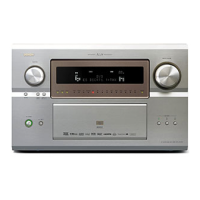
Denon AVC-A1XV - User Manual

Denon AVC-A1XV
178 pages
Print Icon
To Next Page IconTo Next Page
Loading...
AV SURROUND AMPLIFIER
AVC-A1XV
OPERATING INSTRUCTIONS
RC-995
2
We greatly appreciate your purchase of the AVC-A1XV.
2
To be sure you take maximum advantage of all the features the AVC-A1XV has to offer, read these instructions
carefully and use the set properly. Be sure to keep this manual for future reference should any questions or
problems arise.
“SERIAL NO.
PLEASE RECORD UNIT SERIAL NUMBER ATTACHED TO THE REAR OF THE
CABINET FOR FUTURE REFERENCE”

Table of Contents

Other manuals for Denon AVC-A1XV

Questions and Answers

  • S
    Sarah WalkerAug 16, 2025
    Why is there no sound coming from my Denon Amplifier, even though the display is lit?
    • K
      Katherine RobertsonAug 16, 2025
      If the display is lit but no sound is produced, several factors could be at play. First, ensure that the speaker cords are securely connected. Check that the FUNCTION knob is in the correct position. Also, verify that the volume control isn't set to the minimum and that MUTING is switched off. Lastly, confirm that a digital signal is being input and that you've selected the appropriate digital signal input source.
  • T
    Thomas RileyAug 19, 2025
    What to do if my Denon Amplifier remote control is not working?
    • L
      Lisa PowellAug 19, 2025
      If the Denon Amplifier isn't responding to the remote control, try these steps: * Replace the batteries with new ones. * Move closer to the unit. * Ensure there are no obstacles between the remote and the unit. * Make sure you're pressing the correct button. * Verify the batteries are inserted correctly, with the < and > ends in the proper orientation.
  • B
    Becky ChavezAug 22, 2025
    Why isn't there a picture on my monitor when connected to my Denon AVC-A1XV?
    • A
      Amanda MitchellAug 22, 2025
      If nothing is displayed on the monitor, check the following: Ensure the AVC-A1XV’s video output jacks and the monitor’s input jacks are correctly connected. Verify that the monitor TV’s input setting is correctly set to the jacks where the video signals are connected. Make sure the VIDEO OFF mode is not active, and if it is, set the VIDEO ON mode. Also, ensure that the PURE DIRECT mode is not set; use a different surround mode. Finally, confirm that the resolution of the monitor device connected to the component monitor output connector matches the AVC-A1XV’s resolution, using the SCALE button on the main unit or remote to check the resolution setting.
  • M
    Melissa CamposAug 25, 2025
    How to fix no sound from subwoofer on Denon AVC-A1XV Amplifier?
    • L
      Laura CantuAug 26, 2025
      If no sound comes from the subwoofer, first, ensure the subwoofer's power is turned on. Next, check that the subwoofer's initial setting is set to “YES.” Finally, verify that the subwoofer's output is properly connected.
  • T
    Terry MyersAug 27, 2025
    How do I get DTS sound on my Denon AVC-A1XV Amplifier?
    • B
      Bonnie SchmidtAug 28, 2025
      To get DTS sound, first ensure that the DVD player’s audio output setting is set to bit stream by checking the DVD player’s initial settings. Confirm that the DVD player is DTS-compatible. Finally, check that the AVC-A1XV’s input setting is set to AUTO or DTS, not analog.
  • L
    Luke BookerAug 30, 2025
    What to do if there is no image with HDMI/DVI-D connection on Denon Amplifier?
    • M
      Maria PearsonAug 30, 2025
      If there is no image being projected with an HDMI/DVI-D connection, check that the AVC-A1XV’s HDMI/DVI-D output jacks and the monitor’s input jacks are properly connected. Ensure that an HDMI/DVI-D signal is being input and that you've selected the correct HDMI or DVI-D signal input source. Note that the AVC-A1XV will not output a video signal unless the connected equipment supports HDCP. Verify that the settings of “MONITOR SELECT” are correct and that the output format of the connected player (HDMI/DVI-D FORMAT) matches the supported input format of the connected monitor equipment.
  • M
    Mrs. Carolyn MillerSep 2, 2025
    How to resolve no HDMI audio output on my Denon AVC-A1XV Amplifier?
    • J
      James JohnsonSep 2, 2025
      To resolve the issue of no HDMI audio output, first, if the AVC-A1XV does not play HDMI audio signals, set the HDMI audio playback setting at the “HDMI/DVI In Assign” settings to “AMP.” Alternatively, if the HDMI audio signals are not output from the connected monitor device, set the HDMI audio playback setting at the “HDMI/DVI In Assign” settings to “TV.”
  • B
    bbrownSep 4, 2025
    How to fix a Denon Amplifier when the display is not lit and there is no sound?
    • V
      Vanessa DavisSep 4, 2025
      If the display is not lit and no sound is produced when the power switch is on, check the insertion of the power cord plug to ensure it is securely plugged in.
  • M
    Melissa GillespieSep 7, 2025
    Why can't I set Ultra2 Cinema / THX Music Mode / THX Games Mode on my Denon Amplifier?
    • F
      Frank BlankenshipSep 7, 2025
      If you cannot set Ultra2 Cinema / THX Music Mode / THX Games Mode, it may be because the surround back speaker is set to 1. Connect two surround back speakers.
  • H
    heather82Sep 10, 2025
    Why are there no test tones produced by my Denon AVC-A1XV Amplifier?
    • T
      Tiffany HernandezSep 10, 2025
      If no test tones are being produced, ensure that the surround mode is set to Dolby Surround.

Summary

4 FEATURES

5 CONNECTIONS

Speaker System Connections

6 PART NAMES AND FUNCTIONS

Remote Control Unit (RC-995)

7 SYSTEM SETUP

System Setup Menu and Defaults

Overview of the setup menu and factory default settings.

Before Setting Up the System

Auto Setup and Room EQ Function

Automatic room calibration process using microphone.

Performing Auto Setup

Setting Auto Setup and Room EQ

Speaker System Measurement

Setting Room EQ

Setting Speaker Setup

Setting Speaker Type

Setting Delay Time

Setting Channel Level

Setting Crossover Frequency

THX Audio Setup

3 Audio Input Setup

4 Video Setup

5 Setting Advanced Playback

Setting Manual EQ Setup

6 Zone Setup

Setting Speakers for ZONE2

Setting Delay Time for ZONE2

Setting Channel Level for ZONE2

Setting Crossover Frequency for ZONE2

ZONE3 and ZONE4 Tone Control and Channel Level

7 Option Setup

Setting the Channel Setup

Configuring channel assignments and subwoofer settings for zones.

Setting Power Amplifier Assignment

Power Amplifier Assignment Flow

Step-by-step guide for assigning power amplifiers.

Setting the Volume Control

Protecting Setting and Memory Backup

User Memory Function

Storing custom settings for quick recall.

Setup Lock Function

Preventing accidental changes to system settings.

8 REMOTE CONTROL UNIT

Preset Memory

Learning Function

System Call Function

Resetting Remote Control Functions

9 OPERATION

Playing the Input Source

10 SURROUND

Adjustment Steps for Surround Sound Playback

Using Test Tone and Channel Level for setup.

Channel Level Adjustment

THX Surround EX; Home THX Cinema Mode

Dolby Pro Logic IIx (Pro Logic II) Mode

DTS NEO:6 Mode

Memory and Call-out Functions (USER MODE Function)

11 DENON ORIGINAL SURROUND MODES

Tone Control Setting

12 MULTI ZONE

Multi-zone Playback with Multi-source

Overview of multi-zone audio/video playback functionality.

[1] ZONE2 Playback

ZONE2 7.1-channel System

ZONE2 STEREO;MONO System

[2] ZONE3 Playback

ZONE3 STEREO;MONO System

Configuring ZONE3 for stereo or mono playback.

[3] ZONE4 Playback

ZONE4 STEREO;MONO System

Configuring ZONE4 for stereo or mono playback.

Remote Control Unit Operations During Multi-source Playback

System Setup for Multi-zone

Test Tone for ZONE2

Using test tones for ZONE2 surround calibration.

Channel Level for ZONE2

ZONE2 Surround Modes

Memory and Call-out Functions of ZONE2 (USER MODE Function)

ZONE2 Tone Control Setting

15 TROUBLESHOOTING

Speaker Setting Examples

THX Surround EX Systems

Speaker placement examples for THX EX systems.

Surround

Dolby Surround

Overview of Dolby Digital and Dolby Pro Logic formats.

Dolby Pro Logic II

DTS Digital Surround

DTS-ES Extended Surround

DTS-ES Discrete 6.1

DTS-ES Matrix 6.1

DTS Neo:6 surround

Home THX Cinema Surround

Audyssey MultEQ XT

17 SPECIFICATIONS

Denon AVC-A1XV Specifications

General IconGeneral
Amplifier TypeAV Receiver
Channels7.1
Frequency Response10 Hz - 100 kHz (+1, -3 dB)
Total Harmonic Distortion (THD)0.05%
Input Impedance47 k ohms
Input Sensitivity200 mV
Signal-to-Noise Ratio110 dB
HDMI Outputs1
Component Video Inputs3
Component Video Outputs1
Analog Audio Outputs1
Phono InputYes
THX CertificationTHX Ultra2
Digital Audio Outputs1 (coaxial)
Surround Sound FormatsDolby Digital EX, Dolby Pro Logic IIx, DTS 96/24
Digital Audio Inputs4 (optical) + 2 (coaxial)
Dimensions (W x H x D)434 x 178 x 495 mm (17.1 x 7.0 x 19.5 inches)

Related product manuals