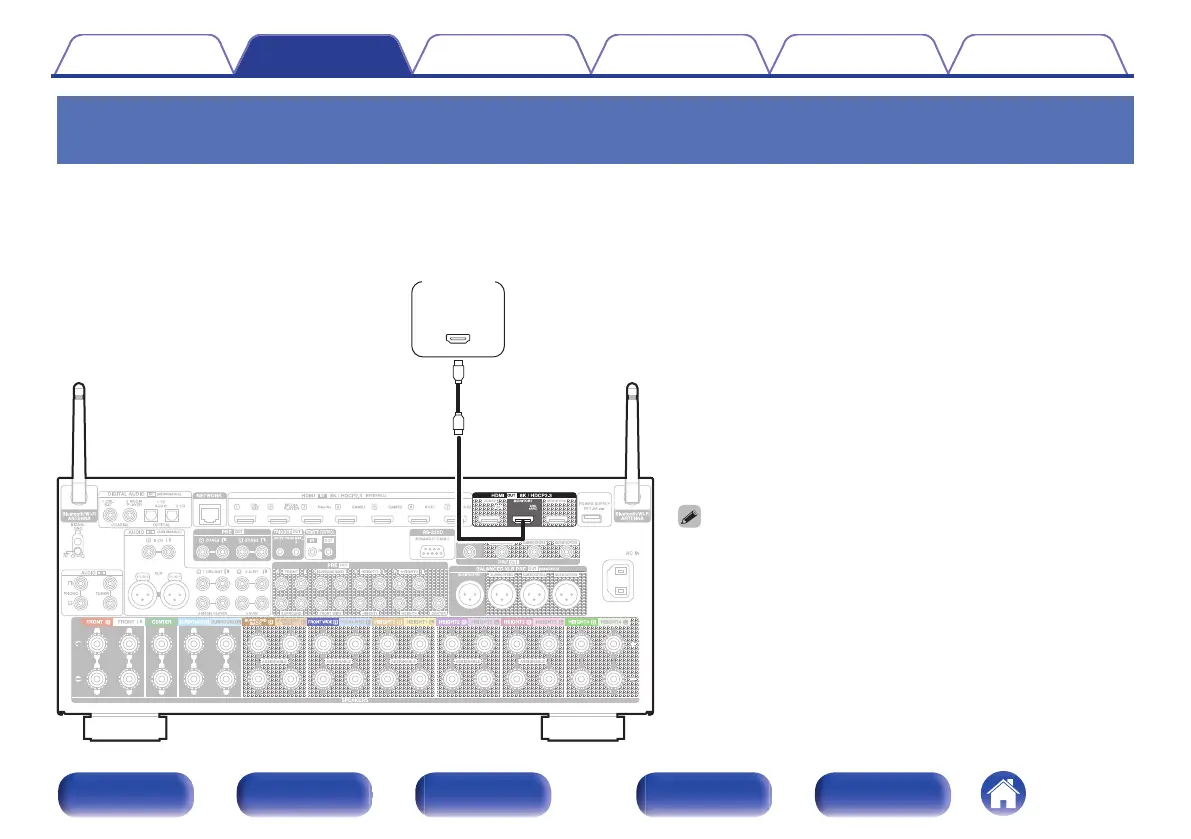
Connection 1 : TV equipped with an HDMI connector and compatible with the ARC /
eARC
Using a high quality HDMI cable
z
, connect one end to the HDMI port labeled “eARC” or “ARC” on your TV. Connect the other end to the HDMI OUT
MONITOR 1 port on this unit.
When a TV with eARC support is connected, the eARC function of this unit is enabled automatically and the television audio is played back. When a TV
with ARC support is connected, set “ARC” in the menu to “On”. (v p. 188)
z
For 4K TVs we recommend using an HDMI cable labeled “High Speed”
and “with Ethernet”.
z
For 8K TVs we recommend using an HDMI cable labeled “Ultra High
Speed”.
0
eARC function settings may be required depending on the eARC
function-compatible television you are using. Make sure eARC is set to
on if this setting exists on your television. For more information, check
your television’s owner’s manual.
0
Use a certified “Ultra High Speed HDMI cable” to enjoy 8K or 4K
120Hz video.
0
Set “4K/8K Signal Format” to “8K Enhanced” in the menu to enjoy 8K
video. (v p. 194)
Contents
Connections Playback Settings Tips Appendix
70
Front panel Display Rear panel Remote Index



 To Next Page
 Loading...