o
When mounting this unit to a wall
You can use the supplied wall-mount bracket to mount this unit to a
wall.
To ensure your safety, ask a professional to mount it to the wall.
0
When you mount this unit to a wall, use a commercially available IR repeater
(separately sold) to receive signals from the remote control. Refer to “Connecting
an external control device” (v p. 14) for more information.
NOTE
0
When you mount the wall-mount bracket to this unit, be sure to use the supplied
self- tapping screws. Using screws other than those supplied may cause fault.
0
To prevent people from accidentally pulling or tripping over the connector cable
and causing this unit to fall over, be sure to fix the cable to a wall or other location.
After mounting, be sure to confirm that it is safe. Also, perform regular inspections
to confirm that there is no possibility of falling.
0
Denon does not bear responsibility for any injuries or accidents due to
inappropriate mounting locations or mounting methods.
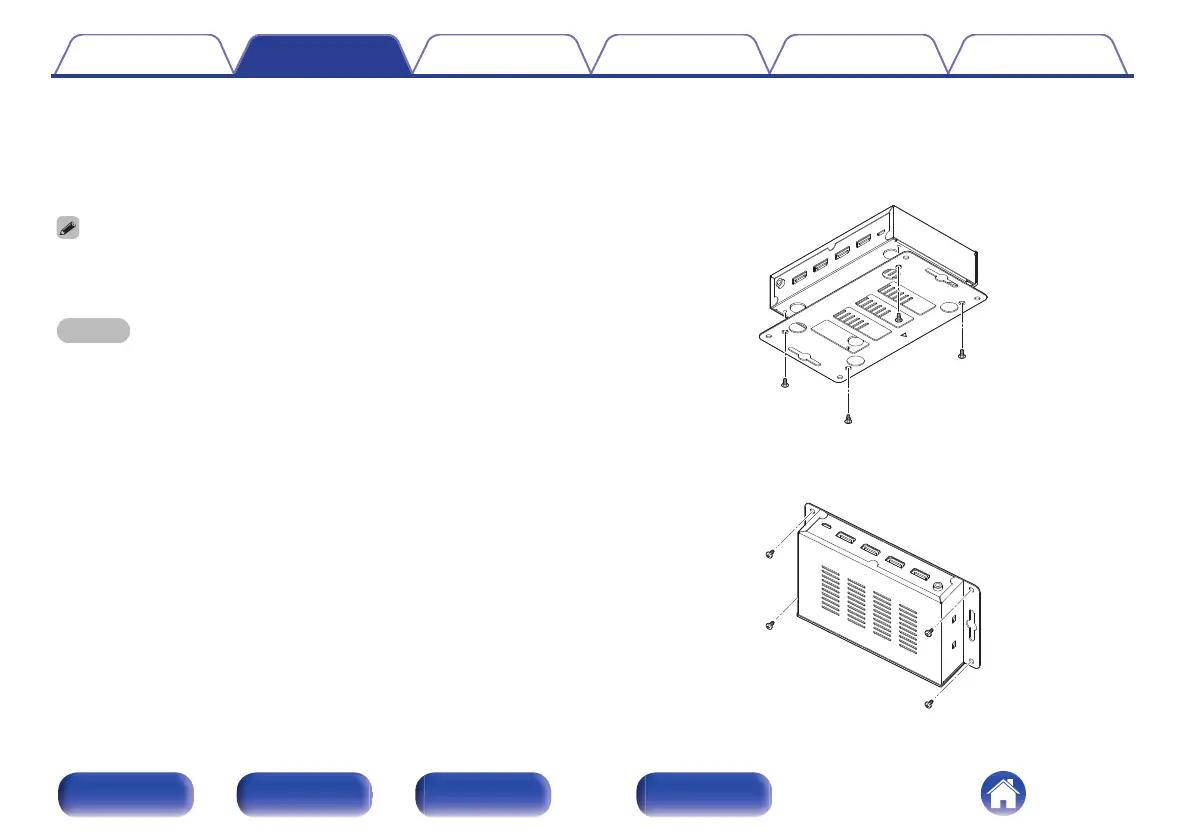
1
Mount the wall-mount bracket to this unit using the
supplied screws.
Attach the wall-mount bracket with the side with the u mark facing
outward.
.
2
Fix this unit to the wall using separately sold wall-
mount screws.
.
Contents
Connections Operations Troubleshooting Appendix Specifications
13
Front panel Rear panel Side panel Remote


 To Next Page