Part names and functions
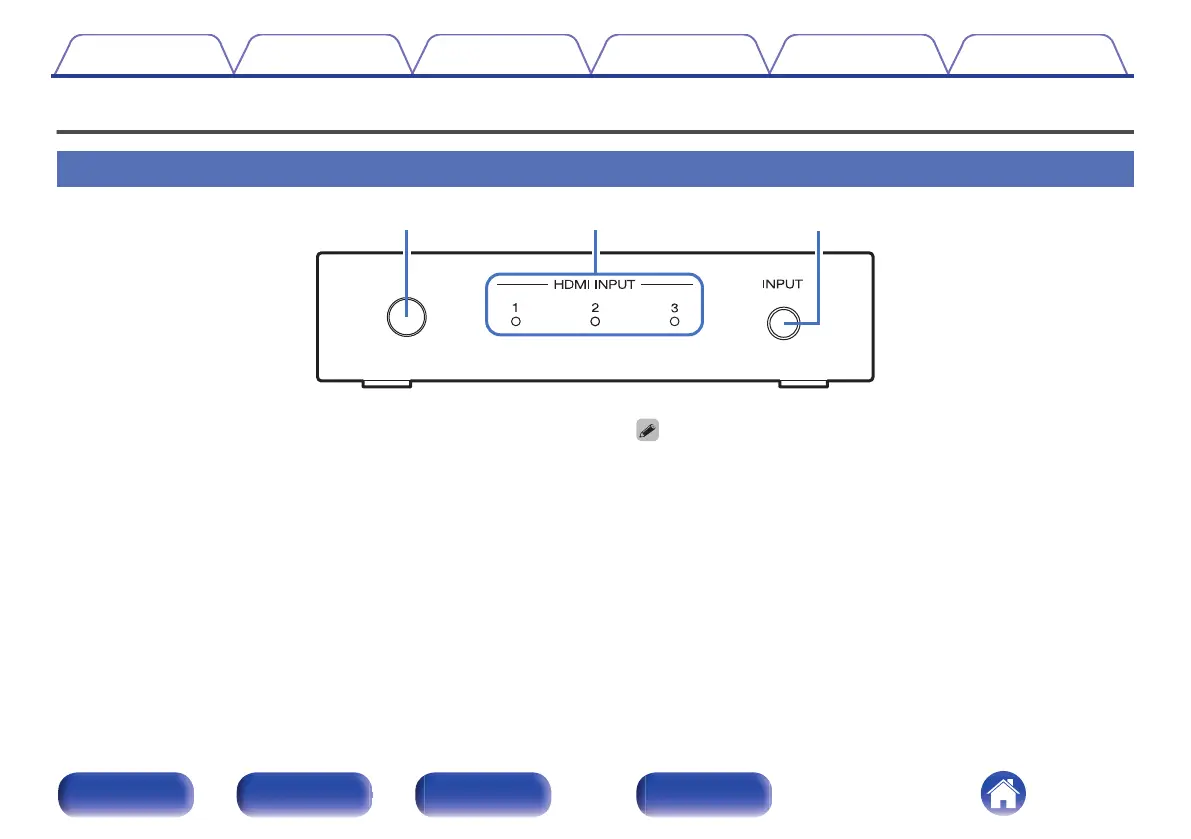
Front panel
.
A
Remote control sensor
This receives signals from the remote control unit. (v p. 6)
Point the remote control unit at this sensor when operating it.
B
HDMI input indicators (HDMI INPUT 1 - 3)
The number of the HDMI input that is currently selected is lit.
This is lit as follows according to the power status of this unit:
0
Power on: Blue
0
Standby: Red
0
The power of this unit is linked to the power status of the HDMI devices
connected to HDMI connectors 1 to 3 and automatically turns on.
0
When the HDMI CONTROL switch is OFF:
Links to the power of the device that is connected to the currently selected
HDMI input.
0
When the HDMI CONTROL switch is ON:
Links to the power of the devices that are connected to HDMI connectors 1
to 3.
C
Input switching button (INPUT)
This selects the HDMI input.
When the button is pressed, the HDMI input switches.
Contents Connections Operations Troubleshooting Appendix Specifications
7
Front panel Rear panel Side panel Remote


 To Next Page