EasyManua.ls Logo

Denon DCD-1015 - Laser Pick-up Handling Precautions; Storage and Physical Handling; Laser Diode Safety Measures; Actuator and Lens Maintenance

Denon DCD-1015
13 pages
Print Icon
To Next Page IconTo Next Page
To Previous Page IconTo Previous Page
Loading...
NAMES
AND
FUNCTIONS
OF
PARTS
ill
0
Power
Switch
(POWER).
When
the
power
is
turned
on,
“(
-
10
)”
appears
on
the
TIME
display,
and
if
no
disc
is
loaded,
“(:0Qo00000')”
appears
on
the
digital
display.
e
If
the
power
is
turned
on
with
a
disc
already
iasded:
the
total
number
of
tracks
on
the
disc
is
displayed
on
the
TRACK
NO.
display,
the
total
time
is
displayed
on
the
TIME
display,
the
numbers
on
the
music
calendar
light
up
to
the
number
of
tracks
on
the
disc,
and
playback
begins.
e
When
the
power
is
turned
off,
the
unit
is
set
to
the
standby
mode.
Disc
Holder
e
Place
the
disc
on
the
disc
holder
with
the
label
facing
up.
e
Use
the
open/close
button
(
44
OPEN/CLOSE)
@:to
open
and
close
the
disc
holder.
@
The-disc
holder
may
aiso
be
closed
by
pressing
the
play
button
(
PLAY)
@
or
pause
button
(il
PAUSE)
©.
Open/Close
Button
(
&
OPEN/CLOSE)
‘@
The
disc
holder
is
opened
and
ciosed
by
pressing
this
button.
e
Press
this
button
once
to
open
the
disc
hoider,
and
once
again
to
close
it.
e
When
the
disc
holder
is
closed
with
a
disc
loaded,
the
dise
will
rotate
for
a
couple
of
seconds
while
the
disc
contents
are
read.
The
number
of
tracks
and
total
playback
time
on
the
disc
are
then
displayed
on
the
digital
display
©.
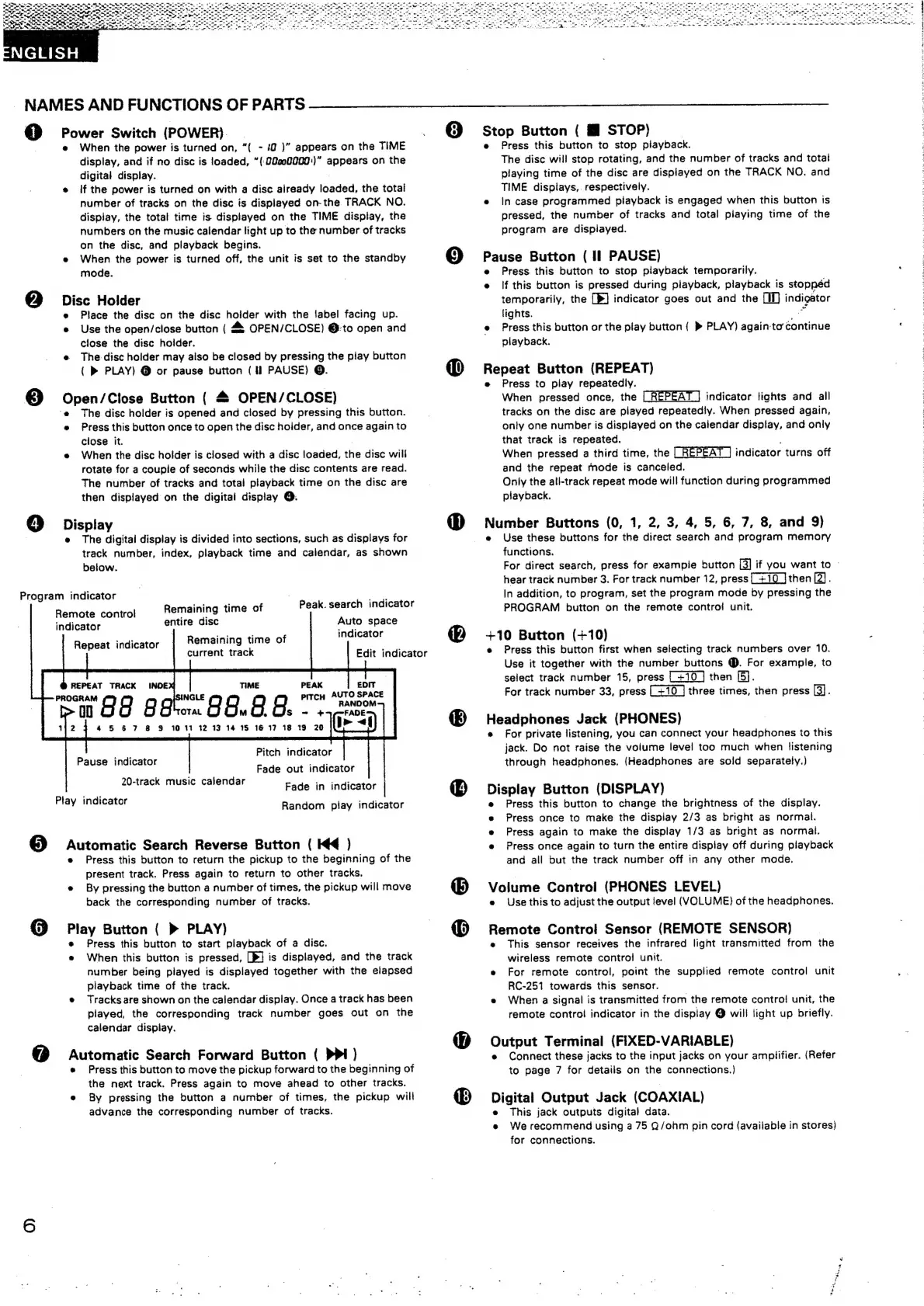
Display
e
The
digital
display
is
divided
into
sections,
such
as
displays
for
track
number,
index,
playback
time
and
calendar,
as
shown
below.
Program
indicator
6
Remote
control
indicator
Sw
ae
a8
Play
indicator
Peak.
search
indicator
Auto
space
indicator
Remaining
time
of
entire
disc
Remaining
time
of
current
track
98.8.8."
45
67
8
9
10
11
12 13
14
15
16
17
18
19
20
Repeat
indicator
REPEAT
TRACK
PITCH
AUTO
SPACE
ANDOM
Pitch
indicator
Pause
indicator
ony
Fade
out
indicator
20-track
music
calendar
Fade
in
indicator
|
Random
play
indicator
Automatic
Search
Reverse
Button
(
HK
)
e
Press
this
button
to
return
the
pickup
to
the
beginning
of
the
present
track.
Press
again
to
return
to
other
tracks.
e
By
pressing
the
button
a
number
of
times,
the
pickup
will
move
back
the
corresponding
number
of
tracks.
Play
Button
(
»
PLAY)
Press
this
button
to
start
playback
of
a
disc.
e
When
this
button
is
pressed,
[P/
is
displayed,
and
the
track
number
being
played
is
displayed
together
with
the
elapsed
playback
time
of
the
track.
Tracks
are
shown
on
the
calendar
display.
Once
a
track
has
been
played,
the
corresponding
track
number
goes
out
on
the
calendar
dispiay.
Automatic
Search
Forward
Button
(
PPI)
e
Press
this
button
to
move
the
pickup
forward
to
the
beginning
of
the
next
track.
Press
again
to
move
ahead
to
other
tracks.
e
By
pressing
the
button
a
number
of
times,
the
pickup
will
advance
the
corresponding
number
of
tracks.
Edit
indicator
6
©
Stop
Button
(
HM
STOP)
Press
this
button
to
stop
playback.
The
disc
will
stop
rotating,
and
the
number
of
tracks
and
total
playing
time
of
the
disc
are
displayed
on
the
TRACK
NO,
and
TIME
displays,.
respectively.
e
incase
programmed
playback
is
engaged
when
this
button
is
pressed,
the
number
of
tracks
and
total
playing
time
of
the
program
are
displayed.
fgets
Button
(
Il
PAUSE)
Press
this
button
to
stop
playback
temporarily.
e
lf
this
button
is
pressed
during
playback,
playback
is
stoppéd
temporarily,
the
[BP]
indicator
goes
out
and
the
LI)
indigator
lights.
e
Press
this
button
or
the
play
button
(
»
PLAY)
again
to’
continue
playback.
mepeet
Button
(REPEAT)
Press
to
play
repeatedly.
When
pressed
once,
the
|
REPEAT
J
indicator
lights
and
all
tracks
on
the
disc
are
played
repeatedly.
When
pressed
again,
only
one
number
is
displayed
on
the
calendar
display,
and
only
that
track
is
repeated.
When
pressed
a
third
time,
the
indicator
turns
off
and
the
repeat
mode
is
canceled.
Only
the
all-track
repeat
mode
will
function
during
programmed
playback.
Number
Buttons
(0,
1,
2, 3, 4,
5,
6, 7,
8,
and
9}
e
Use
these
buttons
for
the
direct
search
and
program
memory
functions.
For
direct
search,
press
for
example
button
[3]
if
you
want
to
-
hear
track
number
3.
For
track
number
12,
press
then
[2].
In
addition,
to
program,
set
the
program
mode
by
pressing
the
PROGRAM
button
on
the
remote
contro!
unit.
+10
Button
(+10)
e
Press
this
button
first
when
selecting
track
numbers
over
10.
Use
it
together
with
the
number
buttons
@.
For
example,
to
select
track
number
15,
press
then
[5].
For
track
number
33,
press
three
times,
then
press
[3].
Headphones
Jack
(PHONES)
e
For
private
listening,
you
can
connect
your
headphones
to
this
jack.
Do
not
raise
the
volume
level
too
much
when
listening
through
headphones.
(Headphones
are
sold
separately.)
Display
Button
(DISPLAY)
e
Press
this
button
to
change
the
brightness
of
the
display.
e
Press
once
to
make
the
display
2/3
as
bright
as
normal.
e
Press
again
to
make
the
display
1/3
as
bright
as
normal.
e
Press
once
again
to
turn
the
entire
display
off
during
playback
and
all
but
the
track
number
off
in
any
other
mode.
Volume
Control
(PHONES
LEVEL)
e
Use
this
to
adjust
the
output
level
(VOLUME)
of
the
headphones.
Remote
Contro!
Sensor
(REMOTE
SENSOR)
®
This
sensor
receives
the
infrared
light
transmitted
from
the
wireless
remote
control
unit.
e
For
remote
control,
point
the
supplied
remote
control
unit
RC-251
towards
this
sensor.
e
When
a
signal
is
transmitted
from
the
remote
control
unit,
the
remote
control
indicator
in
the
display
@
will
light
up
briefly.
Output
Terminal
(FIXED-VARIABLE)
e
Connect
these
jacks
to
the
input
jacks
on
your
amplifier.
(Refer
to
page
7
for
details
on
the
connections.)
Digital
Output
Jack
(COAXIAL)
e
This
jack
outputs
digital
data.
e
Werecommend
using
a
75
Q/ohm
pin
cord
(available
in
stores)
for
connections.
ares
‘tec,

Other manuals for Denon DCD-1015

Related product manuals