EasyManua.ls Logo

Denon DCD-1015 - Adjustment Confirmation Procedures; General Confirmation Steps; Focus Gain Confirmation; Tracking Gain Confirmation

Denon DCD-1015
13 pages
Print Icon
To Next Page IconTo Next Page
To Previous Page IconTo Previous Page
Loading...
oe
ay
Digital
Output
Jack
(OPTICAL)
e
Digital
data
is
output
in
optical
form
from
this
jack.
e
Contact
your
nearest
Denon
Consumer
Center
or
offtce
for
information
on
the
optical
fiber
cabie
to
be
used
for.connection.
@))
AC
INLET
e
Connect
the
included
AC
cord
here.
Continuous
Button
Operation
If
the
automatic
search
reverse
button
@,
the
automatic
search
forward
button
@,
or
the
+10
button
@
are
held
in,
the
function
of
that
button
will
be
repeated.
CONNECTION
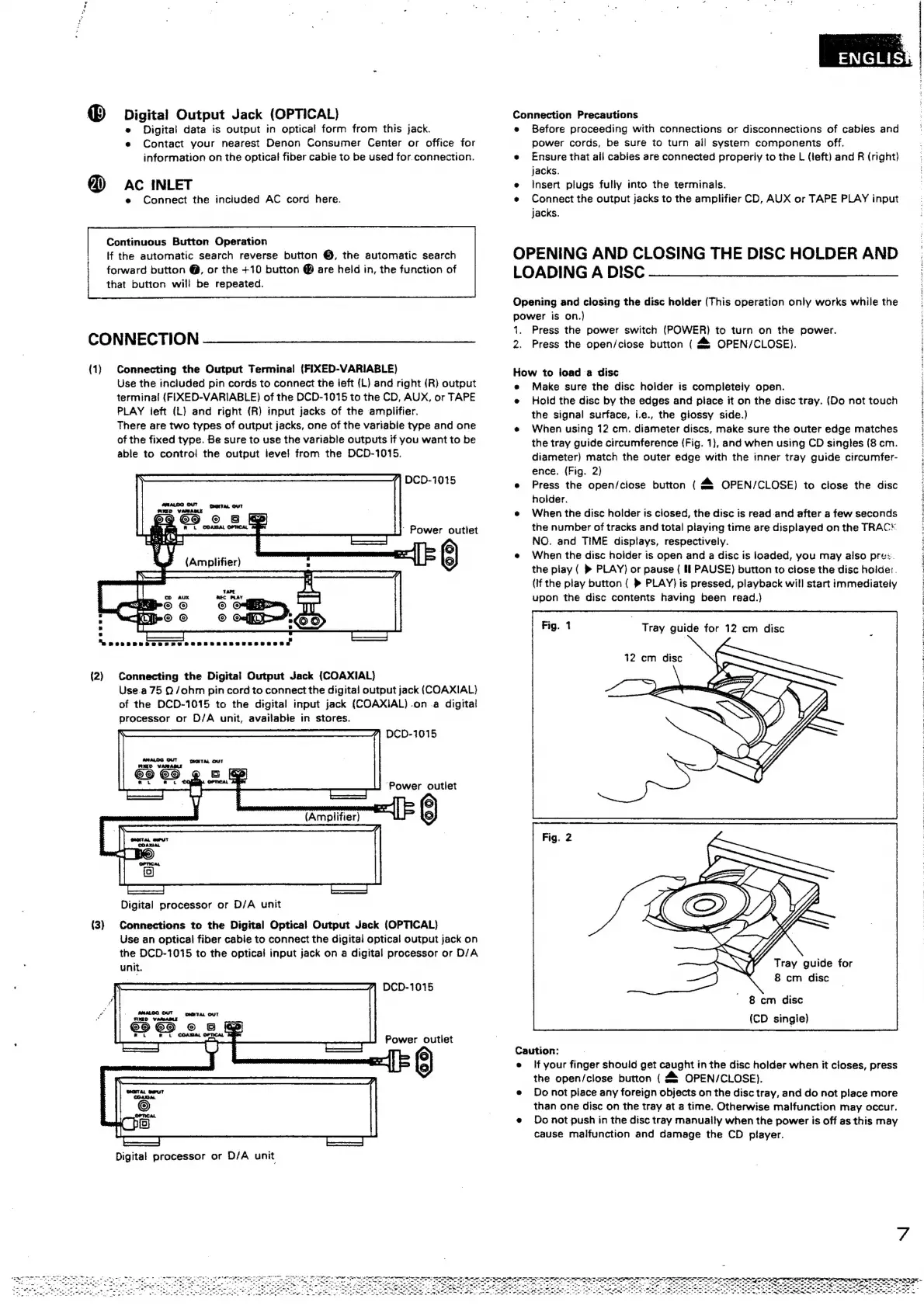
(1)
Connecting
the
Output
Terminal
(FIXED-VARIABLE)
Use
the
included
pin
cords
to
connect
the
ieft
(L)
and
right
(R}
output
terminal
(FIXED-VARIABLE)
of
the
DCD-1015
to
the
CD,
AUX,
or
TAPE
PLAY
left
(L)
and
right
(R)
input
jacks
of
the
amplifier.
There
are
two
types
of
output
jacks,
one
of
the
variable
type
and
one
of
the
fixed
type.
Be
sure
to
use
the
variable
outputs
if
you
want
to
be
able
to
contro!
the
output
level
from
the
DCD-1015.
(/
DCD-1015
Power
outlet
(2}
Connecting
the
Digital
Output
Jack
(COAXIAL)
Use.a
75
2/ohm
pin
cord
to
connect
the
digital
output
jack
(COAXIAL)
of
the
DCD-1015
to
the
digital
input
jack
(COAXIAL)
.on.a
digital
processor
or
D/A
unit,
avaijable
in
stores.
DCD-1015
aMaLOO
OUT
=
maTAL
OUT
RXED
VARAMLE
,
Ri.
Co
‘Power
outlet
Digital
processor
or
D/A
unit
(3)
Connections
to
the
Digital
Optical
Output
Jack
(OPTICAL)
Use
an
optical
fiber
cabie
to
connect
the
digitai
optical
output
jack
on
the
DCD-1015
to
the
optical
input
jack
on
a
digital
processor
or
D/A
unit.
DCD-1015
Power
outlet
\*)
)
Digital
processor
or
D/A
unit
Connection
Precautions
e
Before
proceeding
with
connections
or
disconnections
of
cables
and
power
cords,
be
sure
to
turn
all
system
components
off.
e
Ensure
that
all
cables
are
connected
properly
to
the
L
(left)
and
R
(right)
jacks.
Insert
plugs
fully
into
the
terminals.
Connect
the
output
jacks
to
the
amplifier
CD,
AUX
or
TAPE
PLAY
input
jacks.
OPENING
AND
CLOSING
THE
DISC
HOLDER
AND
LOADING
A
DISC
Opening
and
closing
the
disc
holder
(This
operation
only
works
while
the
power
is
on.)
1.
Press
the
power
switch
(POWER)
to
turn
on
the
power.
2.
Press
the
open/close
button
(
&
OPEN/CLOSE).
How
to
load
a
disc
e
Make
sure
the
disc
holder
is
completely
open.
e
Hold
the
disc
by
the
edges
and
place
it
on
the
disc
tray.
(Do
not
touch
the
signal
surface,
i.e.,
the
glossy
side.)
e
When
using
12
cm.
diameter
discs,
make
sure
the
outer
edge
matches
the
tray
guide
circumference
(Fig.
1},
and
when
using
CD
singles
(8
cm.
diameter)
match
the
outer
edge
with
the
inner
tray
guide
circumfer-
ence.
(Fig.
2)
e
Press
the
open/ciose
button
(4
OPEN/CLOSE)
to
close
the
disc
holder.
e
When
the
disc
holder
is
closed,
the
disc
is
read
and
after
a
few
seconds
the
number
of
tracks
and
total
playing
time
are
displayed
on
the
TRAC
NO.
and
TIME
displays,
respectively.
When
the
disc
holder
is
open
and
a
disc
is
loaded,
you
may
also
pres.
the
play
(
»®
PLAY)
or
pause
(
If
PAUSE)
button
to
close
the
disc
holder.
(If
the
play
button
(
»
PLAY)
is
pressed,
playback
will
start
immediately
upon
the
disc
contents
having
been
read.}
Tray
guide
for
12
cm
disc
12
cm
disc
©
8
cm
disc
8
cm
disc
(CD
single)
Caution:
e
If
your
finger
should
get
caught
in
the
disc
holder
when
it
closes,
press
the
open/close
button
(
&
OPEN/CLOSE).
e
Do
not
piace
any
foreign
objects
on
the
disc
tray,
and
do
not
place
more
than
one
disc
on
the
tray
at
a
time.
Otherwise
malfunction
may
occur.
e
Do
not
push
in
the
disc
tray
manually
when
the
power
is
off
as
this
may
cause
malfunction
and
damage
the
CD
player.
7
a
eee
eRe
oe
ee
pee
ee
ae
Ce
ee
a
i
ee
a
.
8
ge
oe
eee
ee
ey
=
2
"-
ee
ea
gle
ee
ete
Se,
Fa
ati
ty
ii
Op
rend
oe
ne
we
Pa
A
cet
aR
I
Katy
Maglt
TM,
_
S
"
-
we
ae
a
ee
ele
ae
en
al
ae
oe
ee
_——-
ee
ee
ae
oe
ie
Ree
ia!
Fi
~
e
Ne
ae
-~
a
=
A
a8
ee
ae
ee
i
ae
ee
ee
Oe
en
ae
¢
+
t
a
4,
(
i
Tg
dy
POST
Penal
2
aeeevireaiuderr-afleeeh
orate
sire
eR
ee
ee
ee
re
ee
en
eae
a
ee
ea
a
Ra
eee
EN
NCR
ere,
PO
RPT
Ee
ay
ae
Ea
ae
ee
PR ee
ee
aE
a
SE
a
NE
ey
ET
OY
eT
RIE
Ce
Oy
OS
SEI
fe
a
PN
oer
fm
YH
i
a

Other manuals for Denon DCD-1015

Related product manuals