EasyManua.ls Logo

Denon DCD-1015 - Main Unit Adjustment Process; Service Program Activation; Service Program Operations Guide

Denon DCD-1015
13 pages
Print Icon
To Next Page IconTo Next Page
To Previous Page IconTo Previous Page
Loading...
Q
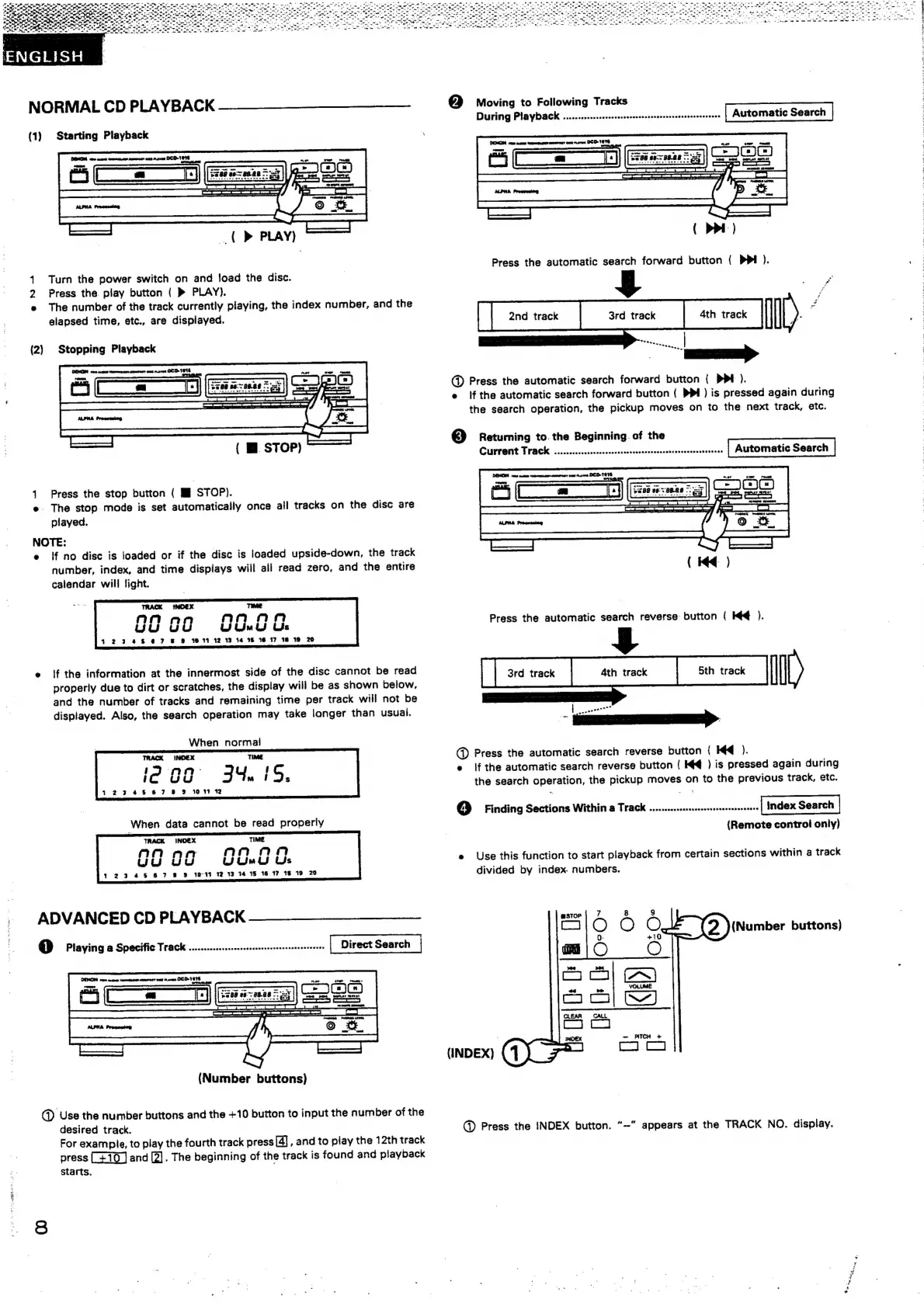
Moving
to
Following
Tracks
DEMON
pen
meee
ee
REIT
Sele
DEO.
Tere
|
ee)
NORMAL
CD
PLAYBACK
(1}
Starting
Playback
COMON
ver
mane
were
ag
menrest
wan
Raves
OCD-1
OE
ae
Cj
(D>
PLAY)
Turn
the
power
switch
on
and
load
the
disc.
Press
the
play
button
(
»
PLAY).
e
The
number
of
the
track
currently
playing,
the
index
number,
and
the
elapsed
time,
etc.,
are
dispiayed.
BJ
=
(2)
Stopping
Playback
@
Press
the
automatic
search
forward
button
{
DPt
).
e
if
the
automatic
search
forward
button
(
PPI)
is
pressed
again
during
the
search
operation,
the
pickup
moves
on
to
the
next
track,
etc.
{
@.
STOP)
®
Se
Ba
the
Beginning.
of
the
POP
ADET
HE
ETESARERETETESTSASHSO
RSET
SSTESET
BEER
ESTESESHH
SHE
DEMON
vers
ane
eeeer
meen:
pas
nsers
DED
TEE
ruts
1
Press
the
stop
button
(
MM
STOP).
a
e.
The
stop
mode
is
set
automatically
once
all
tracks
on
the
disc
are
ee
played.
NOTE:
e
If
no
disc
is
loaded
or
if
the
disc
is
loaded
upside-down,
the
track
number,
index,
and
time
displays
will
all
read
zero,
and
the
entire
calendar
will
light.
TRACK
iINOEX
TE
Anan
on
G
U
nn
Qu
wu
uiJ
Us
123248
6
7
&
9
16
1%
12 13
14
15
16
17
18:38
20
e
|f
the
information
at
the
innermost
side
of
the
disc
cannot
be
read
properly
due
to
dirt
or
scratches,
the
display
will
be
as
shown
below,
and
the
number
of
tracks
and
remaining
time
per
track
will
not
be
displayed.
Also,
the
search
operation
may
take
longer
than
usual.
When
normal
ie
oa
34.
1S,
7234667
8
&
10147
72
@
Press
the
automatic
search
reverse
button
({
Kd
).
e
ifthe
automatic
search
reverse
button
(
Hq
)
is
pressed
again
during
the
search
operation,
the
pickup
moves
on
to
the
previous
track,
etc.
©
Finding
Sections
Within
a
Track
..........cssscscsneererseserssees
index
Search
When
data
cannot
be
read
properly
(Remote
control
only)
TRACK
INOEX
TIME
Wy
O07
Ee
8
ae
e
Use
this
function
to
start
playback
from
certain
sections
within
a
track
123.45
8 7 8
3%
10-44
12:13
14:15
16
17
18
19
20
divided
by
index
numbers.
ADVANCED
CD
PLAYBACK
@o
Playing
a
Specific
Track
.........ssssscesssscnsrresenersneeenenenes
(Number
buttons)
DENG
rem
meme
nemmeenn
emerett
wun
raven
ICD
1616
jee
So
‘mn
(Number
buttons)
@D
Use
the
number
buttons
and
the
+10
button
to
input
the
number
of
the
desired
track.
@
Press
the
INDEX
button.
“-"
appears
at
the
TRACK
NO.
display.
For
example,
to
play
the
fourth
track
press
[4]
,
and
to
play
the
12th
track
press
and
[2].
The
beginning
of
the
track
is
found
and
playback
starts.
on
a
.
fete,
~~)
S
oe
we
¥
[7
-
on
x
+
ters
oe
BeAr
7
al
A
Aa
.
“mt
aoe
es
ett,
ee,
Her
aln’.
ge
nee
ee
*
*
~
-
~-
he
ae
~
oe
--
=
«“
pee
Pit
ce
ree
Teale
ta
Tete
hari
ey
erat
gies,
Acme
:
Len
cee
Te
pan
eg
re,
ste
re
7
a
a
ae
ee
ee
he
oe
i
LC
I
Oo
I
ae
ED
a
lan
a
earl
ate
are
As
a
tes
Ege
Te
te
gta
eo
ee
hee
“Rt
legge
ow
ele
ae
ee
me
ae
a
ee
Rae
te”
ea
ene
at
7
a
age
ae
eek
:
Tote
7
Mele
DL
AE
De
le
Tif
7s
ete
ee
Te
mae
et
Cee
a
a
a
ela
Se
ne
ar
ek
Ts
Ee
SE
ee
gg
Cale
a
oe
gel
satae
eer
es
fey
MST)
Os
A
aot
=
we
-
a
7

Other manuals for Denon DCD-1015

Related product manuals