EasyManua.ls Logo

Denon DCD-1015 - Heat Run Mode Operation; Activating the Heat Run Mode; Heat Run Mode Functionality; Heat Run Mode Error Codes

Denon DCD-1015
13 pages
Print Icon
To Next Page IconTo Next Page
To Previous Page IconTo Previous Page
Loading...
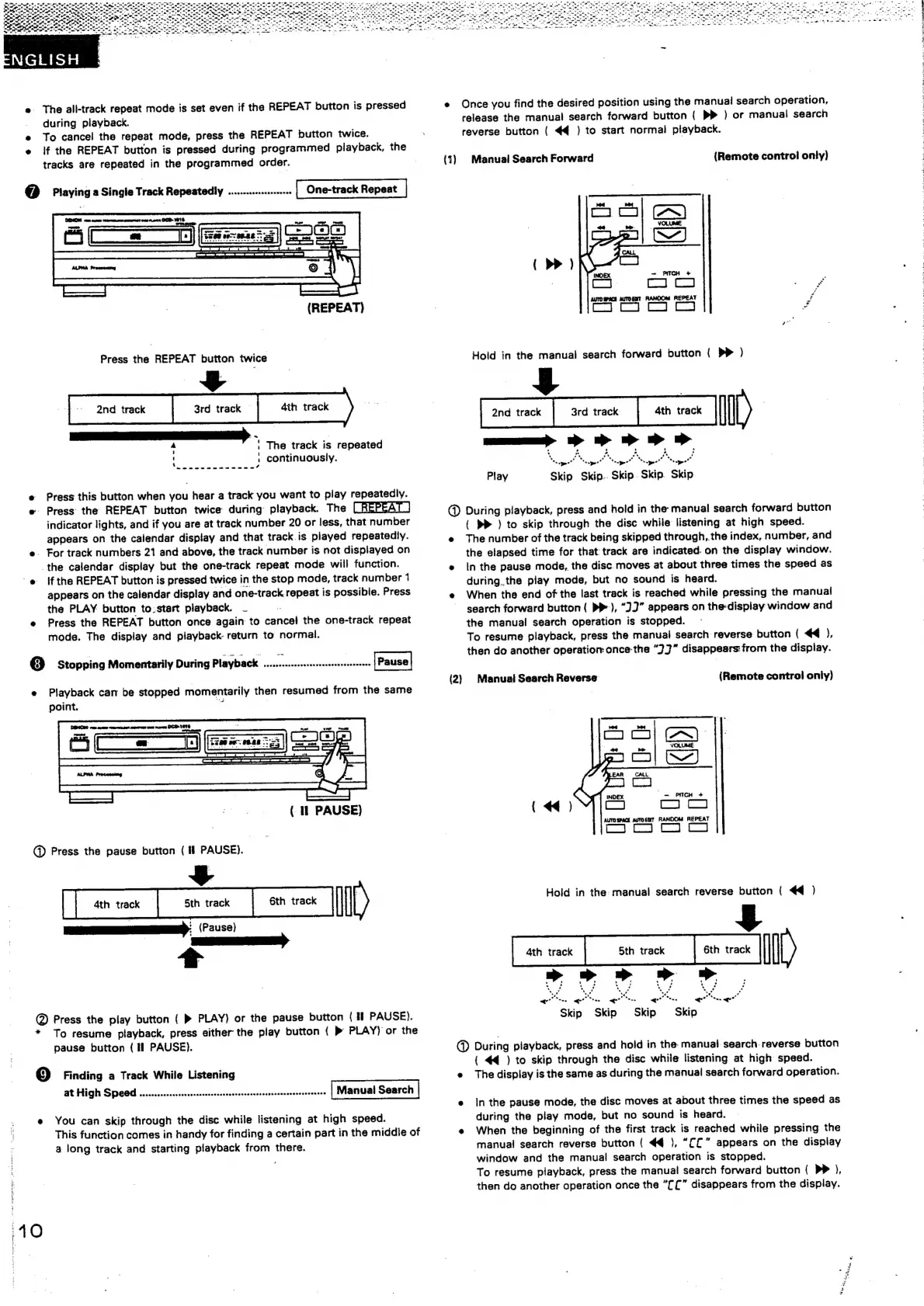
e
The
ali-track
repeat
mode
is
set
even
if
the
REPEAT
button
is
pressed
_
during
playback.
e
To
cance!
the
repeat
mode,
press
the
REPEAT
button
twice.
e
if
the
REPEAT
button
is
pressed
during
programmed
playback,
the
tracks
are
repeated
in
the
programmed
order.
@
Playing
a
Single
Track
Repeatedly
............
pneRe
One-track
Repeat
(REPEAT)
Press
the
REPEAT
button
twice
n
'
‘The
track
is
repeated
,
continuously.
e
Press
this
button
when
you
hear
a
track
you
want
to
play
repeatedly.
e-
Press:
the
REPEAT
button
twice
during
playback.
The
indicator
lights,
and
if
you
are
at
track
number
20
or
less,
that
number
appears
on
the
calendar
display
and
that
track
is
played
repeatedly.
e.
For
track
numbers
21
and
above,
the
track.
number
is
not
displayed
on
the
calendar
display
but
the
one-track
repeat
mode
will
function.
@
Ifthe
REPEAT
button
is
pressed
twice
in
the
stop
mode,
track
number
1
appears
on
the
calendar
display
and
one-track
repeat
is
possible.
Press
the
PLAY
button
to.start
playback.
_
e
Press
the
REPEAT
button
once
again
to
cancel
the
one-track
repeat
mode.
The
display
and
playback
return
to
normal.
8
]
Stopping
Momentarily
During
Playback
hla
ee
opaoaea
tty
ak
{Pause
e
Playback
cam
be
stopped
momentarily
then
resumed
from
the
same
point.
vi
|
|
(
1
PAUSE)
@
Press
the
pause
button
(
if
PAUSE).
Lom
[one
[om
Ill)
EE:
(Pause)
_
@
Press
the
play
button
(
»
PLAY)
or
the
pause
button
(if
PAUSE).
*
To
resume
playback,
press
either
the
play
button
(
»
PLAY)
or
the
pause
button
(
Il
PAUSE).
Gg)
Finding
a
Track
While
Listening
at
High
Speed
........ccscsssssssrcccsccsserseecsnsscesessanssoceneonees
Manual
Search
e
You
can
skip
through
the
disc
while
listening
at
high
speed.
This
function
comes
in
handy
for
finding
a
certain
part
in
the
middle
of
a
long
track
and
starting
playback
from
there.
40
e
Once
you
find
the
desired
position
using
the
manual
search
operation,
release
the
manual
search
forward
button
{
PP
)
or
manual
search
reverse
button
(
4€@
})
to
start
normal
playback.
(1)
Manual
Search
Forward
(Remote
control
only)
AuTo
Spica
auTOgT
RANOOM
REPEAT
re
ies
Hold
in
the
manual
search
forward
button
(
PP
)
ane
[seme
|
=
Il)
ee
sapee”
‘sae
po’
*.
Te
Se
epee”
=
ape’
Play
Skip
Skip..
Skip.
Skip.
Skip
@
During
playback,
press
and
hold
in
the
manual
search
forward
button
(
PP
)
to
skip
through
the
disc
while
listening
at
high
speed.
e
The
number
of
the
track
being
skipped
through,.the
index,
number,
and
the
elapsed
time
for
that
track
are
indicated.
on
the
display
window.
e
Inthe
pause
mode,
the
disc.
moves
at
about
three
times
the
speed
as
during.
the
play
mode,
but
no
sound
is
heard.
e
When
the
end
of
the
last
track
is
reached
while
pressing
the
manual!
search
forward
button
(
PP),
“J”
appears
on
the-display
window
and
the
manual
search
operation
is
stopped.
To
resume
playback,
press
the
manual
search
reverse
button
(
44),
then
do
another
operation:
once-the
“)3"
disappears:from
the
display.
(2}
Manual
Search
Reverse
{Remote
control
only)
INDEX
“=
PITCH
+
2)
i)
AUTO
SPACE
AUTOEET
RANDOM
REPEAT
{
44)
Hold
in
the:
manual
search
reverse
button
(
44
)
$
woe
[owes
|)
,
«
.
te
ss
oe
Pa
PT
a
cel
(eid
ee
od
*Su5
ee
Meee
<<"
mee
«
Skip
Skip
Skip
Skip
@D
During
playback,
press
and
hold
in
the
manual
search
reverse
button
(
44
)
to
skip
through
the
disc
while
listening
at
high
speed.
e
The
display
is
the
same
as
during
the
manual
search
forward
operation.
e
inthe
pause
mode,
the
disc
moves
at
about
three
times
the
speed
as
during
the
play
mode,
but
no
sound
is
heard.
e
When
the
beginning
of
the
first
track
is
reached
while
pressing
the
manual
search
reverse
button
(
44
),
“££”
appears
on
the
display
window
and
the
manual
search
operation
is
stopped.
To
resume
playback,
press
the
manual
search
forward
button
{
p>
),
then
do
another
operation
once
the
"[£”
disappears
from
the
display.
Wen
es
emer
ete
leh
ani.
as
dae
Mgt
[70%
fav
al
AR

Other manuals for Denon DCD-1015

Related product manuals