EasyManua.ls Logo

Denon DCD-1015 - Focus Error Signal Judgment

Denon DCD-1015
13 pages
Print Icon
To Next Page IconTo Next Page
To Previous Page IconTo Previous Page
Loading...
Pete
®
lo
tes,
inserting
Blanks
Between
Tracks.
..................
uidaidducupeacscets
(Remote
controj
only)
*
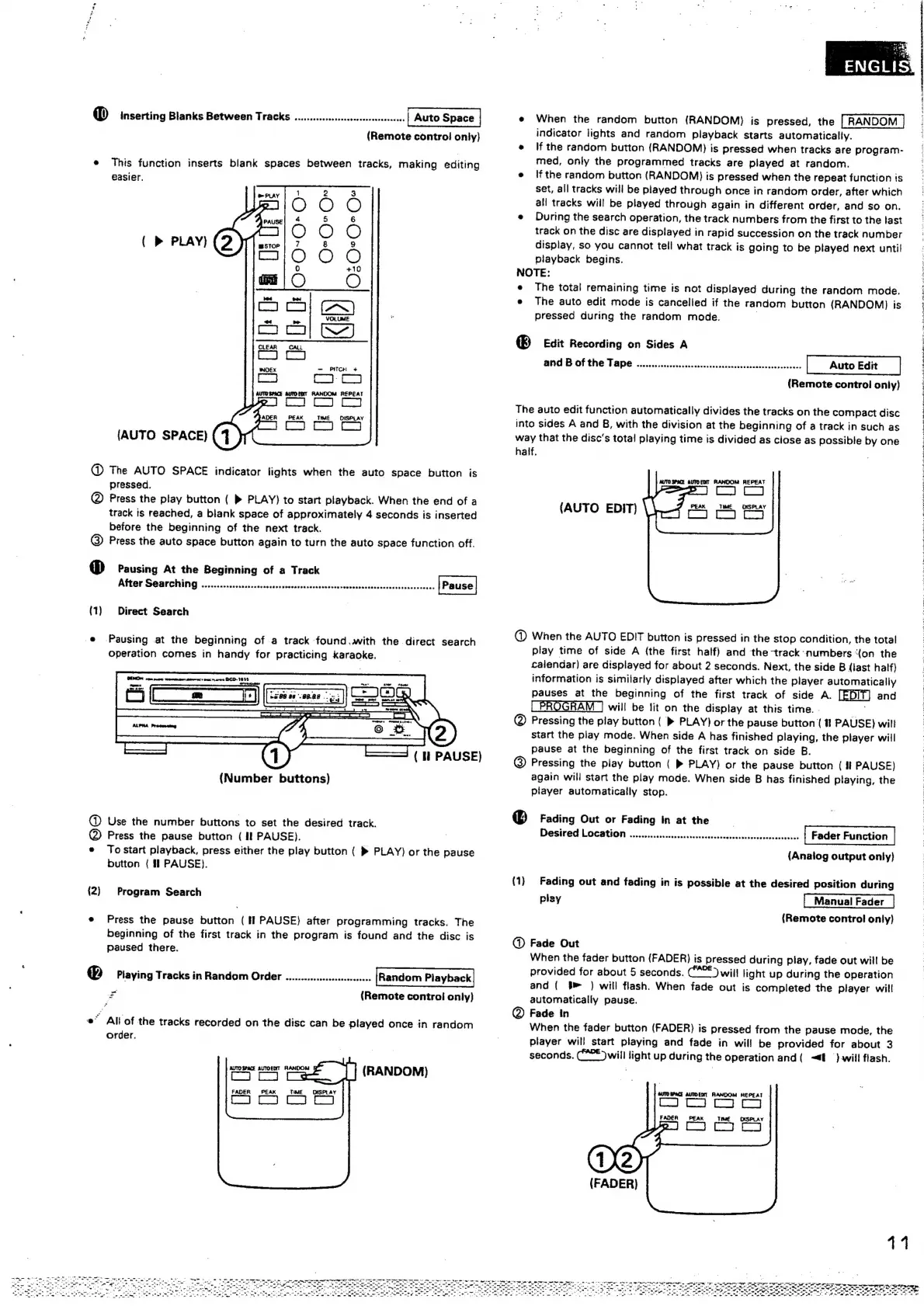
This
function
inserts
blank
spaces
between
tracks,
making
editing
easier.
(
PLAY)
AUTO
SPACE
AUTO
EDT
RANDOM
REPEAT
ADEA
PEAK
TE
DISPLAY
(AUTO
SPACE)
@
The
AUTO
SPACE
indicator
lights
when
the
auto
space
button
is
pressed.
@
Press
the
play
button
(
®
PLAY)
to
start
playback.
When
the
end
of
a
track
is
reached,
a
blank
space
of
approximately
4
seconds
is
inserted
before
the
beginning
of
the
next
track.
@
Press
the
auto
space
button
again
to
turn
the
auto
space
function
off.
@
Pausing
At
the
Beginning
of
a
Track
After
Searching
.........s.0ccccosesossoscvccsscscessocsonescenssnseseoancosnasonsesecseess
{1)
Direct
Search
e
Pausing
at
the
beginning
of
a
track
found.with
the
direct
search
Operation
comes
in
handy
for
practicing
karaoke.
CEPON
wees
ave
Trestingers
seers
peat
ares
DCD-
1895
ho
tel
(
It
PAUSE)
(Number
buttons)
@
Use
the
number
buttons
to
set
the
desired
track.
@
Press
the
pause
button
(Il
PAUSE).
e
To
start
playback,
press
either
the
play
button
(
»
PLAY)
or
the
pause
button
(
fl
PAUSE).
(2)
Program
Search
e
Press
the
pause
button
(#1
PAUSE)
after
programming
tracks.
The
beginning
of
the
first
track
in
the
program
is
found
and
the
disc
is
paused
there.
Playing
Tracks
in
Random
Order
.............scccssceeseveee
Random
Playback
2
(Remote
controi
only)
©”
All
of
the
tracks
recorded
on
the
disc
can
be
played
once
in
random
order.
(RANDOM)
DISPLAY
a
z
SMe
te
rn
erect
pre
ee
rie
ere
ete
tk
ee
BT
ee
TE
A
SE
OT
UY
Bar
ae
pe
OS
ee
epee
ere
ae"
|
wapcet
oes
SETS
ENT
Yn
Metces
e
eee.
SOT
IES
TI
NE
ET
ee
et
ee
eee
ee
Se
sara
ae
aa
R
a
eee
an
em
roe,
Se
ne
Nae
ae
ng
te
et
teen
TAT
Tne
Dele
el
sled
Da
Ieee
a
Saag
tate
ge
ge
oe
ae
ee
ea
ee
tee
rein
eee
t
ease
Th.
bee
meas
ine
a
Coe
a,
ae
eT
~
a
of
‘hy
'
4
soe
ie
ra
eat
e
When
the
random
button
(RANDOM)
is
pressed,
the
indicator
lights
and
random
playback
starts
automatically.
e
If
the
random
button
(RANDOM)
is
pressed
when
tracks
are
program-
med,
only
the
programmed
tracks
are
played
at
random.
e
ifthe
random
button
(RANDOM)
is
pressed
when
the
repeat
function
is
set,
all
tracks
will
be
played
through
once
in
random
order,
after
which
all
tracks
will
be
played
through
again
in
different
order,
and
so
on.
e
During
the
search
operation,
the
track
numbers
from
the
first
to
the
last
track
on
the
disc
are
displayed
in
rapid
succession
on
the
track
number
display,
so
you
cannot
tell
what
track
is
going
to
be
played
next
until
playback
begins.
NOTE:
e
The
total
remaining
time
is
not
displayed
during
the
random
mode.
e
The
auto
edit
mode
is
cancelled
if
the
random
button
(RANDOM)
is
pressed
during
the
random
mode.
|
®
Edit
Recording
on
Sides
A
and
B
of
the
Tape
...............sccccsscsssssssccsssssssesseseercesencs
(Remote
control
only)
The
auto
edit
function
automatically
divides
the
tracks
on
the
compact
disc
into
sides
A
and
B,
with
the
division
at
the
beginning
of
a
track
in
such
as
way
that
the
disc's
total
playing
time
is
divided
as
close
as
possible
by
one
half.
ASTO
SPME
AUTOEDITT
RANOOM
REPEAT
TE
=
DISPLAY
(AUTO
EDIT)
es
@)
When
the
AUTO
EDIT
button
is
pressed
in
the
stop
condition,
the
total
play
time
of
side
A
(the
first
half)
and
the
-track
numbers
‘(on
the
calendar)
are
displayed
for
about
2
seconds.
Next,
the
side
B
{last
half)
information
is
similarly
displayed
after
which
the
player
automatically
pauses
at
the
beginning
of
the
first
track
of
side
A.
[EDIT]
and
will
be
lit
on
the
display
at
this
time.
.
@
Pressing
the
play
button
(
®
PLAY)
or
the
pause
button
(
1!
PAUSE)
wil!
start
the
play
mode.
When
side
A
has
finished
playing,
the
player
will
pause
at
the
beginning
of
the
first
track
on
side
B.
@
Pressing
the
play
button
(
®
PLAY)
or
the
pause
button
(Il
PAUSE}
again
will
start
the
play
mode.
When
side
B
has
finished
playing,
the
player
automatically
stop.
®
Fading
Out
or
Fading
in
at
the
Desired
Location
cet
Soothe
Risvidcecoece
sebteseen
Fader
Function
{Analog
output
only)
{1}
Fading
out
and
fading
in
is
possible
at
the
desired
position
during
play
Manual
Fader
(Remote
control
only)
@
Fade
Out
When
the
fader
button
(FADER)
is
pressed
during
play,
fade
out
will
be
provided
for
about
5
seconds.
(*™)
will
light
up
during
the
operation
and
(
§
)
will
flash.
When
fade
out
is
completed
the
player
will
automatically
pause.
@
Fade
In
When
the
fader
button
(FADER)
is
pressed
from
the
pause
mode,
the
player
will
start
playing
and
fade
in
will
be
provided
for
about
3
seconds.
C~°*
will
light
up
during
the
operation
and
(
<t
)
will
flash.
AUTO
Pact
AUTOENT
RANDOM
HEPEAT
.
CS Es
te)
ea
FADEA
PEAK
TmwE
OfSPLAY
SF
ES
ra
(FADER)
a
3
&
3
i
i
3
£
2
6
i
4
7
3
4
4
i
1-43.52
red
ate
OE
PE
Pee
epee
eect
teal
enter
So
Pack’
co
ath-vercebes
Gabe
ba,
11
ata
.
at
a
ee
ee
eee
‘oe
re
ee
<
ee
ee
re
eee
ete
at
Tne
et
é
eae
en
ae
ert
ree
ie
eee
eae
eh
a
eM
ae
ae
on
ge
ee
ee
He
A
a
a
ewe
alee
pene
Pp
tees
I
a
a
al
ea
i
A
ei
a
De
ea
_—
*
v
=
roa
.
eae
ae
ee
ete
Pe
ee
og
ee
Ce
7
|
woh
a
ed

Other manuals for Denon DCD-1015

Related product manuals