EasyManua.ls Logo

Denon DCD-1500 - Adjustment Equipment and Detailed Steps

Denon DCD-1500
42 pages
Print Icon
To Next Page IconTo Next Page
To Previous Page IconTo Previous Page
Loading...
(4)
Adjustment
of
PLL
®
Preparation
%
TEO!
Track
error
out
~
®
Turn
the
power
off,
©
Do
not
toad
the
adjustment
disc.
©
Check
to
see
that
the
laser
pick-up
is
set
at
inner
circle
of
Program
area
(To
move
pick-up,
refer
to
(5)(2)).
©
Check
to
see
that
the
unit
is
in
service
mode
(Short-circuit_
pins
@)
and
G),
TP-204
of
signal
processing
P.W.B.).
©
Short-circuit
pins
@
and
@,.
or
@
and
©.
TP-202
(3P)
of
signal
processing
P.W.B.
{Ku-
5760).
*
Short-circuit
pins
@)
and
G).,
TP-207
(3P)
of
signal
processing
P.W.B,
:
©
Turn
the
power
on,
©
Confirm
that
uo
blinks
on
the
indication
window,
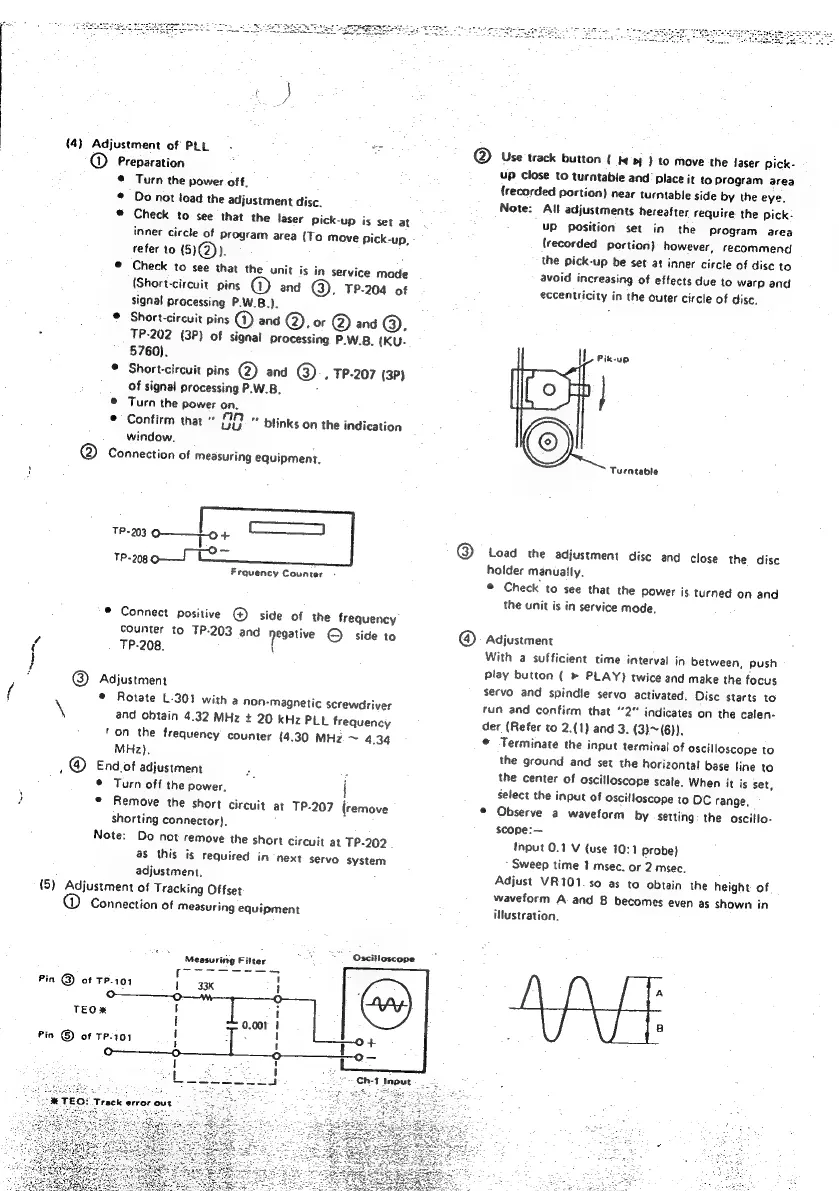
Connection
of
measuring
equipment,
RNa
TP-203
o——jpo+
1P-20g
0S
LO
Frquency
Counter
*
Connect
positive
@
side
of
the
frequency
counter
to
TP-203
and
Negative
©
side
to
TP-208.
\
Adjustment
©
Rotate
L-301
with
a
non-magnetic
screwdriver
and
obtain
4.32
MHz
+
20
KHz
PLL
frequency
‘on
the
frequency
counter
(4.30
MHz
~
4.34
MHz).
End
of
adjustment
.
©
Turn
off
the
power,
{
©
Remove
the
short
circuit
at
TP-207
(remove
shorting
connector).
Note:
Do
not
remove
the
short
circuit
at
TP-202
as
this
is
required
in
next
servo
system
adjustment,
{5)
Adjustment
of
Tracking
Offset
Connection
of
measuring
equipment
oN
:
="
Oscitloscope
Measuring
Fitter
Use
track
button
{
fy
bt)
to
move
the
faser
pick-
up
close
to
turntable
and’
place
it
to
program
area
{recorded
portion)
near
turntable
side
by
the
eye.
Note:
All
adjustments
hereafter
require
the
pick:
UP
position
set
in
the
Program
area
{recorded
portion)
however,
recommend
the
pick-up
be
set
at
inner
circle
of
disc
to
avoid
increasing
of
effects
due
to
warp
and
eccentricity
in
the
outer
circle
of
disc.
Turntable
Load
the
adjustment
disc
and
close
the disc
holder
manually,
©
Check
to
see
that
the
Power
is.
turned
on
and
the
unit
is
in
service
mode,
Adjustment
With
a
sufficient
time
interval
in
between,
push
play
button
(
»
PLAY)
twice
and
make
the
focus
servo
and
spindle
servo
activated.
Disc
starts
to
run
and
confirm
that
“2”
indicates
on
the
calen-
der
(Refer
to
2.(1)
and
3.
(3)~(6)).
©
Terminate
the
input
terminal
of
oscilloscope
to
the
ground
and
set
the
horizontal
base
line
to
the
center
of
oscilloscope
scale.
When
it
is
set,
select
the
input
of
oscilloscope
to
OC
range.
©
Observe
a
waveform
by
setting
the
oscitto-
scope:
Input
0.1
V
(use
10:1
probe}
Sweep
time
1
msec.
or
2
msec.
Adjust
VR101.so
as
to
obtain
the
height
of
waveform
A
and
B
becomes
even
as
shown
in
illustration.

Other manuals for Denon DCD-1500

Related product manuals