EasyManua.ls Logo

Denon DCD-1500 - Page 16

Denon DCD-1500
42 pages
Print Icon
To Next Page IconTo Next Page
To Previous Page IconTo Previous Page
Loading...
(3)
Preparation
)
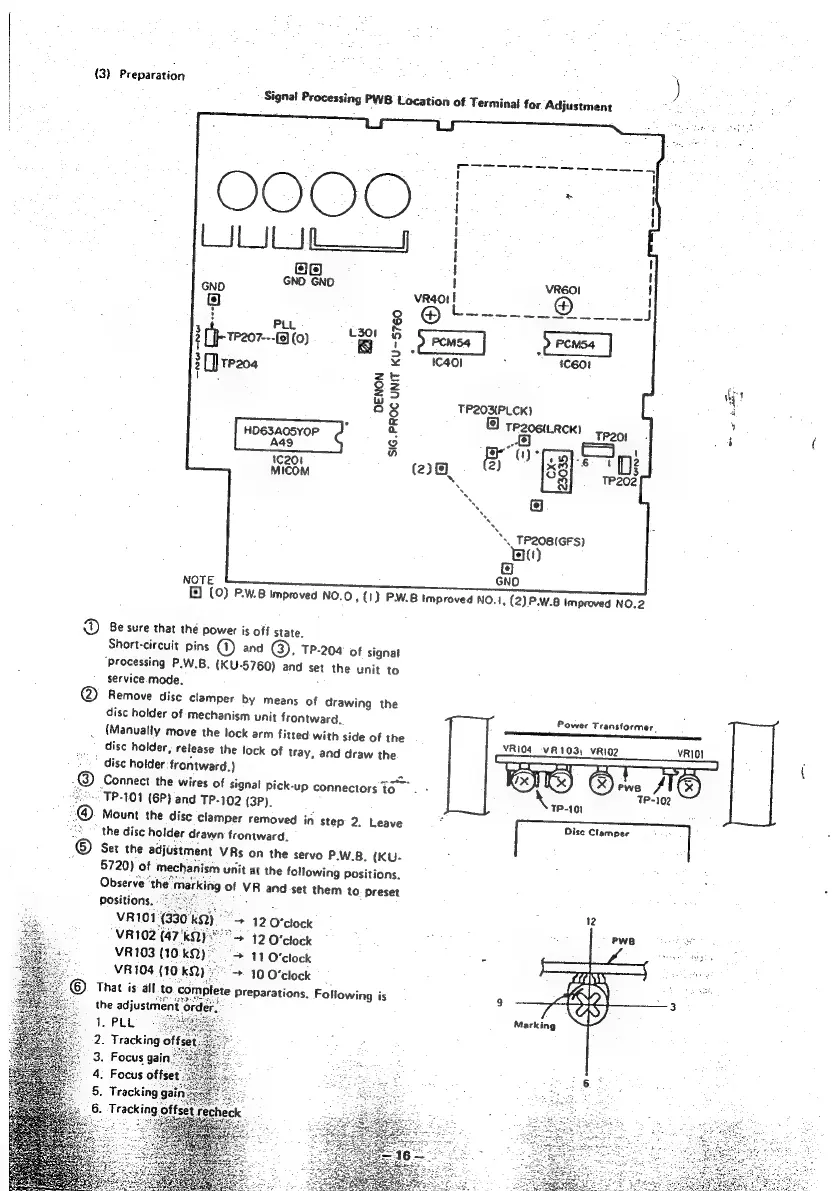
Signal
Processing
PWB
Location
of
Terminal
for
Adjustment
;
[Q{a}
GNO
GND
eo
LY
:
oO
PLL
x
L301
2
[
Ik
1P207---19
(0)
~~
t
i]
3
&
3
[]tP204
ms
oa
?
23
"
a8
TP2OXPLCK)
:
«
9)
te2o6i.RcK)
:
HO6SA05vOP
a
_&
R201
;
i
(
ao
&
(ye
OF
‘(he
ce
je
2
fgg
Os
*\
TP2OB(GFS)
Ba)
GND
NOTE
f)
(0)
P.W.8
Improved
NO.O,
(1)
PW.B
Improved
NO.1,
(2)
P.W.8
Improved
NO.2
D
Be
sure
that
the
power
is
of
f
state,
Short-circuit
pins
@
and
®.
TP-204
of
signal
‘Processing
P.W.B.
(KU-5760)
and
set
the
unit
to
service.
mode.
@
Remove
disc
clamper
by
means
of
drawing
the
disc
holder
of
mechanism
unit
frontward.
Power
Transformer,
.
{Manually
move
the
lock
arm
fitted
with
side
of
the
VRI04_VA103;
vAo2
vRio}
disc
holder,
release
the
lock
of
tray,
and
draw
the
<=
=
=>
disc
holder
frontward.)
2
Ux]
tx)
‘€3
we:
Af
x)
Connect
the
wires
of
signal
pick-up
connectors
to.
-
Le
TP-102
~-
TP-101
(6P)
and
TP-102
(3P).
TP-101
@
Mount
the
disc
clamper
removed
in
step
2.
Leave
°
Disc
Clamper
:
“2
the
disc
holder
drawn
frontward.
®
Set
the
adjustment
VRs
on
the
servo
P.W.B.
(KU-
.
.
5720)
of
mechanism
unit
at
the
following
positions.
Observe
“the
marking
of
VR
and
set
them
to.
preset
Positions.
ee,
ok
VR101
(330°kQ)
"+
12
O'clock
VR102
(47'KQ)
">
12
O'clock
VR103
(10.
KO)
>
11
O'clock
7
“>
10
O'clock
That
is
all
to
complete
Preparations.
Following
is
9
the
adjustment
order.
Marking

Other manuals for Denon DCD-1500

Related product manuals