EasyManua.ls Logo

Denon DCD-315 - Page 10

Denon DCD-315
34 pages
Print Icon
To Next Page IconTo Next Page
To Previous Page IconTo Previous Page
Loading...
I
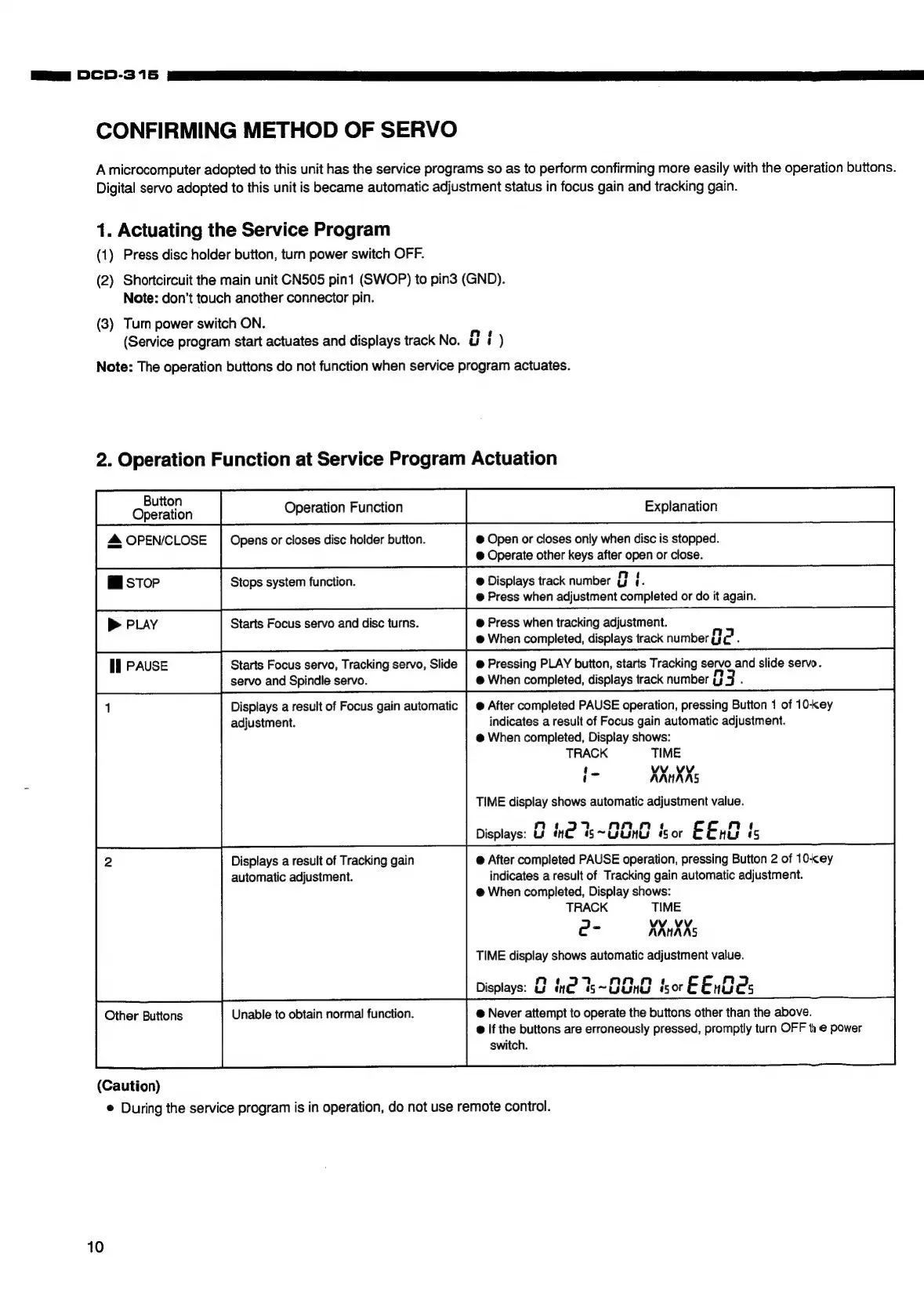
CONFIRMING
METHOD
OF
SERVO
A
microcomputer
adopted
to
this
unit
has
the
service
programs
so as
to
perform
confirming
more
easily
with
the
operation
buttons.
Digital
servo
adopted
to
this
unit
is
became
automatic
adjustment
status
in
focus
gain
and
tracking
gain.
1.
Actuating
the
Service
Program
(1)
Press
disc
holder
button,
turn
power
switch
OFF.
(2)
Shortcircuit
the
main
unit
CN505
pint
(SWOP)
to
pin3
(GND).
Note:
don’t
touch
another
connector
pin.
(3)
Turn
power
switch
ON.
(Service
program
start
actuates
and
displays
track
No.
ai
)
Note:
The
operation
buttons
do
not
function
when
service
program
actuates.
2.
Operation
Function
at
Service
Program
Actuation
Goeraton
Operation
Function
Explanation
4
OPEN/CLOSE
|
Opens
or
closes
disc
holder
button.
@
Open
or
closes
only
when
disc
is
stopped.
@
Operate
other
keys
after
open
or
close.
Mi
stop
Stops
system
function.
@
Displays
track
number
g
i.
@
Press
when
adjustment
completed
or
do
it
again.
p>
PLAY
Starts
Focus
servo
and
disc
turns.
@
Press
when
tracking
adjustment.
@
When
completed,
displays
track
number
a
Pad
.
Ii
PAUSE
Starts
Focus
servo,
Tracking
servo,
Slide
|
@
Pressing
PLAY
button,
starts
Tracking
servo
and
slide
servo.
servo
and
Spindle
servo.
@
When
completed,
displays
track
number
HH
3
,
Displays
a
result
of
Focus
gain
automatic
|
@
After
completed
PAUSE
operation,
pressing
Button
1
of
10-key
adjustment.
indicates
a
result
of
Focus
gain
automatic
adjustment.
Other
Buttons
@
When
completed,
Display
shows:
(Caution)
TRACK
TIME
e
During
the
service
program
is
in
operation,
do
not
use
remote
control.
=
vv
vv
t
AANHAAS
TIME
display
shows
automatic
adjustment
value.
:
n
4
Displays:
Uf
ne
5s~OOne
iS
or
EE:
is
@
After
completed
PAUSE
operation,
pressing
Button
2
of
10-cey
indicates
a
result
of
Tracking
gain
automatic
adjustment.
@
When
completed,
Display
shows:
TRACK
TIME
-
VV
Vv
e
KXnXXs
TIME
display
shows
automatic
adjustment
value.
n
7
Displays:
us
ine
Ss
~8E28
isor
EEnWe:
@
Never
attempt
to
operate
the
buttons
other
than
the
above.
@
If
the
buttons
are
erroneously
pressed, promptly
turn
OFF
te
power
switch.
Displays
a
result
of
Tracking
gain
automatic
adjustment.
Unable
to
obtain
normal
function.
10

Related product manuals