EasyManua.ls Logo

Denon DCD-3300 - Page 19

Denon DCD-3300
45 pages
Print Icon
To Next Page IconTo Next Page
To Previous Page IconTo Previous Page
Loading...
(4)
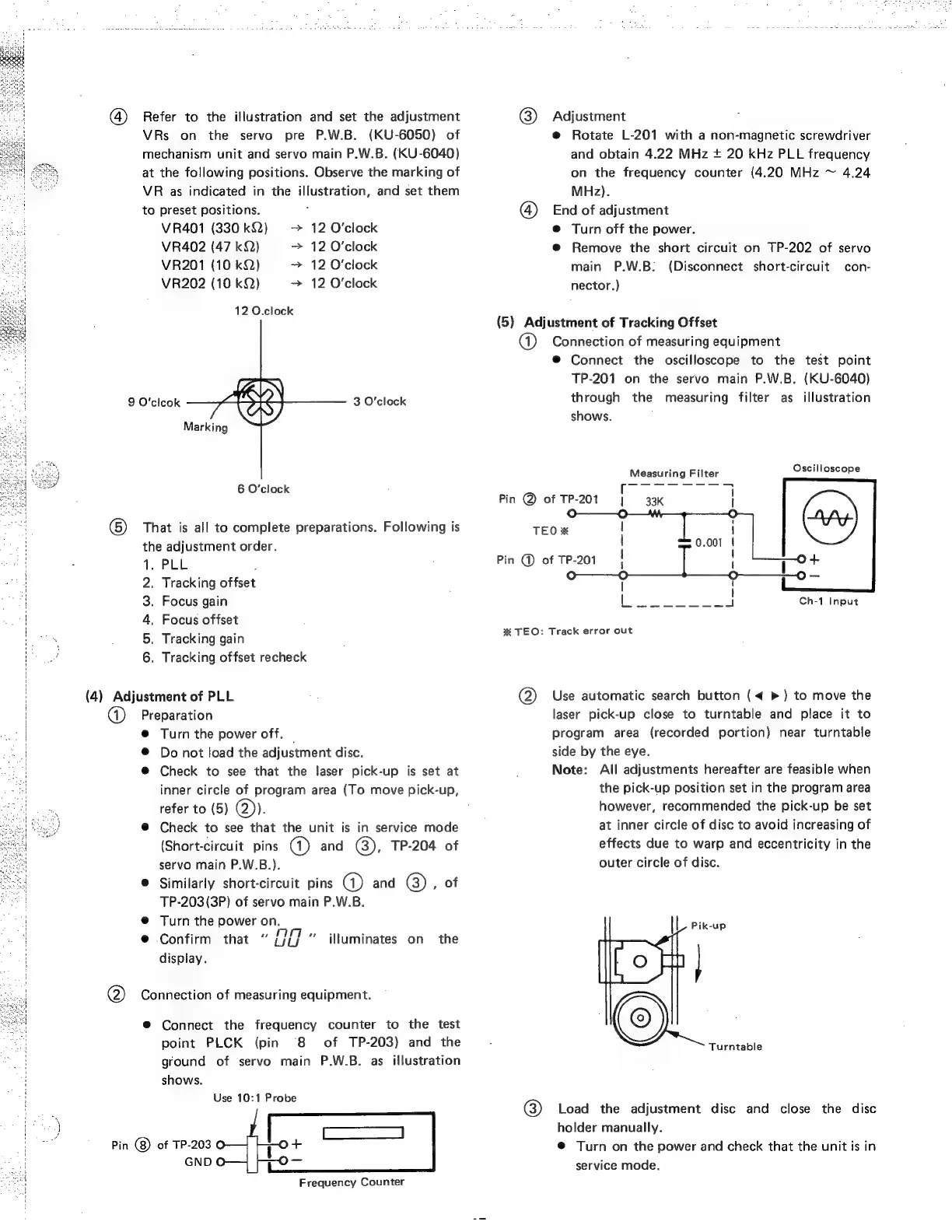
Refer
to
the
illustration
and
set
the
adjustment
VRs
on
the
servo
pre
P.W.B.
(KU-6050)
of
mechanism
unit
and
servo
main
P.W.B.
(KU-6040)
at
the
following
positions.
Observe
the
marking
of
VR
as
indicated
in
the
illustration,
and
set
them
to
preset
positions.
VR401
(330
k22)
12
O'clock
VR402
(47
kQQ)
>
12
O'clock
VR201
(10
kQ)
>
12
O'clock
VR202
(10
kQ)
>
12
O'clock
12
O.clock
9
O'clcok
3
O'clock
Marking
6
O'clock
6)
That
is
all
to
complete
preparations.
Following
is
the
adjustment
order.
PLL
P
Tracking
offset
Focus
gain
Focus
offset
Tracking
gain
Tracking
offset
recheck
AaanPrPwon-
(4)
Adjustment
of
PLL
@)
Preparation
@
Turn
the
power
off.
®
Do
not
load
the
adjustment
disc.
@
Check
to
see
that
the
laser
pick-up
is
set
at
inner
circle
of
program
area
(To
move
pick-up,
refer
to
(5)
(2)).
@
Check
to
see
that
the
unit
is
in
service
mode
(Short-circuit
pins
(1)
and
(@),
TP-204
of
servo
main
P.W.B.).
@
Similarly
short-circuit
pins
@)
and
GB)
,
of
TP-203(3P)
of
servo
main
P.W.B.
@
Turn
the
power
on.
@
Confirm
that
UO
display.
illuminates
on
the
@
Connection
of
measuring
equipment.
®
Connect
the
frequency
counter
to
the
test
point
PLCK
(pin
“8
of
TP-203)
and
the
ground
of
servo
main
P.W.B.
as
illustration
shows.
Use
10:1
Probe
Pin
@)
of
TP-203
GND
Frequency
Counter
@)
Adjustment
@
Rotate
L-201
with
a
non-magnetic
screwdriver
and
obtain
4.22
MHz
+
20
kHz
PLL
frequency
on
the
frequency
counter
(4.20
MHz
~
4.24
MHz).
@
End
of
adjustment
@
Turn
off
the
power.
@
Remove
the
short
circuit
on
TP-202
of
servo
main
P.W.B:
(Disconnect
short-circuit
con-
nector.)
(5)
Adjustment
of
Tracking
Offset
@
Connection
of
measuring
equipment
®
Connect
the
oscilloscope
to
the
test
point
TP-201
on
the
servo
main
P.W.B.
(KU-6040)
through
the
measuring
filter
as
illustration
shows.
Measuring
Filter
Oscilloscope
r
Pin
@
of
TP-201
|
33k
1
TEO
xX
i
0.001
|
Pin
@
of
TP-201_
|
|
pot
=
Ch-1
Input
%
TEO:
Track
error
out
@)
Use
automatic
search
button
(<
>)
to
move
the
laser
pick-up
close
to
turntable
and
place
it
to
program
area
(recorded
portion)
near
turntable
side
by
the
eye.
Note:
Al!
adjustments
hereafter
are
feasible
when
the
pick-up
position
set
in
the
program
area
however,
recommended
the
pick-up
be
set
at
inner
circle
of
disc
to
avoid
increasing
of
effects
due
to
warp
and
eccentricity
in
the
outer
circle
of
disc.
Turntable
@)
Load
the
adjustment
disc
and
close
the
disc
holder
manually.
@
Turn
on
the
power
and
check
that
the
unit
is
in
service
mode.

Related product manuals