EasyManua.ls Logo

Denon DCD-3300 - Page 20

Denon DCD-3300
45 pages
Print Icon
To Next Page IconTo Next Page
To Previous Page IconTo Previous Page
Loading...
@)
Adjustment
@
Observe
a
waveform
‘by
setting
the
oscillo-
With
a
sufficient
time
interval
in
between,
push
scope
:—
play
button
PLAY)
twice
and
make
the
focus
Input
0.1
V/DIV
(use
10:1
probe)
servo
and
spindle
servo
activated.
(Confirm
that
Sweep
time
1
msec/div
or
2
msec/DIV
of
“9'
on
the
calendar
fails.)
Disc
starts
to
run.
Adjust
VR401
on
the
servo
pre
P.W.B.
(KU-
ah
(Refer
to
(2.(1),
3.(3)
~
(6))
6050)
so
as
to
obtain
the
height
of
waveform
A
@
Terminate
the
input
terminal
of
oscilloscope
to
and
B
becomes
even
as
illustration
shows.
the
ground
and
set
the
horizontal
base
line
to
:
the
center
of
oscilloscope
scale.
When
it
is
set,
select
the
input
of
oscilloscope
to
DC
range.
:
(6)
Adjustment
of
Focus
Gain
8)
Connection
of
measuring
equipment
a
With
a
sufficient
interval
of
time
in
between,
push
@
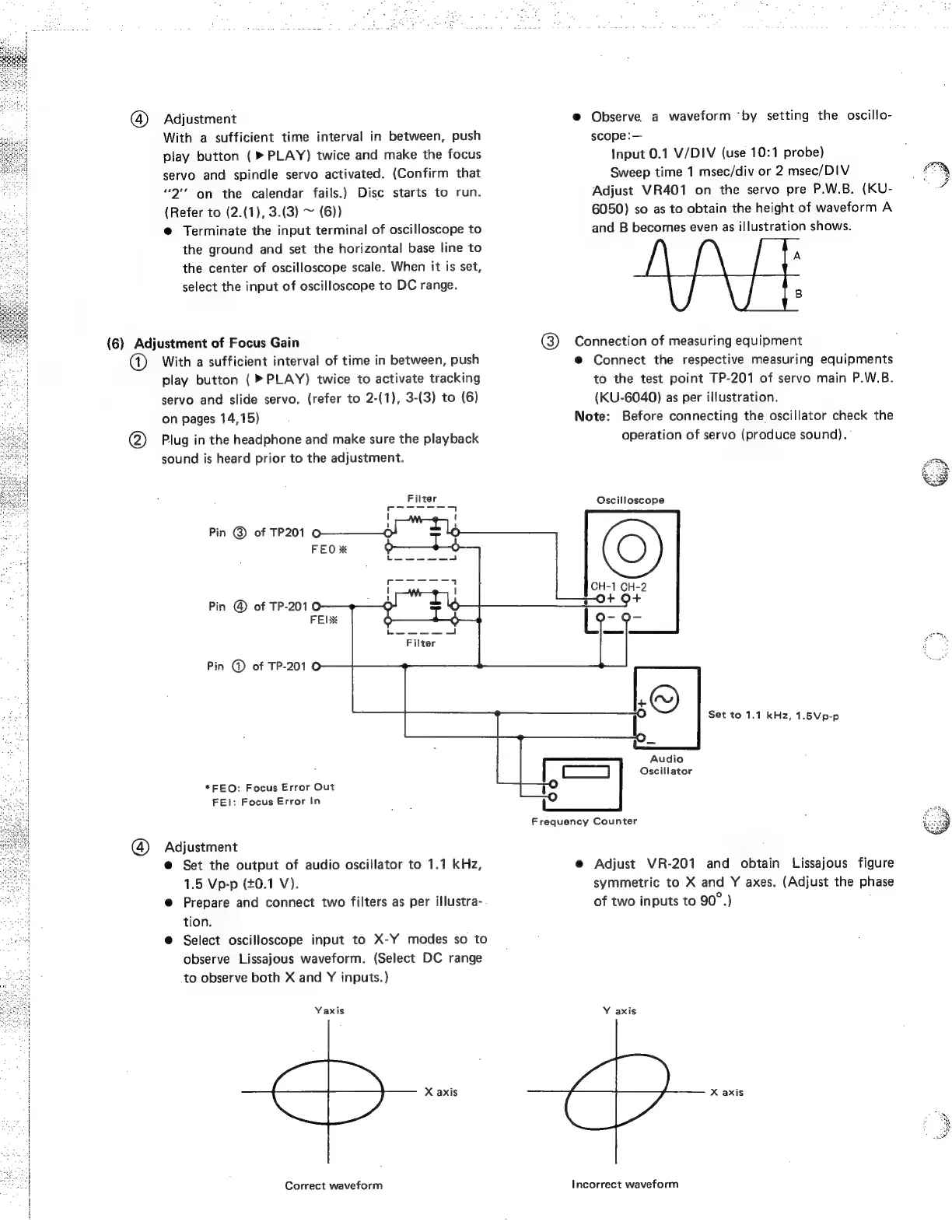
Connect
the
respective
measuring
equipments
play
button
(>
PLAY)
twice
to
activate
tracking
to
the
test
point
TP-201
of
servo
main
P.W.B.
servo
and
slide
servo.
(refer
to
2-(1),
3-(3)
to
(6)
(KU-6040)
as
per
illustration.
Note:
Before
connecting
the
oscillator
check
the
operation
of
servo
(produce
sound).
on
pages
14,15)
2)
Plug
in
the
headphone
and
make
sure
the
playback
sound
is
heard
prior
to
the
adjustment.
Filter
Oscilloscope
Pin
@
of
TP201
FEO
Pin
@
of
TP-2010
FELX
Pin
@
of
TP-201
©
Set
to
1.1
kHz,
1.5Vp-p
Audio
a
|
Oscillator
*FEO:
Focus
Error
Out
FEI:
Focus
Error
In
Frequency
Counter
(4)
Adjustment
@
Set
the
output
of
audio
oscillator
to
1.1
kHz,
@
Adjust
VR-201
and
obtain
Lissajous
figure
1.5
Vp-p
(£0.1
V).
symmetric
to
X
and
Y
axes.
(Adjust
the
phase
e@
Prepare
and
connect
two
filters
as
per
illustra-
of
two
inputs
to
90°.)
.
tion.
@
Select
oscilloscope
input
to
X-Y
modes
so
to
observe
Lissajous
waveform.
(Select
DC
range
to
observe
both
X
and
Y
inputs.)
Yaxis
Y
axis
X
axis
X
axis
Correct
waveform
Incorrect
waveform

Related product manuals