DCD-F101
7
FEO
TEO
TEO
HF
FEO
TEO
HF
DRF
HF
A (A=1.5±0.3Vp-p)
FEO
TB
SLD
How to check the test mode
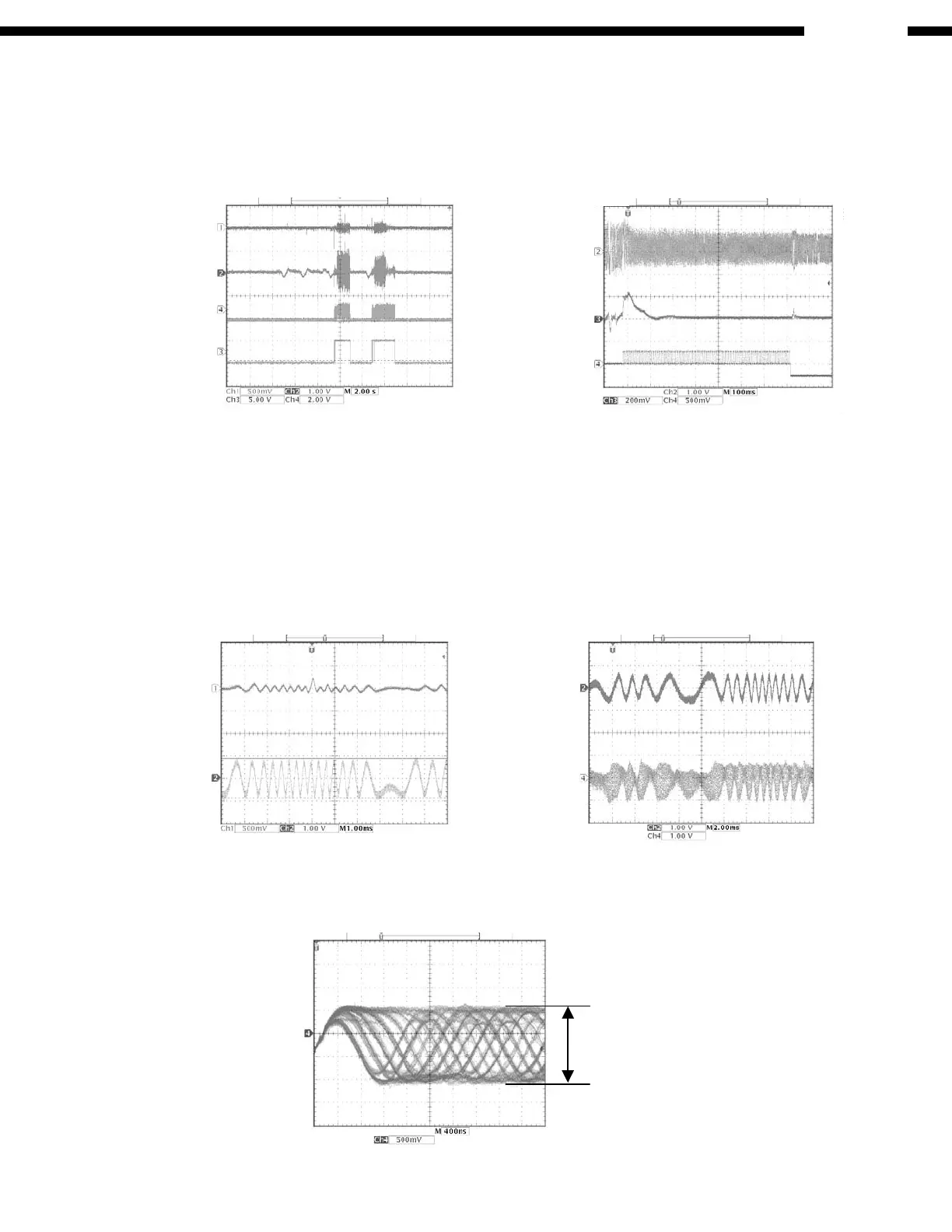
( 1 ) DISC discrimination, adjustment
* Insert DISC, and press the AUTO SEARCH REVERSE button.
* “06 Adj” is displayed, and discrimination of DISC size 8 cm/12 cm, discrimination of DISC reflectance (CD, CD-
R/CD-RW), adjustment of focus, tracking offset, and EF balance will be performed. (Adjusted values are not
displayed: Refer to Fig. 2, 3)
* After completing the discrimination and adjustment, it becomes stop condition.
* Once discrimination of DISC has been carried out in the “06 Adj” mode, discrimination of size and reflectance is
no longer made, and only adjustment will be performed.
( 2 ) Checking of servo state
* Press the PLAY button after performing above (1) “DISC discrimination, adjustment”.
* “02 L on” is displayed, and the laser will start to light. (The pickup may vibrate with a rattling noise if DISC has
been loaded, but this is not abnormal.)
* Press the PLAY button again.
* “03 F on” is displayed. DISC starts turning, and focus servo will be actuated. (Refer to Fig. 4, 5)
* Press the PLAY button again.
* “04 t on” is displayed. Tracking, CLV, and slide servo will be actuated.
* Monitor HF signal using the Test Point, HF point and VC point.
Check that the signal’s amplitude is 1.5V±0.3Vp-p. (Refer to Fig. 6)
Fig. 2 DISC discrimination,
adjustment (Case of CD-RW)
Fig. 3 Adjustment of EF balance
Fig. 4 In “03 F on” Fig. 5 In “03 F on”
Fig. 6 In “04 t on”



 To Next Page