EasyManua.ls Logo

Denon DCM-560 - Adjustment Procedures; Required Equipment and Presets; Focus Gain Adjustment

Denon DCM-560
44 pages
Print Icon
To Next Page IconTo Next Page
To Previous Page IconTo Previous Page
Loading...
BDC
-SSO/
4
SC
eae
a
aaa
I
SI
a
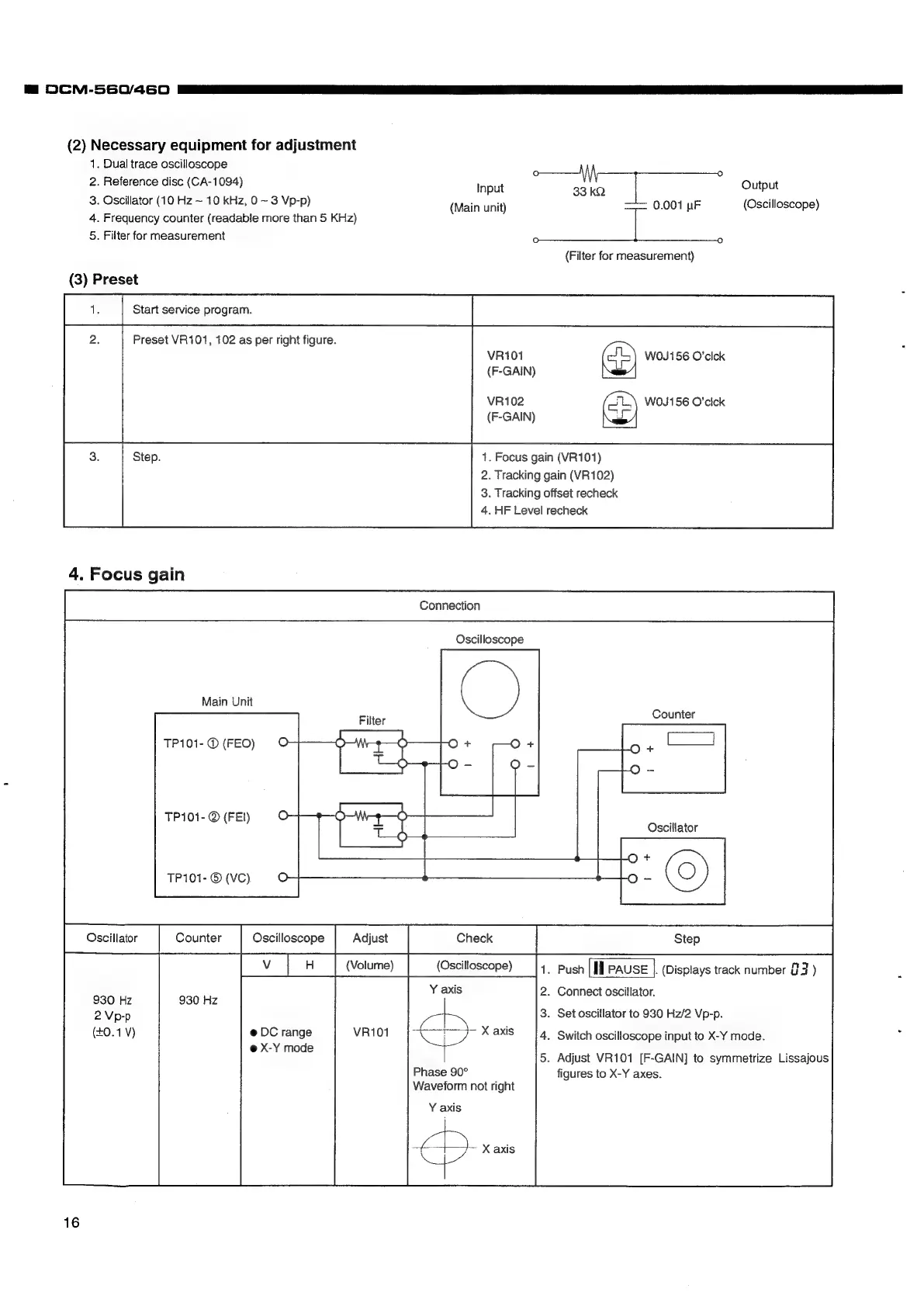
(2)
Necessary
equipment
for
adjustment
1.
Dual
trace
oscilloscope
2.
Reference
disc
(CA-1094)
3.
Oscillator
(10
Hz
~
10
kHz,
0
~
3
Vp-p)
4.
Frequency
counter
(readable
more
than
5
KHz)
5.
Filter
for
measurement
(Main
unit)
(3)
Preset
Preset
VR101,
102
as
per
right
figure.
VR101
(F-GAIN)
VR102
(F-GAIN)
4.
Focus
gain
Connection
Oscilloscope
Main
Unit
Filter
TP101-
©
(FEO)
TP101-
@
(FEI)
Input
33
kQ
1.
Focus
gain
(VR101)
2.
Tracking
gain
(VR102)
3.
Tracking
offset
recheck
4.
HF
Level
recheck
Output
0.001
uF
(Oscilloscope)
(Filter
for
measurement)
W0J156
O’clck
4
WO0J156
O'cick
Nw]
Counter
TP101-
©
(VC)
Oscillator
(Volume)
(Oscilloscope)
930
Hz
@
DC
range
VR101
@
X-Y
mode
Phase
90°
Waveform
not
right
Y
axis
<->
X
axis
16
1.
Push
|Il
PAUSE
|.
(Displays
track
number
G2
)
2.
Connect
oscillator.
3.
Set
oscillator
to
930
Hz/2
Vp-p.
4.
Switch
oscilloscope
input
to
X-Y
mode.
5.
Adjust
VR101
[F-GAIN]
to
symmetrize
Lissajous
figures
to
X-Y
axes.

Related product manuals