5
Rear Panel
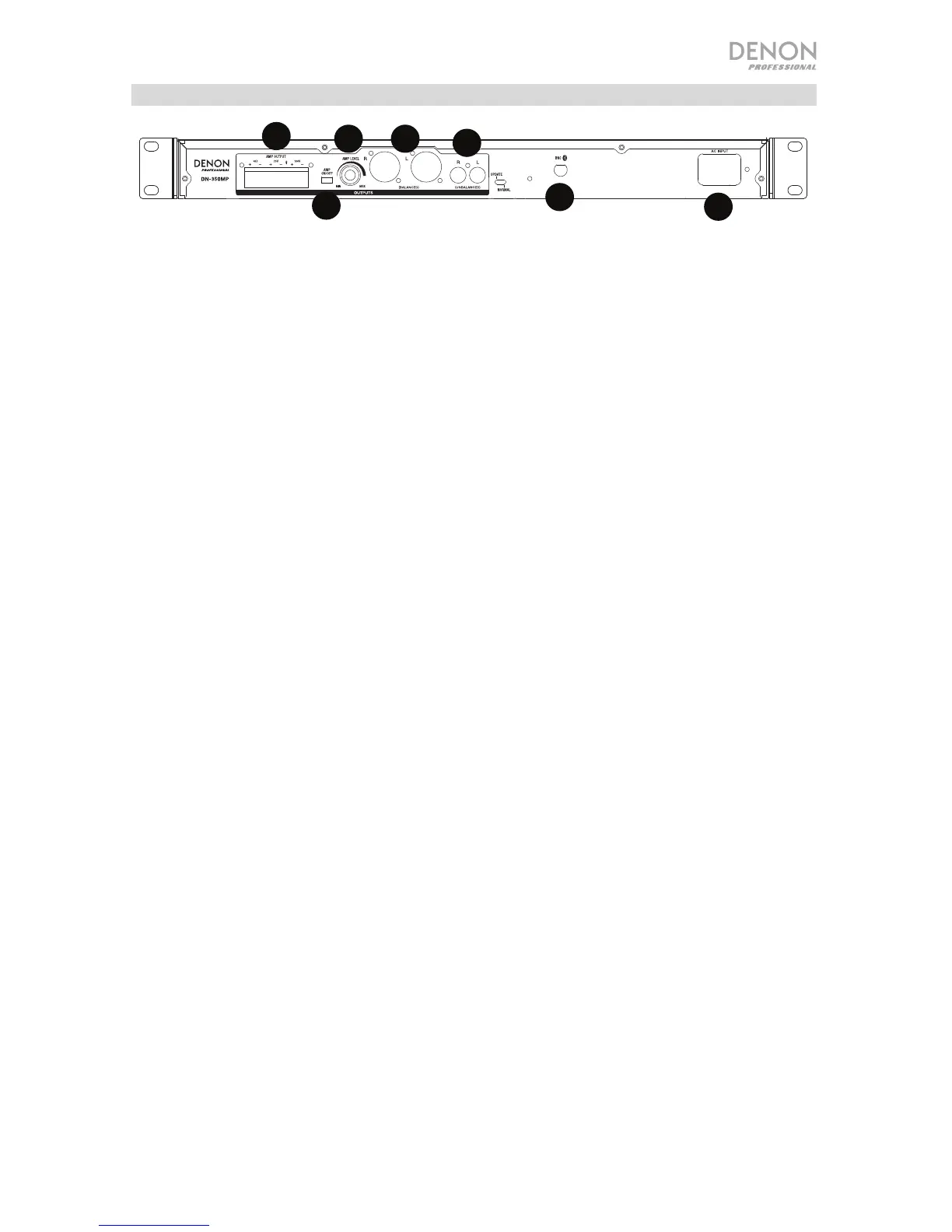
1. Bluetooth BNC Connector: Connect the detachable remote antenna here for
Bluetooth signal reception.
2. RCA Output: These outputs send the audio signals from a paired Bluetooth
device, CD, USB flash drive, and a device connected to the Aux In. Use RCA
cables to connect these outputs to a sound system, external speakers, etc.
3. XLR Balanced Output: These outputs send the audio signals from a
Bluetooth-paired device, USB flash drive, and device connected to the Aux In.
Use XLR cables to connect these outputs to a sound system, external
speakers, etc.
4. Amp Level: Adjust this knob to control the output level of the amplifer.
5. Amplifier On/Off: Adjust this switch to turn the amplifier on or off.
6. Amplifier Output: Connect the included Euroblock to the applicable amp
output: 4 Ohm, 70V, and 100V.
7. AC Input: Connect the included power cable here.



 To Next Page