EasyManua.ls Logo

Denon DN-951FA - Page 14

Denon DN-951FA
92 pages
Print Icon
To Next Page IconTo Next Page
To Previous Page IconTo Previous Page
Loading...
vl
DENON
DN-961FA
STDBY/CUE
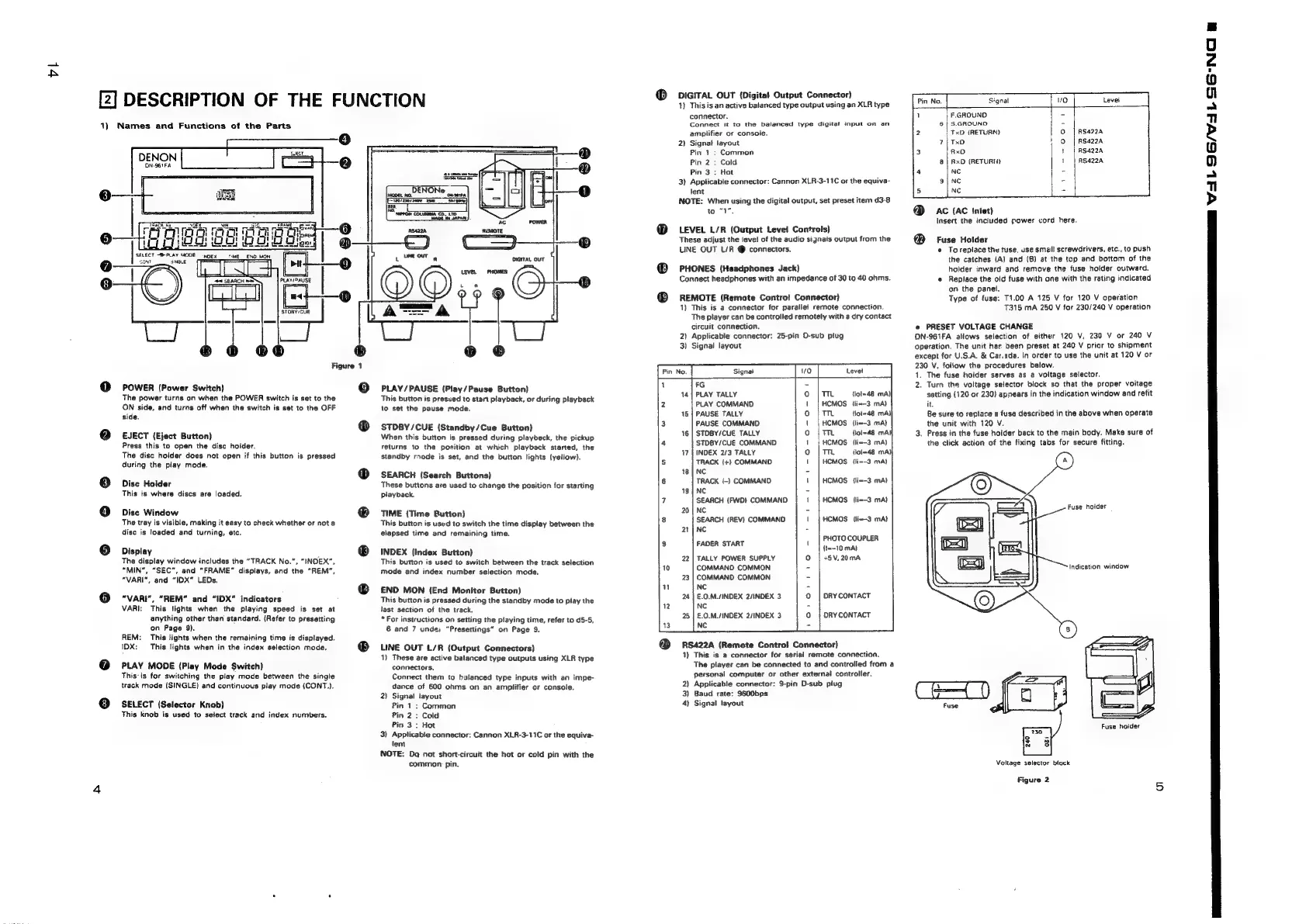
Figure
1
POWER
(Power
Switch)
The
power
turns
on
when
the
POWER
switch
is
set
to
the
ON
side,
and
turns
off
when
the
switch
is
set
to
the
OFF
side.
EJECT
(Eject
Button)
Press
this
to
open
the
disc
holder.
The
disc
holder
does
not
open
if
this
button
is
pressed
during
the
play
mode.
Dise
Holder
This
is
where
discs
are
loaded.
Disc
Window
The
tray
is
visible,
making
it
easy
to
check
whether
or
not
a
disc
is
loaded
and
turning,
etc.
Display
The
display
window
includes
the
“TRACK
No.”,
“INDEX”,
“MIN”,
“SEC”,
and
“FRAME”
displays,
and
the
“REM”,
“VARI”,
and
“IDX"
LEDs.
"VARI",
“REM®
and
“IDX”
indicators
VARI:
This
‘Sights
when
the
playing
speed
is
set
at
anything
other
than
standard.
(Refer
to
presetting
on
Page
9).
REM:
This
lights
when
the
remaining
time
is
displayed.
IDX: This
lights
when
in
the
index
selection
mode.
PLAY
MODE
(Play
Mode
Switch)
This:
is
for
switching
the
play
mode
between
the
singie
track
mode
(SINGLE)
and
continuous
play
mode
(CONT.).
SELECT
(Selector
Knob)
This
knob
is
used
to
setect
track
and
index
numbers.
19)
©
[2]
DESCRIPTION
OF
THE
FUNCTION
1)
Names
and
Functions
of
the
Parts
tims
PLAY/PAUSE
(Play/Pause
Button)
This
button
is
pressed
to
start
playback,
or
during
playback
to
set
the
pause
mode.
STDBY/CUE
(Standby/Cue
Button)
When
this
button
is
pressed
during
playback,
the
pickup
returns
to
the
position
at
which
playback
started,
the
standby
rnode
is
set,
and
the
button
lights
(yellow).
SEARCH
(Search
Buttons}
These
buttons
are
used
to
change
the
position
for
starting
playback.
TIME
(Time
Button)
This
button
is
used
to
switch
the
time
display
between
the
elapsed
time
and
remaining
time.
INDEX
(Index
Button)
This
button
is
used
to
switch
between
the
track
selection
mode
and
index
number
selection
mode,
£ND
MON
(End
Monitor
Button)
This
button
is
pressed
during
the
standby
mode
to
play
the
last
section
of
the
track.
*
For
instructions
on
setting
the
playing
time,
refer
to
d5-5,
6
and
7
undei
“Presettings”
on
Page
9.
LINE
OUT
L/R
(Output
Connectors)
1)
These
are
active
balanced
type
outputs
using
XLR
type
connectors.
Connect
them
to
balanced
type
inputs
with
an
impe-
dance
of
600
ohms
on
an
amplifier
or
console.
2)
Signal
layout
Pin
1
:
Common
Pin
2:
Cold
Pin
3:
Hot
3)
Applicable
connector:
Cannon
XLA-3-11C
or
the
equiva-
lent
NOTE:
Dq
not
short-circuit
the het
or
cold
pin
with
the
common
pin.
DIGITAL
OUT
{Digital
Output
Connector)
1)
This
is
an
active
baianced
type
output
using
an
XLR
type
connector.
Connect
it
to
the
balanced
type
digitat
input
on
an
amplifier
or
consoie.
Signal
layout
Pin
1:
Common
Pin
2
:
Cald
Pin
3
:
Hot
Applicable
connector:
Cannon
XLR-3-11C
or
the
equiva-
jent
NOTE:
When
using
the
digital
output,
set
preset
item
d3-8
to
“1,
2
3
LEVEL
L/R
(Output
Level
Controls)
These
adjust
the
level
of
the
audio
signals
output
from
the
LINE
OUT
L/R
connectors.
PHONES
(Headphones
Jack)
Connect
headphones
with
an
impedance
of
30
to
40
ohms.
REMOTE
(Remote
Controt
Connector)
1}
This
is
a
connector
for
parallel
remote
connection.
The
player
can
be
controlled
remotely
with
a
dry
contact
circuit
connection.
2)
Applicable
connector:
25-pin
O-sub
plug
3)
Signal
layout
S
Signal
FG
PLAY
TALLY
PLAY
COMMAND
PAUSE
TALLY
PAUSE
COMMAND
STDBY/CUE
TALLY
STDBY/CUE
COMMAND
INDEX
2/3
TALLY
TRACK
(+)
COMMAND
NC
TRACK
(-)
COMMAND
NC
TTL
{lol=48
mA)|
HCMOS
{lix-3
mA)
™m
(Woi-48
mA}
|
HCMOS
{lim-3
mA)
mm
{lol=48
mA}
CMOS
{li--3
mA)
Tm
ilol=48
mA)
HCMOS
[li--3
mA)
-'!-0-0-0-01
HCMOS
(li--3
mA)
SEARCH
{FWO}
COMMAND
HCMOS
{lim—-3
mA}
NC
SEARCH
(REV)
COMMAND
NC
HCMOS
li--3
mA}
PHOTO
COUPLER
{t=-10
mA}
TALLY
POWER
SUPPLY
+8V,20mA
COMMAND
COMMON
COMMAND
COMMON
NC
E.0.M./INDEX
2/INDEX
3
NC
£.0.M./INDEX
2/INDEX
3
NC
FADER
START
DRY
CONTACT
ORY
CONTACT
RS422A
(Remote
Control!
Connector)
1)
This
is
a
connector
for
serial
remote
connection.
The
player
can
be
connected
to
and
controlled
from
a
personal
computer
or
other
external
controller.
2)
Applicable
connector:
9-pin
D-sub
plug
3)
Baud
rate:
9600bps
4}
Signal
layout
|
F.GROUND
6
|
S.GROUND
H
|
TxD
(RETURN)
RS422A
7
|
TxD
AS44224
RxD
RS4224
&@|
RxD
(RETURN)
RS4224
NC
=
NC
NC
@
AC
{AC
Inlet)
Insert
the
included
power
cord
here.
@
Fuse
Holder
e
Toreplace
the
tuse,
use
small
screwdrivers,
etc.,
to
push
the
catches
(A)
and
(B)
at
the
top
and
bottom
of
the
holder
inward
and
remove
the
fuse
holder
outward.
e
Replace
the
old
fuse
with
one
with
the
rating
indicated
on
the
panel.
Type
of
fuse:
T1.00
A
125
V
for
120
V
operation
T315
mA
250
V
for
230/240
V
operation
e
PRESET
VOLTAGE
CHANGE
DN-961FA
allows
selection
of
either
120
V,
230
V
or
240
V
operation.
The
unit
has
been
preset
at
240
V
prior
to
shipment
except
for
U.S.A.
&
Car.ada.
In
order
to
use
the
unit
at
120
V
or
230
V,
follow
the
procedures
below.
1.
The
fuse
holder
serves
as
a
voltage
selector.
2.
Turn
the
voltage
selector
block
so
that
the
proper
voltage
setting
{120
or
230)
appears
in
the
indication
window
and
refit
it.
Be
sure
to
replace
a
fuse
described
in
the
above
when
operate
the
unit
with
120
V.
3.
Press
in
the
fuse
holder
back
to
the
main
body.
Make
sure
of
the
click
action
of
the
fixing
tabs
for
secure
fitting.
Fuse
holder
Indication
window
Fuse
holder
Voltage
selector
block
Figure
2
a
X11
IS/L
SS-NC
w

Related product manuals