EasyManua.ls Logo

Denon DN-951FA - Page 15

Denon DN-951FA
92 pages
Print Icon
To Next Page IconTo Next Page
To Previous Page IconTo Previous Page
Loading...
Sl
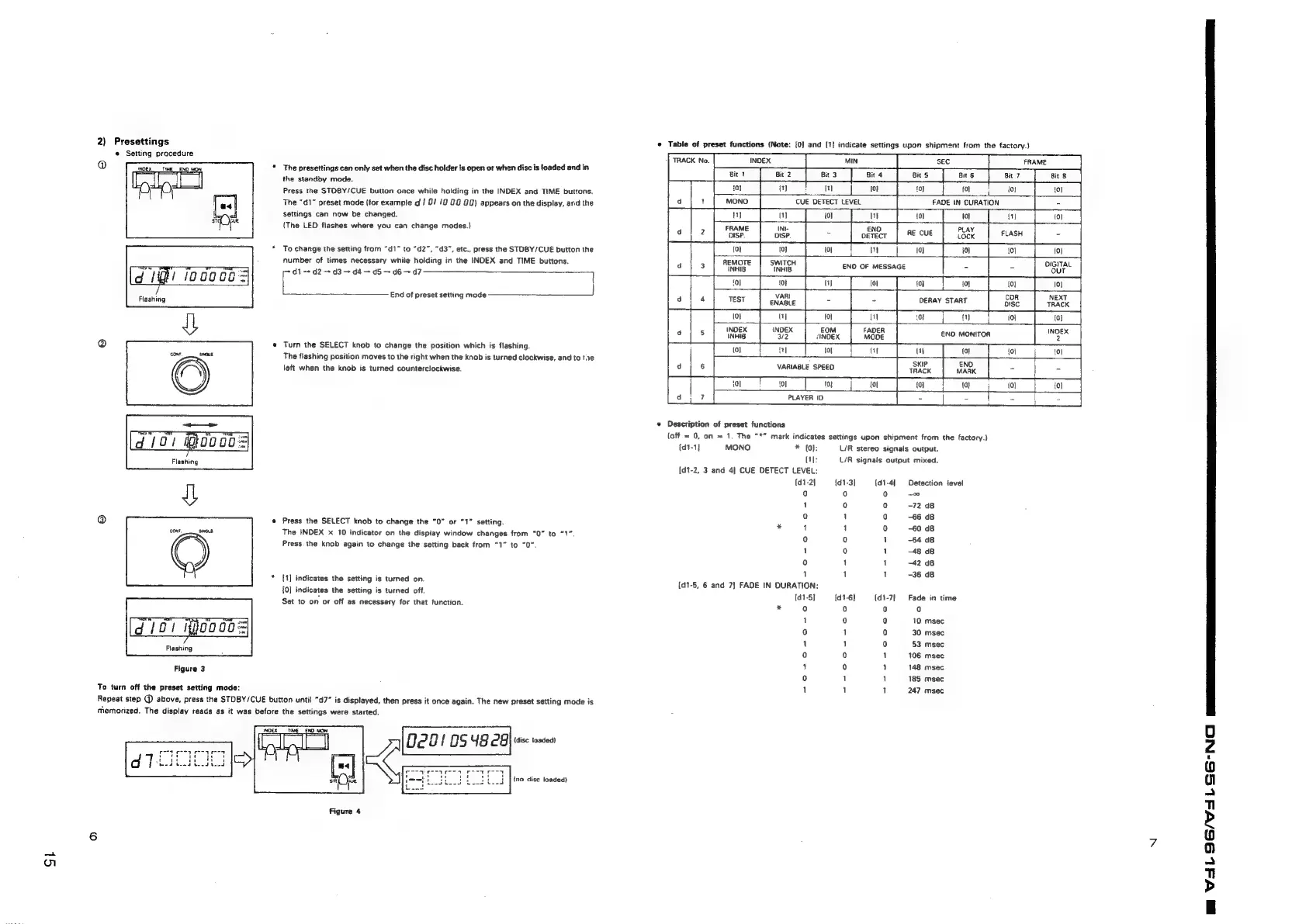
2)
Presettings
*
Table
of
preset
functions
(Note:
{0]
and
[1}
indicate
settings
upon
shipment
from
the
factory.)
the
standby
mode.
Press
the
STOBY/CUE
button
once
while
holding
in
the
INDEX
and
TIME
buttons.
i
i
al
(01 {0}
fol
{ol
The
“d1”
preset
mode
(for
example
d
/
8! 12
00
02)
appears
on
the
display,
ard
the
settings
can
now
be
changed.
(The
LED
flashes
where
you
can
change
modes.}
i
CUE
DETECT
LEVEL
a
IN
DURATION
PLAY
(or
{0}
foi
Remore
|
switcH
OIGITAL
iNHIB
INHIB
END
OF
MESSAGE
out
*
To
change
the
setting
from
“d1”
to
“d2”,
“d3”,
etc.,
press
the
STOBY/CUE
button
the
number
of
times
necessary
while
holding
in
the
INDEX
and
TIME
buttons.
jdt
~+
d2
~-
d3
+
d4
d5
~
d6
d7
71
[ats
tin
anm
tend
End
of
preset
setting
mode
pe
*
|
Emi
joooe0=
10}
i
{0} {0}
10}
VARI
CDR
NEXT
Flashing
ENABLE
DERAY
START
iri
ana
l
\
LM
iol (01
£OM
/INDEX
END
MONITOR
@
e
Turn
the
SELECT
knob
to
change
the
position
which
is
flashing.
conr,
SINR
The
flashing
position
moves
to
the
right
when
the
knab
is
turned
clockwise,
and
to
te
left
when
the
knob
is
turned
counterclockwise.
VARIABLE
SPEED
PLAYER
ID
#
Description
of
preset
functions
(off
=
0,
on
~
1.
The
“**
mark
indicates
settings
upon
shipment
from
the
factory.)
{dt-1]
MONO
*
(0):
L/R
stereo
signals
output.
Fissning
[1]:
L/R
signals
output
mixed.
[d1-2,
3
and
4]
CUE
DETECT
LEVEL:
{d1-2}
{d1-3]
{d1-4]
Detection
ievel
Q
0
)
0
1
0
o
-72
dB
QO
1
0
66
dB
@
*
Press
the
SELECT
knob
to
change
the
“0”
or
“1”
setting.
*
4
1
0
60
dB
Cont,
SHO8
The
INDEX
x
10
indicator
on
the
display
window
changes
from
“0”
to
“1”.
0
0
1
-54
dB
Press.
the
knob
again
to
change
the
setting
back
from
“1”
to
“0”
1
0
1
48
dB
y
y
00]
1
1
42
dB
1
1
1
-36
dB
[1]
indicates
the
setting
is
turned
on.
{0]
indicates
the
setting
is
turned
off.
Set
to
on
or
off
as
necessary
for
that
function.
{d1-5,
6
and
7?)
FADE
IN
DURATION:
[d1-5]
{d1-6)
(d1-7}
Fade
in
time
*
0
i)
0
0
10
msec
30
msec
53
msec
106
msec
148
msec
185
msec
247
msec
[d
loi
ijooo0s
Flashing
Figure
3
=o
o-0
48
0
1
1
0
0
1
1
“www
oo°o
To
turn
off
the
preset
setting
mode:
Repeat
step
@
above,
press
the
STDBY/CUE
button
until
"d7”
is
displayed,
then
press
it
once
again.
The
new
preset
setting
mode
is
memorized.
The
display
reads
as
it
was
before
the
settings
were
started.
pce
etn
hI
(disc
toaded)
[*]
rot
ot
wou
tot
ed
ben
eed
teed
Claes
a
cr
cee
a
3
|
|
{no
dise
loaded)
Figure
4
m
VAL
9OG/V4aLSE-Na

Related product manuals