EasyManua.ls Logo

Denon DN-951FA - Page 22

Denon DN-951FA
92 pages
Print Icon
To Next Page IconTo Next Page
To Previous Page IconTo Previous Page
Loading...
oS
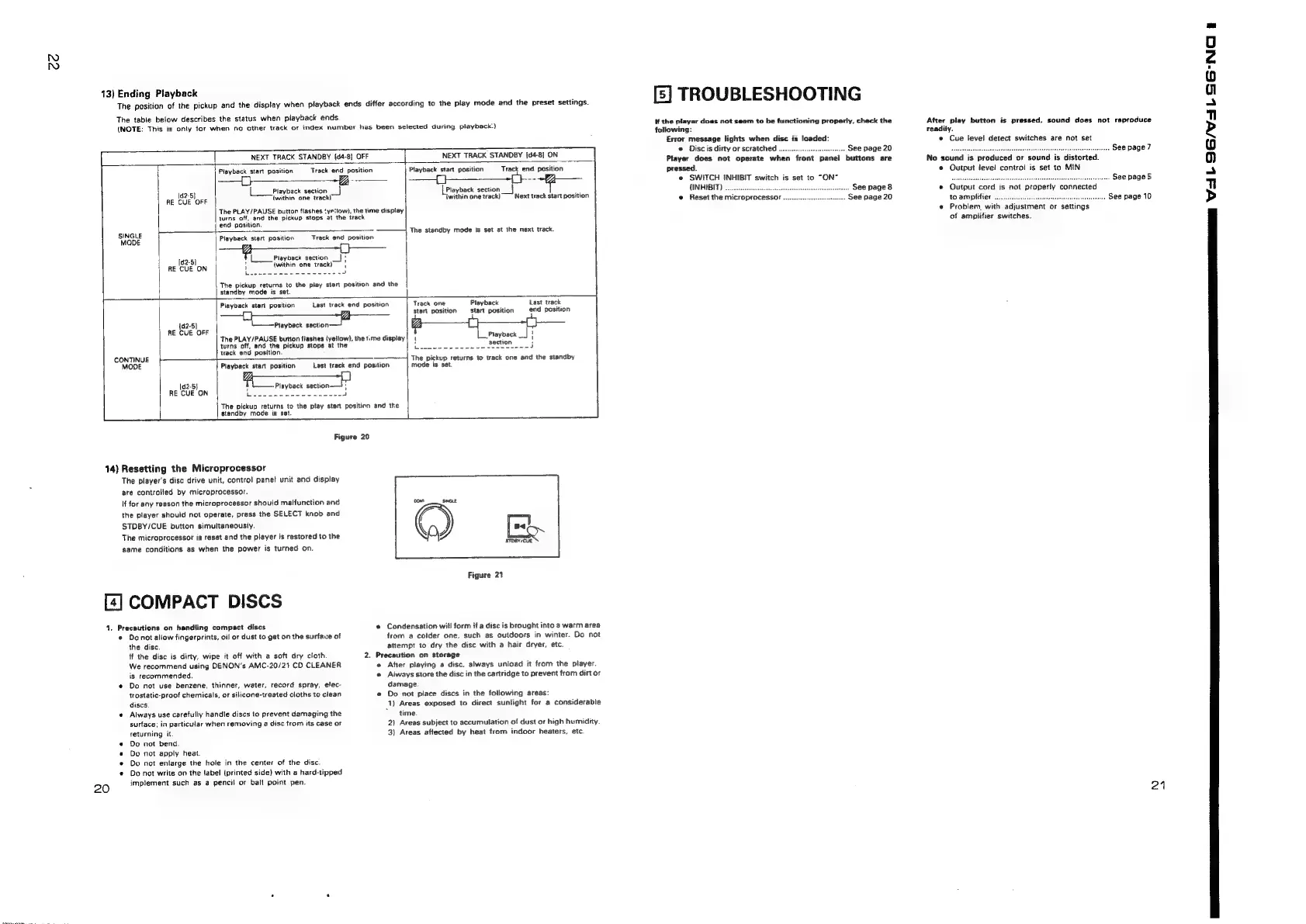
13)
Ending
Playback
The
position
of
the
pickup
and
the
display
when
piayback
ends
differ
according
to
the
play
mode
and
the
preset
settings.
The
table
below
describes
the
status
when
piayback
ends.
(NOTE:
This
is
only
for
when
no
other
track
or
index
number
has
been
selected
during
playback’)
NEXT
TRACK
STANDBY
(d4-8]
OFF
NEXT
TRACK
STANDBY
[04-8]
ON
}
Playback
start
position
Track
end
position
Playback
start
position
Track
end
position
Playback
section
_]
Re
CUE
OFF
(within
one
track!
turns
off,
and
the
pickup
stops
at
the
track
The
PLAY/PAUSE
button
flashes
‘ye:low),
the
time
display
[Playback
section
|
iwithin
one
track)
Next
track
start
position
The
standby
mode
is
set
at
the
next
track.
end
position.
SNORE:
Playback
start
position
|
Track
end
position
@
Playback
section
'
RE
1g28)
{within
one
ion
'
Le
|
standby
mode
is
set.
The
pickup
returns
to
the
play
start
position
and
the
Playback
start
position
Last
track
end
position
|
Track
one
Playback
Last
track
Start
position
start
position
end
position
142-5]
{Playback
CES
RE
CUE
OFF
turns
off,
and
the
pickup
stops
at
the
track
end
position.
The
PLAY/PAUSE
button
flashes
{yellow},
the
t.me
display
Playback
__|
|
CONTINUE
+—
=
MODE
Playback
start
position
f
{Playback
PRE
[d2-5}
RE
CUE
ON
L
standby
mode
is
set.
Figure
20
14)
Resetting
the
Microprocessor
The
player's
disc
drive
unit,
control
panel
unit
and
display
are
controlled
by
microprocessor.
If
for
any
reason
the
microprocessor
should
malfunction
and
the
player
should
not
operate,
press
the
SELECT
knob
and
STDBY/CUE
button
simultaneously.
The
microprocessor
is
reset
and
the
player
is
restored
to
the
same
conditions
as
when
the
power
is
turned
on.
[4]
COMPACT
DISCS
4.
Precautions
on
handling
compact
discs
©
Donot
allow
fingerprints,
oil
or
dust
to
get
on
the
surfave
of
the
disc.
if
the
disc
is
dirty,
wipe
it
off
with
a
soft
dry
cloth
2.
We
recommend
using
DENON’s
AMC-20/21
CD
CLEANER
is
recommended.
@
Do
not
use
benzene,
thinner,
water,
record
spray,
elec-
trostatic-proof
chemicals,
or
silicone-treated
cioths
to
clean
discs
e
Always
use
carefully
handle
discs
to
prevent
damaging
the
surface;
in
particular
when
removing
a
disc
from
its
case
or
returning
it.
«
Do
not
bend.
e
Do
not
apply
heat.
¢
Do
not
enlarge
the
hole
in
the
center
of
the
disc.
¢
Do
not
write
on
the
label
(printed
side)
with
a
hard-tipped
20
implement
such
as
a
pencil
or
bal!
point
pen.
Last
track
end
position
The
pickup
returns
to
the
play
start
position
and
the
The
pickup
returns
to
wack
one
and
the
standby
mode
is
set.
Figure
21
®
Condensation
will
form
if
a
disc
is
brought
into
a
warm
area
trom
a
colder
one,
such
as
outdoors
in
winter.
Do
not
attempt
to
dry
the
disc
with
a
hair
dryer,
etc.
Precaution
on
storage
«
After
playing
a
disc,
always
unload
it
from
the
player.
®
Aiways
store
the
disc
in
the
cartridge
to
prevent
from
dirt
or
damage.
e
Do
not
place
discs
in
the
following
areas:
1)
Areas
exposed
to
direct
sunlight
for
a
considerable
*
time.
2)
Areas
subject
to
accumulation
of
dust
or
high
humidity.
3)
Areas
affected
by
heat
from
indoor
heaters,
etc.
[5]
TROUBLESHOOTING
#f
the
player
does
not
seem
to
be
functioning
properly,
check
the
following:
Error
message
jights
when
disc
is
loaded:
Disc
is
dirty
or
scratched
............
...
See
page
20
Player
does
mot
operate
when
front
panel
buttons
are
pressed.
e
SWITCH
INHIBIT
switch
is
set
to
“ON”
(INHIBIT)
...
e
Reset
the
microprocessor
..
..
See
page
8
See
page
20
After
play
button
is
pressed,
sound
does
not
reproduce
readily.
©
Cue
level
detect
switches
are
not
set
.
See
page7
No
sound
is
produced
or
sound
is
distorted.
e
Output
level
control
is
set
to
MIN
.-..
See
page
5
e
Qutput
cord
is
not
properly
connected
to
amplifier
...
scibeince
See
page
10
e
Problem,
with
adjustment
or
settings
of
amplifier
switches.
21
EER
a
we
ee ne
eee
YL
OS/VaL
S6-NC

Related product manuals