EasyManua.ls Logo

Denon DN-951FA - Page 21

Denon DN-951FA
92 pages
Print Icon
To Next Page IconTo Next Page
To Previous Page IconTo Previous Page
Loading...
Le
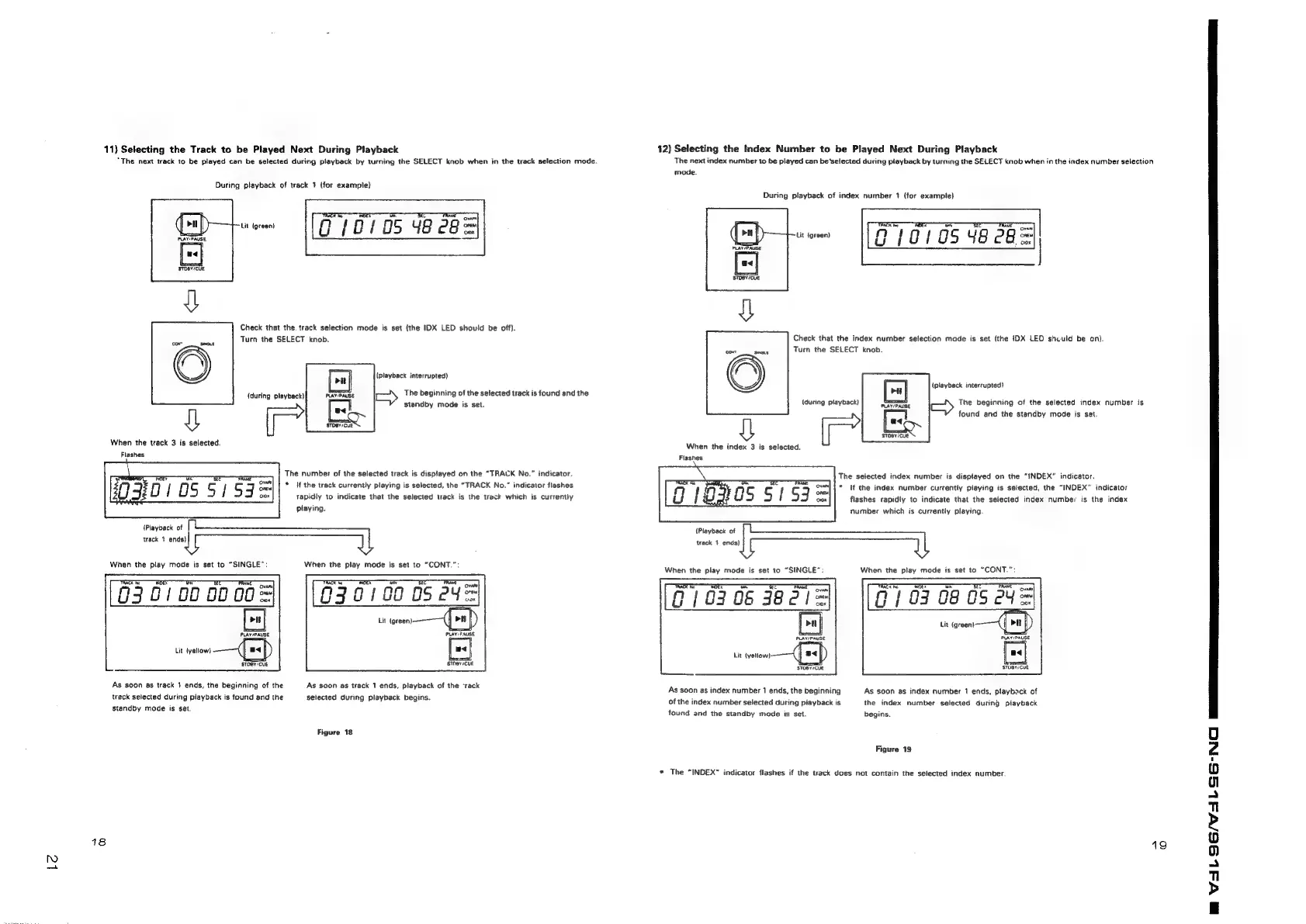
11)
Selecting
the
Track
to
be
Played
Next
During
Playback
“The
next
track
to
be
played
can
be
selected
during
playback
by
turning
the
SELECT
knob
when
in
the
track
selection
mode.
During
playback
of
track
1
(for
example)
van
Lit
(green!
G
/
0D
!
OS
48
eu
Check
that
the.
track
selection
mode
is
set
(the
IDX
LED
should
be
off).
Turn
the
SELECT
knob.
(playback
interrupted)
The
beginning
of
the
selected
track
is
found
and
the
standby
mode
is
set.
{during
playback)
STOBY/CUE
When
the
track
3
is
selected.
Flashes
The
number
of
the
selected
track
is
displayed
on
the
“TRACK
No.”
indicator.
*
If
the
track
currently
playing
is
selected,
the
“TRACK
No.”
indicator
flashes
rapidly
to
indicate
that the
selected
track
is
the
track
which
is
currently
playing.
{Playback
of
track
1
ends)
When
the
play
mode
is
set
to
“SINGLE”:
When
the
play
mode
is
set
to
“CONT.”:
030100
05
Y=
Lit
(green)
G30)
00
00
00=
Lit
tyellow)
STOBY/CUE
sTher:CUE
As
soon
as
track
1
ends,
the
beginning
of
the
track
selected
during
piayback
is
found
and
the
standby
mode
is
set.
As
soon
as
track
1
ends,
playback
of
the
‘rack
selected
during
playback
begins.
Figure
18
18
12)
Selecting
the
Index
Number
to
be
Played
Next
During
Playback
The
next
index
number
to
be
played
can
be
selected
during
playback
by
turning
the
SELECT
knob
when
in
the
index
number
selection
mode.
During
playback
of
index
number
1
(for
example}
a
e
wom
1170105
48
cb
=
Check
that
the
index
number
selection
mode
is
set
(the
IDX
LED
shculd
be
an).
‘cad
Sax
Turn
the
SELECT
knob.
(playback
interrupted)
(during
playback)
The
beginning
of
the
selected
index
number
is
found
and
the
standby
mode
is
set,
STOBY/CUE
When
the
index
3
is
selected.
Flashes
2
The
selected
index
number
is
displayed
on
the
“INDEX”
indicator.
.
in
}
oS
S
|
co
Sal
*
If
the
index
number:
currently
piaying
is
selected,
the
“INDEX”
indicator
4
An
1
flashes
rapidly
to
indicate
that
the
selected
index
number
is
the
index
number
which
is
currently
playing.
{Playback
of
track
1
ends)
When
the
play
mode
is
set
to
“SINGLE”:
When
the
play
mode
is
set
to
“CONT.”:
PT
10306
382!
S
[sj
PLAY/PAUSE
Lit
tyellow).
ad)
STOBY/CUE
STUBY/CUE
As
soon
as
index
number
1
ends,
the
beginning
As
soon
as
index
number
1
ends,
playback
of
of
the
index
number
selected
during
playback
is
the
index
number
selected
during
playback
found
and
the
standby
mode
is
set.
begins.
Figure
19
*
The
“INDEX”
indicator
flashes
if
the
track
does
not
contain
the
selected
index
number.
19
BM
VAL
SGN
SG
NO

Related product manuals