EasyManua.ls Logo

Denon DN-951FA - Page 20

Denon DN-951FA
92 pages
Print Icon
To Next Page IconTo Next Page
To Previous Page IconTo Previous Page
Loading...
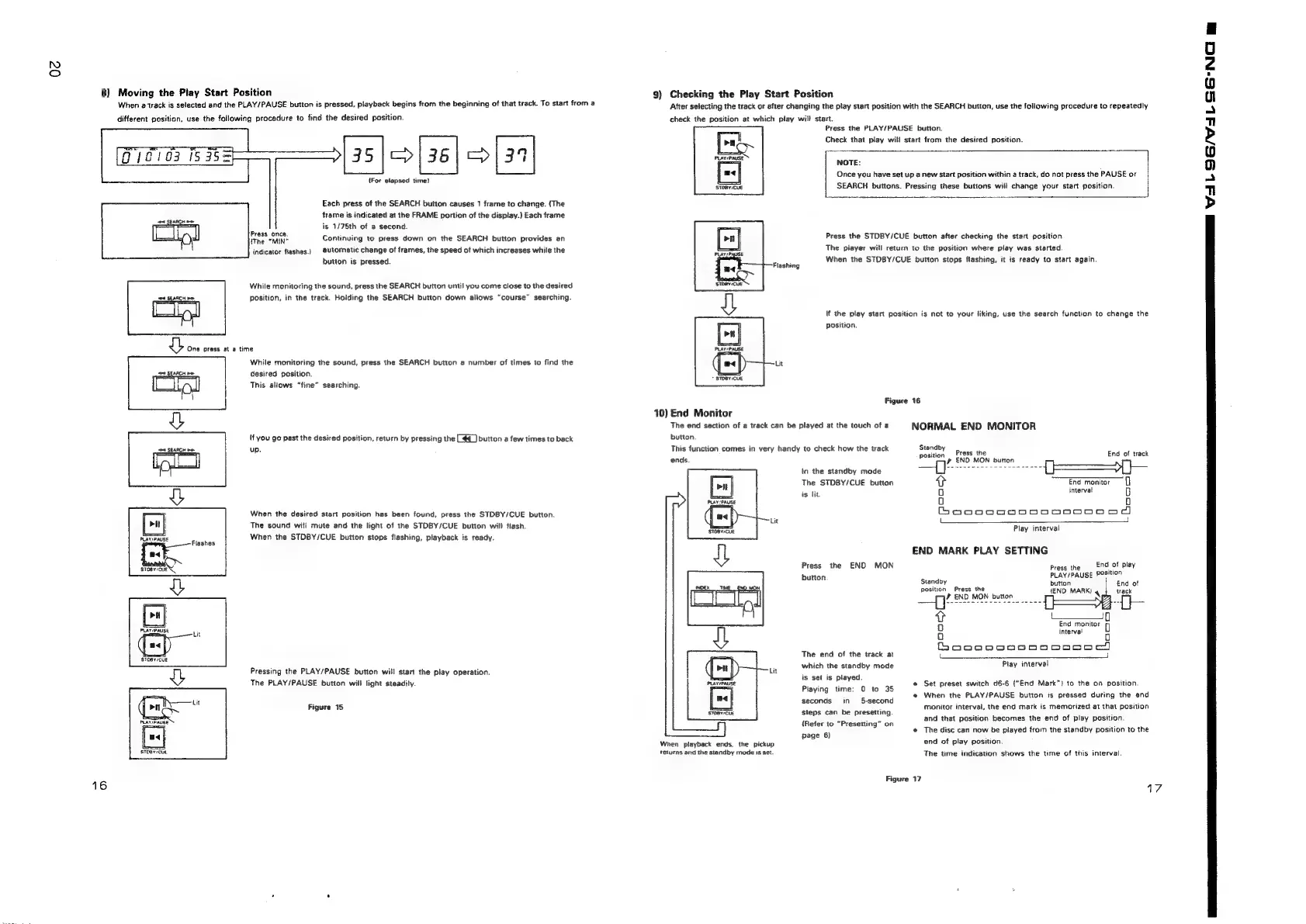
8)
Moving
the
Play
Start
Position
When
a
track
is
selected
and
the
PLAY/PAUSE
button
is
pressed,
playback
begins
from
the
beginning
of
that
track.
To
start
from
a
different
position,
use
the
following
procedure
to
find
the
desired
position.
35
|)
36)
9134
(For
elapsed
time)
oes
Each
press
of
the
SEARCH
button
causes
1
frame
to
change.
(The
frame
is
indicated
at
the
FRAME
portion
of
the
display.)
Each
frame
is
1/78th
of
a
second.
ibaa
rer
Continuing
to
press
down
on
the
SEARCH
button
provides
an
indicator
flashes.)
automatic
change
of
frames,
the
speed
of
which
increases
while
the
button
is
pressed.
While
monitoring
the
sound,
press
the
SEARCH
button
until
you
come
close
to
the
desired
sea
SEARCH
oe
position,
in
the
track.
Holding
the
SEARCH
button
down
allows
“course”
searching.
|
om
|
|
oe
|
1
ne
press
a
»
time
While
monitoring
the
sound,
press
the
SEARCH
button
a
number
of
times
to
find
the
ort
SEARCH
pe
desired
position.
This
allows
“fine”
searching.
|f
you
go
past
the
desired
position,
return
by
pressing
the
[44
_]
button
a
few
times
to
back
sna
SEARCH
moe
up.
a
When
the
desired
start
position
has
been
found,
press
the
STDBY/CUE
button.
aS
q
The
sound
will
mute
and
the
light
of
the
STDBY/CUE
button
will
flash.
4
When
the
STOBY/CUE
button
stops
flashing,
playback
is
ready.
PLAY
PAUSE
Flashes
ad
ee
@
PLAY/PAUSE
SDOy/CUE
Pressing
the
PLAY/PAUSE
button
will
start
the
play
operation.
The
PLAY/PAUSE
button
will
light
steadily.
mag
oy
Figure
15
PLATIPAUSE
[=]
STOBY:CUE
16
9)
Checking
the
Play
Start
Position
After
selecting
the
track
or
after
changing
the
play
start
position
with
the
SEARCH
button,
use
the
following
procedure
to
repeatedly
check
the
position
at
which
play
wili
start.
Press
the
PLAY/PAUSE
button.
Check
that
play
will
start
from
the
desired
position.
NOTE:
Once
you
have
set
up
a
new
Start
position
within
a
track,
do
not
press
the
PAUSE
or
SEARCH
buttons.
Pressing
these
buttons
will
change
your
start
position.
Press
the
STDBY/CUE
button
after
checking
the
start
position.
The
piayer
will
return
to
the
position
where
play
was
started
When
the
STDBY/CUE
button
stops
flashing,
it
is
ready
to
start
again.
If
the
play
start
position
is
not
to
your
liking,
use
the
search
function
to
change
the
position.
+
STDBY/CUE
Figure
16
10)
End
Monitor
The
end
section
of
a
track
can
be
played
at
the
touch
of
a
NORMAL
END
MONITOR
button.
‘i
i
Standb
This
function
comes
in
very
handy
to
check
how
the
track
at
Prasi‘the
Ena
Sh
tack
ends
»
END
MON
button
In
the
standby
mode
—{]
Se
tae
ee
ae
Y=)
The
STDBY/CUE
button
>
End
montor
is
lit
oO
imterval
6
0
a]
Boooo0n0n0n0Do0oDooOoo
dd
——
3
Play
interval
END
MARK
PLAY
SETTING
Press
the
END
MON
Press
the
End
of
play
button.
PLAY/PAUSE
Position
Standby
button
position
Press
the
{END
MARK)
4
ry:
END
MON
button
v
1____ip
Qo
End
monitor
Oo
interval
Boooo.09sn000co)
;
The
end
of
the
track
at
which
the
standby
mode
is
set
is
played.
Piaying
time:
0
to
35
seconds
in
5-second
Piay
interval
e
Set
preset
switch
d6-6
(“End
Mark”)
to
the
on
position.
e@
When
the
PLAY/PAUSE
button
is
pressed
during
the
end
steps
can
be
presetting.
monitor
interval,
the
end
mark
is
memorized
at
that
position
and
that
position
becomes
the
end
of
play
position.
e
The
disc
can
now
be
played
from
the
standby
position
to
the
end
of
play
position.
The
time
indication
shows
the
time
of
this
interval.
{Refer
to
“Presetting”
on
page
6)
When
playback
ends,
the
pickup
relurns
and
the
standby
mode
is
set.
Figure
17
17
ea
pa
a
aan
VALOS/
VALS
NG
wm

Related product manuals