EasyManua.ls Logo

Denon DN-951FA - Page 19

Denon DN-951FA
92 pages
Print Icon
To Next Page IconTo Next Page
To Previous Page IconTo Previous Page
Loading...
6|
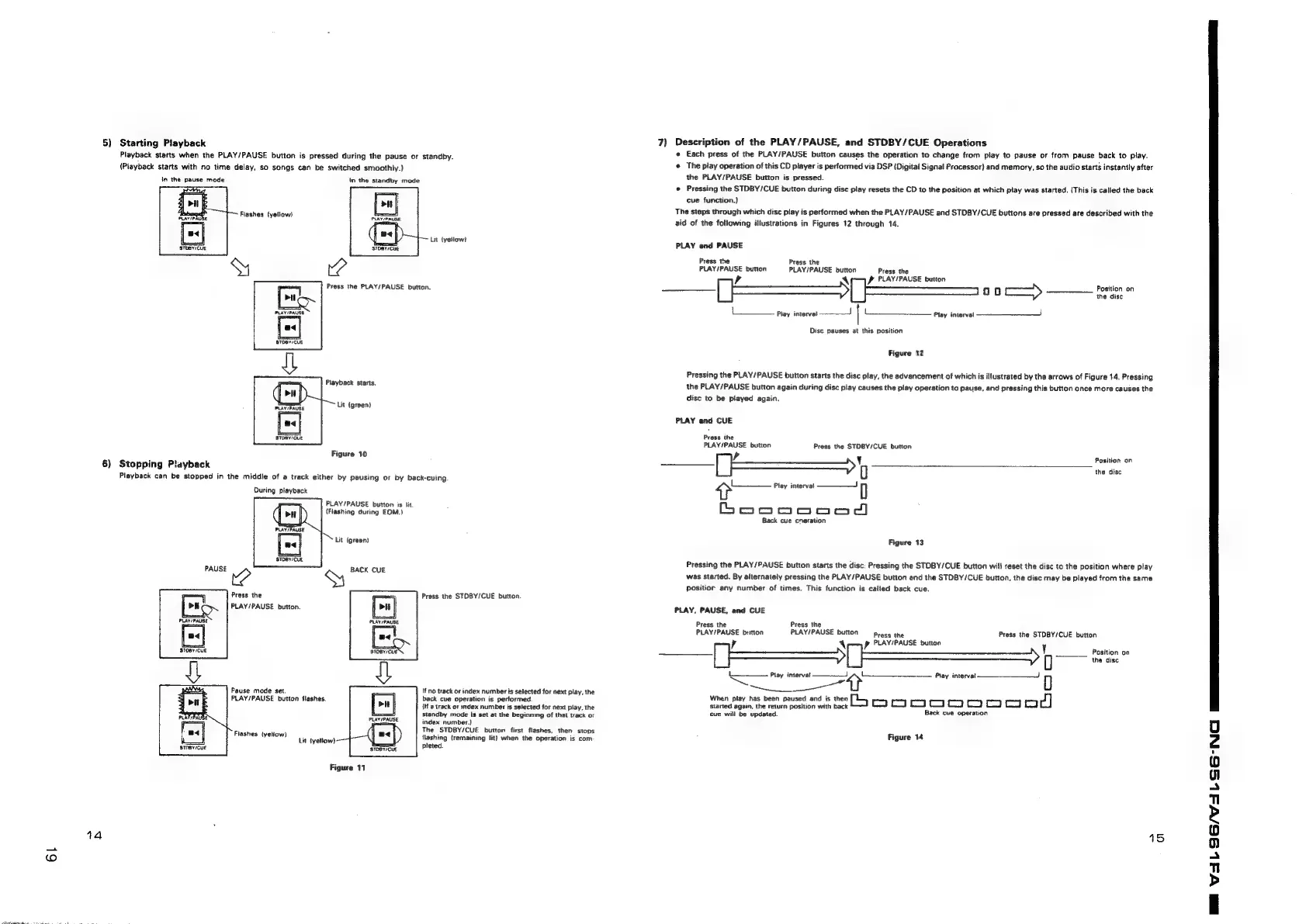
5)
Starting
Playback
Playback
starts
when
the
PLAY/PAUSE
button
is
pressed
during
the
pause
or
standby.
(Playback
starts
with
no
time
delay,
so
songs
can
be
switched
smoothly.)
in
the
pause
mode
in
the
standby
mode
Fiashes
(yellow)
Lit
(yellow?
STDBY/CUE
Playback
starts.
Lit
(green)
Figure
10
6)
Stopping
Playback
Playback
can
be
stopped
in
the
middle
of
a
track
either
by
pausing
or
by
back-cuing
During
playback
PLAY/PAUSE
button
is
lit
(Flashing
during
EOM.)
Press
the
PLAY/PAUSE
button.
Press
the
STOBY/CUE
button.
Pause
mode
set.
PLAY/PAUSE
button
flashes.
If
no
track
or
index
number
is
selected
for
next
play,
the
back
cue
operation
is
performed.
{If
a
track
or
index
number
is
selected
for
next
play,
the
standby
mode
is
set
at
the
beginning
of
that
track
or
index
number.)
The
STDBY/CUE
button
first
flashes,
then
stops
flashing
{remaining
lit}
when
the
operation
is
com-
pleted.
Fiashes
(yeliow)
Lit
(yellow)
ti
STOBYICUE
STDBY/CUE
Figure
11
44
7)
Description
of
the
PLAY/PAUSE,
and
STDBY/CUE
Operations
«
Each
press
of
the
PLAY/PAUSE
button
causes
the
operation
to
change
from
play
to
pause
or
from
pause
back
to
play.
¢
The
play
operation
of
this
CD
player
is
performed
via
DSP
{Digital
Signal
Processor}
and
memory,
so
the
audio
starts
instantly
after
the
PLAY/PAUSE
button
is
pressed.
@
Pressing
the
STDBY/CUE
button
during
disc
play
resets
the
CD
to
the
position
at
which
play
was
started.
(This
is
called
the
back
cue
function.)
The
steps
through
which
disc
play
is
performed
when
the
PLAY/PAUSE
and
STDBY/CUE
buttons
are
pressed
are
described
with
the
aid
of
the
fotlowing
illustrations
in
Figures
12
through
14.
PLAY
end
PAUSE
Press
the
Press
the
PLAY/PAUSE
button
PLAY/PAUSE
button
Press
the
,
PLAY/PAUSE
button
Position
on
a
cerca
ceeenes
oo
ee
oe
Play
interval
Play
interval
Disc
pauses
|
this
position
Figure
12
Pressing
the
PLAY/PAUSE
button
starts
the
disc
play,
the
advancement
of
which
is
illustrated
by
the
arrows
of
Figure
14.
Pressing
the
PLAY/PAUSE
button
again
during
disc
play
causes
the
play
operation
ta
pause,
and
pressing
this
button
once
more
causes
the
disc
to
be
played
again.
PLAY
and
CUE
Press
the
ae
button
Press
the
STDBY/CUE
button
Position
on
i
the
disc
tn
Play
interval
—==
4)
eine
Back
cue
cneration
Figure
13
Pressing
the
PLAY/PAUSE
button
starts
the
disc:
Pressing
the
STDBY/CUE
button
will
reset
the
disc
to
the
position
where
play
was
stacted.
By
alternately
pressing
the
PLAY/PAUSE
button
and
the
STDBY/CUE
button,
the
disc
may
be
played
from
the
same
positior
any
number
of
times.
This
function
is
calied
back
cue.
PLAY,
PAUSE,
and
CUE
Press
the
Press
the
pain’
button
PLAY/PAUSE
button
recs
the
Press
the
STDBY/CUE
button
p
PLAY/PAUSE
button
Position
on
.—
the
disc
ee
interval
Play
=
When
play
has
been
paused
oe
is
then
ee
ee
ee
i
mnoopoonoooD
cue
will
be
updated.
Back
cue
operation
Figure
14
15
I
ea

Related product manuals