EasyManua.ls Logo

Denon DN-951FA - Page 18

Denon DN-951FA
92 pages
Print Icon
To Next Page IconTo Next Page
To Previous Page IconTo Previous Page
Loading...
Bt
[3]
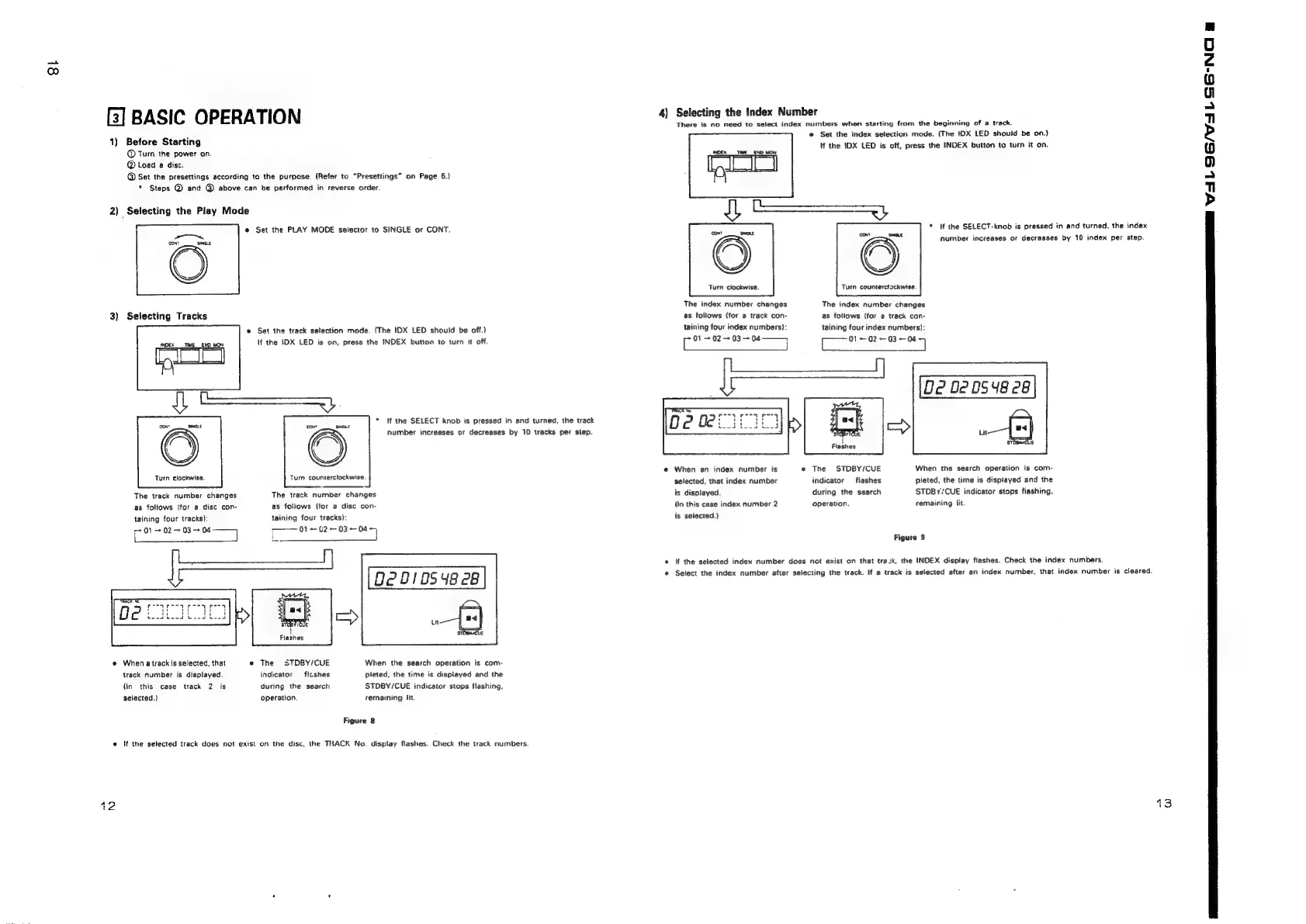
BASIC
OPERATION
1)
Before
Starting
@
Turn
the
power
on.
@
Load
a
disc.
@
Set
the
presettings
according
to
the
purpose.
(Refer
to
“Presettings”
on
Page
6.)
*
Steps
@
and
@
above
can
be
performed
in
reverse
order.
2)
Selecting
the
Play
Mode
@
Set
the
PLAY
MODE
selector
to
SINGLE
or
CONT.
oe
conT
GLE
3)
Selecting
Tracks
©
Set
the
track
selection
mode.
(The
IDX
LED
should
be
off.)
lf
the
IDX
LED
is
on,
press
the
INDEX
button
to
turn
it
off.
(NOEX
TIME
END
MON
*
ff
the
SELECT
knob
is
pressed
in
and
turned,
the
track
Number
increases
or
decreases
by
10
tracks
per
step.
Turn
clockwise.
Turn
counterclockwise.
The
track
number
changes
as
follows
(for
@
disc
con-
taining
four
tracks}:
(ee
eee
Te
ee
eo
f
The
track
number
changes
as
fotlows
(for
a
disc
con-
taining
four
tracks):
Flashes
@
When
atrack
is
selected,
that
e
The
STDBY/CUE
track
number
is
displayed.
indicator
flashes
(in
this
case
track
2
is
during
the
search
selected.)
operation.
When
the
search
operation
is
com-
pleted,
the
time
is
displayed
and
the
STDBY/CUE
indicator
stops
flashing.
remaining
lit.
Figure
8
e
If
the
selected
track
does
not
exist
on
the
disc,
the
TRACK
No.
display
flashes.
Check
the
track
numbers.
12
4)
Selecting
the
index
Number
There
is
no
need
to
select
index
numbers
when
starting
from
the
beginning
of
a
track.
©
Set
the
index
selection
mode.
(The
IDX
LED
should
be
on.)
tf
the
IDX
LED
is
off,
press
the
INDEX
button
to
turn
it
on.
INDEX
TE
END
MON
*
if
the
SELECT-knob
is
pressed
in
and
turned,
the
index
number
increases
or
decreases
by
10
index
per
step.
ae.
Turn
clockwise.
Turn
counterclackwise.
The
index
number
changes
as
follows
(for
a
track
con-
taining
four
index
numbers}:
The
index
number
changes
as
follows
{for
a
track
con-
taining
four
index
numbers):
01
02
+
03
+
04
——
01-02-03
--04
C
—_—
1
O02
02054828
A
e@
When
an
index
number
is
e
The
STDBY/CUE
When
the
search
operation
is
com-
selected,
that
index
number
indicator
flashes.
pleted,
the
time
is
displayed
and
the
is
displayed.
during
the
search
STDBY/CUE
indicator
stops
flashing.
(in
this
case
index
number
2
operation.
remaining
fit.
is
selected.)
Flashes
Figure
9
©
If
the
selected
index
number
does
not
exist
on
that
track,
the
INDEX
display
flashes.
Check
the
index
numbers.
©
Select
the
index
number
after
selecting
the
track.
If
a
track
is
selected
after
an
index
number,
that
index
number
is
cleared.
13
ee
X11
5/7
SGN
&

Related product manuals