EasyManua.ls Logo

Denon DN-951FA - Page 17

Denon DN-951FA
92 pages
Print Icon
To Next Page IconTo Next Page
To Previous Page IconTo Previous Page
Loading...
Rn
ee
{d7)
PLAYER
ID:
Set
to
4-bit
(binary)
to
contro!
the
player
with
commands
including
IDs
from
the
RS-422A
connector.
*
When
several
units
are
connected
via
the
RS-422A
connector,
separate
IDs
must
be
set
for
each
of
them.
[d7-1}
{d7-2}
(d7-3}
1d7-4]
1D
*
0 0
0
0
Q
1
Q
tv)
it)
1
9
1
it]
tt]
2
1 1
tt) tt)
3
QO
0
1
0
4
1
0
1
0
5
La)
1 1
0
6
1
1
4
0
7
0
tt)
0
1
8
1
0
0
1
9
0
1
0
1
10
1 1
0
1
13
0
ti)
1
1
42
1
0
1 t
13
0
1
1 1
14
1
1 1
1
15
©
Resetting
to
the
default
settings
Turn
the
POWER
switch
on
while
holding
in
the
INDEX
and
TIME
buttons.
All
values
are
reset
to
the
values
indicated
on
the
“Table
of
preset
functions”.
3)
Connections
3)-1
Output
signal
connections
@
Analog
output
signal
connections
Connect
the
player's
output
connectors
(LINE
OUT
L
and
R)
@
to
the
balanced
inputs
on
an
amplifier
or
console
using
3-pin
cords.
Digital
output
signai
connections
To
use
the
digital
output,
connect
the
player's
output
connector
(DIGITAL
OUT)
@
to
the
balanced
digital
input
on
an
amplifier
or
console
using
a
3-pin
cord.
NOTES:
1)
When
using
the
digital
output,
set
preset
item
d3-8
to
“on”.
2)
To
send
the
digital
output
to
an
unbalanced
circuit,
do
so
via
a
balanced/unbaianced
conversion
circuit.
Balanced/unbaianced
conversion
circuit
+5V
+
+5Vv
+5v
100»
sv]
16V
<6uD]
SN73157
T4HCO4
(72)
(176)
+
FROM
(3)
.
Han
aaa
Wr
—@)
ovr
ON-961FA
(2)
d
DIGITAL
OUT
1
‘>
=
SII
A
PE
IE
el
Se
ta
EEN
ing
[>
je
f
i
eet
(
4
1
(376)
I
'
!
Wi
rae
eed
Ss
tes
ee
ee
Sr
J
Figure
5
3)-2
Remote
signal
connections
@
Parallel
remote
signal
connections
To
use
the
player
remotely,
connect
the
remote
connector
(REMOTE)
®
with
the
remote
control
circuit
using
a
25-pin
D-sub
cord,
NOTE;
When
using
paraliel
remote
connections,
set
preset
item
d3-1
tc
“off”.
@
Seriai
remote
signal
connections
To
use
the
player
connected
to
@
controller
or
personal
computer,
connect
the
remote
connector
(RS422A)
@
to
the
controlier
using
a
9-pin
D-sub
cord.
10
Zi
4)
Loading
and
Ejecting
the
Disc
e
ifthe
disc
holder
is
closed,
press
the
EJECT
button
to
open
it.
3)-3
Power
supply
connections
Connect
the
player
to
a
power
supply
with
the
preset
voltage
(as
shown
on
the
fuse
holder
window}
using
the
included
power
cord.
Make
sure
the
POWER
switch
is
turned
off
when
doing
so.
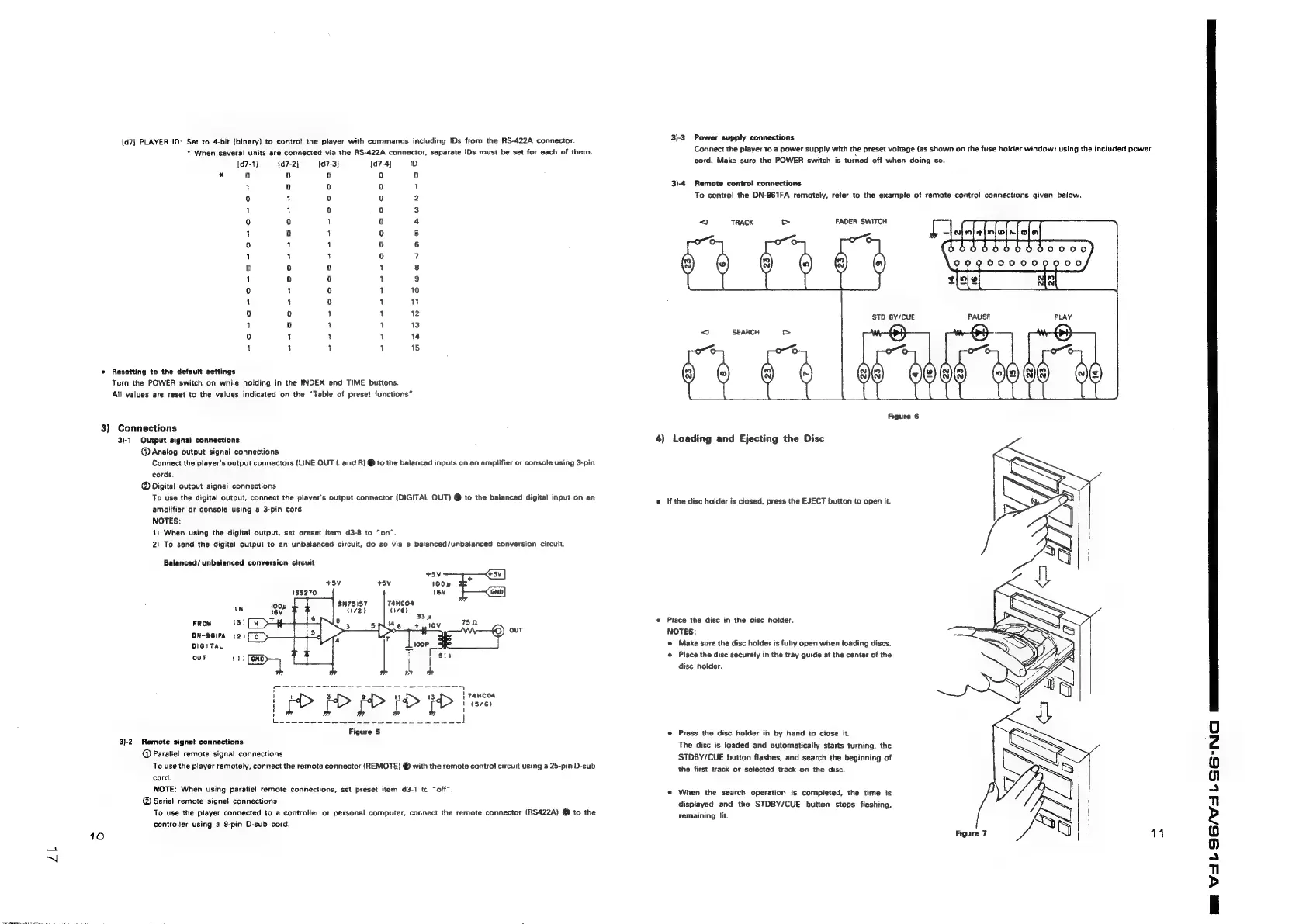
3)4
Remote
contro!
connections
To
contro!
the
DN-961FA
remotely,
refer
to
the
example
of
remote
control
connections
given below.
FADER
SWITCH
Place
the
disc
in
the
disc
holder.
NOTES:
@
Make
sure
the
disc
holder
is
fully
open
when
loading
discs.
@
Place
the
disc
securely
in
the
tray
guide
at
the
center
of
the
disc
holder.
@
Press
the
disc
holder
in
by
hand
to
ciose
it.
The
disc
is
loaded
and
automatically
starts
turning,
the
STDBY/CUE
button
flashes,
and
search
the
beginning
of
the
first
track
or
selected
track
on
the
disc.
«
When
the
search
operation
is
completed,
the
time
is
displayed
and
the
STDBY/CUE
button
stops
flashing,
remaining
lit.
aS
a
|
Figure
7
i
14
y
\7
3
BAL
SG/S
3b
SG
NC

Related product manuals