EasyManua.ls Logo

Denon DN-951FA - Page 8

Denon DN-951FA
92 pages
Print Icon
To Next Page IconTo Next Page
To Previous Page IconTo Previous Page
Loading...
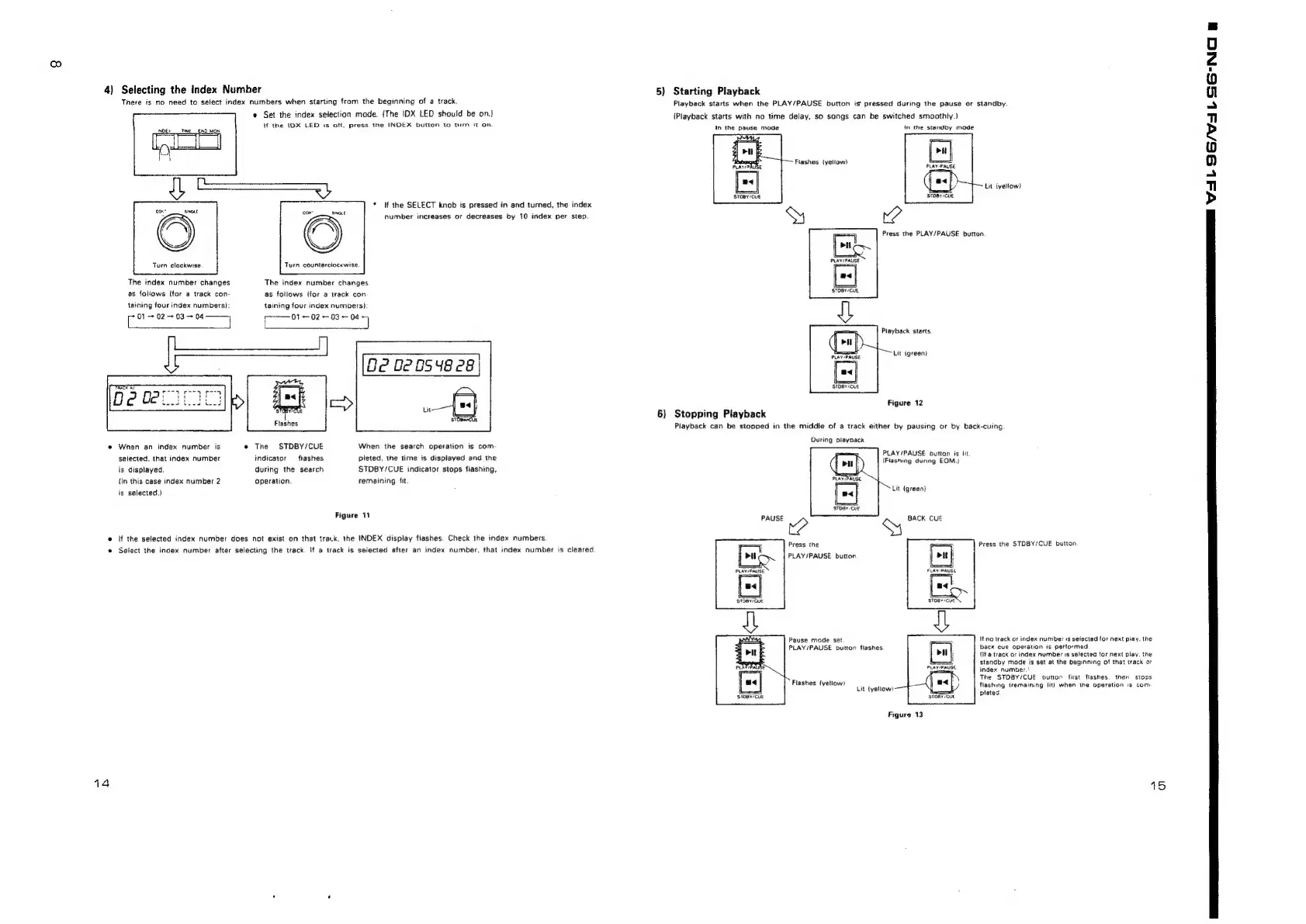
4}
Selecting
the
Index
Number
There
is
no
need
to
select
index
numbers
when
starting
from
the
beginning
of
a
track.
INDEX
__TIME__END_MON
Turn
clockwise.
The
index
number
changes
as
follows
(for
a
track
con-
taining
tour
index
numbers):
Ins
+
02
+03
+
04
@
Set
the
index
selection
mode.
{The
IDX
LED
should
be
on.)
if
the
IDX
LED
is
off,
press
the
INDEX
button
to
turn
it
on
Turn
counterciockwise.
The
index
number
changes
as
follows
(for
a
track
con
taining
four
index
numbers):
~——01
ieee
Sead
bee
2
O23
Be
02
0548
28
eal
aan
Flashes
@
When
an
index
number
is
The
STDBY/CUE
When
the
search
operation
is
com-
selected,
that
index
number
indicator
flashes
pleted,
the
time
is
displayed
and
the
is
disptayed.
during
the
search
STDBY/CUE
indicator
stops
fiashing,
(In
this
case
index
number
2
operation.
remaining
Sit.
is
selected.)
Figure
11
@
If
the
selected
index
number
does
not
exist
on
that
track,
the
INDEX
display
flashes.
Check
the
index
numbers
Select
the
index
number
after
selecting
the
track.
If
a
track
is
selected
after
an
index
number,
that
index
number
is
cieared
*
If
the
SELECT
knob
is
pressed
in
and
turned,
the
index
number
increases
or
decreases
by
10
index
per
step.
5)
Starting
Playback
Playback
starts
when
the
PLAY/PAUSE
button
is
pressed
during
the
pause
or
standby.
(Playback
starts
with
no
time
delay,
so
songs
can
be
switched
smoothty.)
In
the
pause
mode
in
the
standby
mode
Flashes
iyeliow)
STOBY
CLE
STOBY
CUE
Press
the
PLAY/PAUSE
button
STOBY/CUE,
Playback
starts.
Lit
(green)
STDBY/CUE
Figure
12
6)
Stopping
Playback
Playback
can
be
stopped
in
the
middle
of
a
track
either
by
pausing
or
by
back-cuing.
During
playoack
PLAY/PAUSE
button
is
iit
(Flashing
during
EOM.)
Lit
{green}
C
BACK
CUE
stDay
CUE
Press
the
PLAY/PAUSE
button
Lit
(yellow)
Press
the
STDBY/CUE
button.
14
Pause
mode
set
PLAY/PAUSE
button
flashes
Flashes
(yellow)
Lit
lyeliow?
‘SIDBY
CUE
Figure
13
lt
no
track
or
index
number
is
selected
for
next
play,
the
back
cue
operation
is
pertormed
(If
a
track
or
index
number
is
selected
tor
next
play,
the
standby
mode
is
set
at
the
beginning
of
that
track
or
index
number.*
The
STDBY/CUE
button
first
flashes.
then
stops
flashing
(remaining
lit}
when
the
operation
is
com:
pleted.
15
Se
VF
SS
SSN

Related product manuals