EasyManua.ls Logo

Denon DN-951FA - Page 9

Denon DN-951FA
92 pages
Print Icon
To Next Page IconTo Next Page
To Previous Page IconTo Previous Page
Loading...
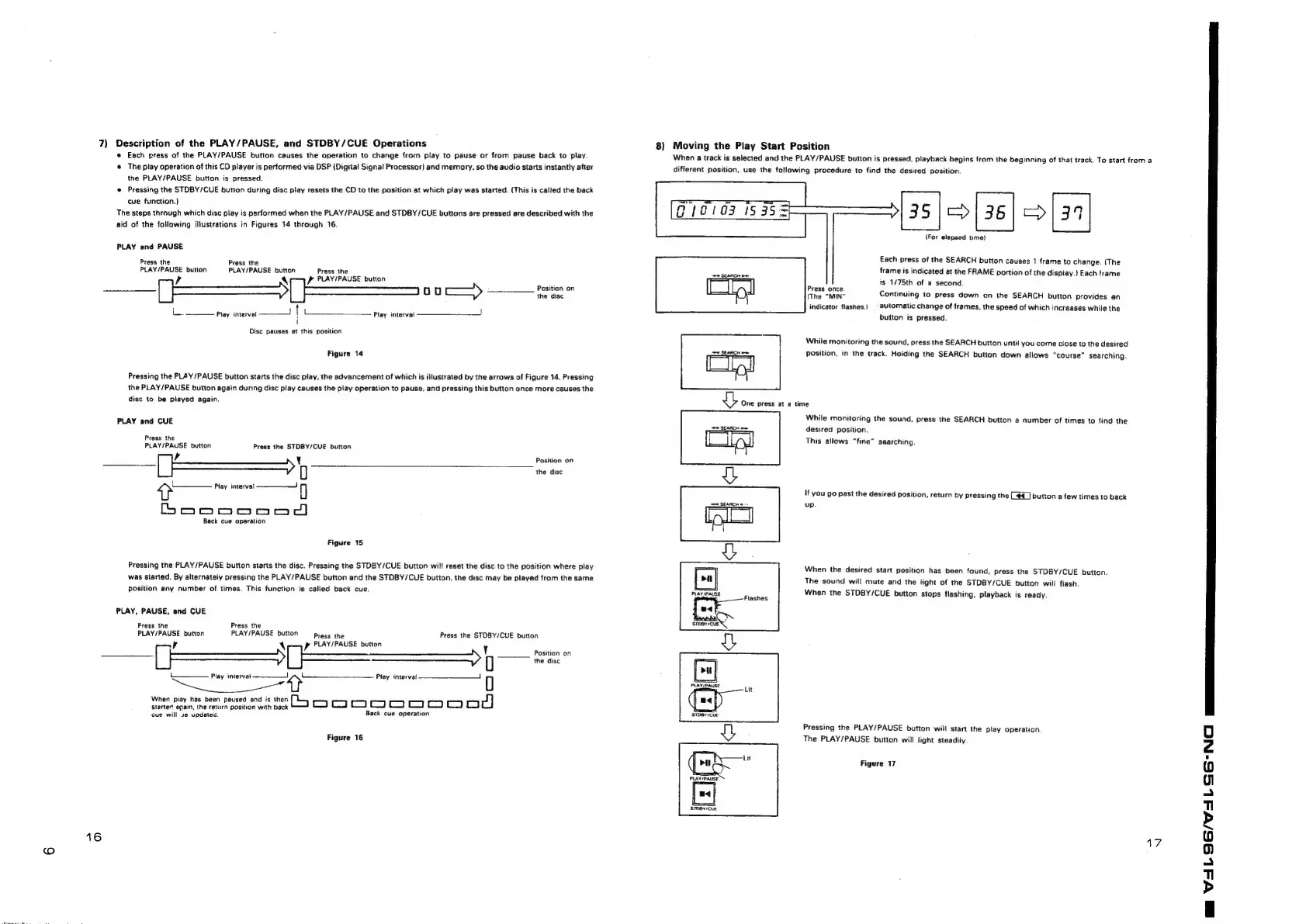
7)
Description
of
the
PLAY/PAUSE,
and
STDBY/CUE
Operations
e
Each
gress
of
the
PLAY/PAUSE
button
causes
the
operation
to
change
from
play
to
pause
or
from
pause
back
to
play.
@
The
play
operation
of
this
CD
player
is
performed
via
DSP
(Digital
Signal
Processor)
and
memory,
so
the
audio
starts
instantly
atter
the
PLAY/PAUSE
button
is
pressed.
e
Pressing
the
STOBY/CUE
button
during
disc
play
resets
the
CD
to
the
position
at
which
play
was
started.
(This
is
called
the
back
cue
function.)
The
steps
through
which
disc
play
is
performed
when
the
PLAY/PAUSE
and
STDBY/CUE
buttons
are
pressed
are
described
with
the
aid
of
the
following
illustrations
in
Figures
14
through
16.
PLAY
and
PAUSE
Press
the
Press
the
PLAY/PAUSE
button
PLAY/PAUSE
button
Press
the
,
AY
Pp
PLAY/PAUSE
button
Position
on
a
Ste
>
pagel
=
Play
interval
!
t
l
Play
interval
!
\
Disc
pauses
at
this
position
Figure
14
Pressing
the
PLAY/PAUSE
button
starts
the
disc
play,
the
advancement
of
which
is
illustrated
by
the
arrows
of
Figure
14.
Pressing
the
PLAY/PAUSE
button
again
during
disc
play
causes
the
play
operation
to
pause,
and
pressing
this
button
once
more
causes
the
disc
to
be
played
again.
PLAY
and
CUE
Press
the
PLAY/PAUSE
button
Press
the
STDBY/CUE
button
jefe
eg
ae
r
Y
Position
on
0
the
disc
>
Play
interval
-——_—J
q
boeoooood)
Back
cue
operation
Figure
15
Pressing
the
PLAY/PAUSE
button
starts
the
disc.
Pressing
the
STOBY/CUE
button
will
reset
the
disc
to
the
position
where
play
was
started.
By
alternately
pressing
the
PLAY/PAUSE
button
and
the
STDBY/CUE
button,
the
disc
may
be
played
from
the
same
position
any
number
of
times.
This
function
is
called
back
cue.
PLAY,
PAUSE,
and
CUE
Press
the
Press
the
PLAY/PAUSE
button
PLAY/PAUSE
button
press
the
Press
the
STDBY/CUE
button
p
PLAY/PAUSE
button
Y
Position
on
0
the
disc
r
4
When
piay
has
been
paused
and
is
then
Z]
ee
ones
meitae
Back
cue
operation
cue
will
2
updated.
Figure
16
16
8)
Moving
the
Play
Start
Position
When
a
track
is
selected
and
the
PLAY/PAUSE
button
is
pressed,
playback
begins
from
the
beginning
of
that
track.
To
start
from
a
different
position,
use
the
following
procedure
to
find
the
desired
position.
[35
|=
36|
>|
39
(For
elapsed
time)
12103
1535
Each
press
of
the
SEARCH
button
causes
1
frame
to
change.
(The
frame
is
indicated
at
the
FRAME
portion
of
the
disptay.}
Each
frame
is
1/75th
of
a
second.
Press
once.
(The
"MIN"
Continuing
to
press
down
on
the
SEARCH
button
provides
an
indicator
flashes.)
|
automatic
change
of
frames,
the
speed
of
which
increases
while
the
button
is
pressed.
While
monitoring
the
sound,
press
the
SEARCH
button
until
you
come
close
to
the
desired
22
SEARCH
oe
Position,
in
the
track.
Holding
the
SEARCH
button
down
allows
“course”
searching.
th
One
press
at
a
time
While
monitoring
the
sound,
press
the
SEARCH
button
a
number
of
times
to
find
the
desired
position.
This
allows
“fine”
searching.
t
H
I
Mes
'f
you
go
past
the
desired
position,
return
by
pressing
the
(€@
]
button
a
few
times
to
back
24
SEARCH
up.
u
When
the
desired
start
position
has
been
found,
press
the
STDBY/CUE
button.
The
sound
will
mute
and
the
light
of
the
STDBY/CUE
button
will
flash.
When
the
STDBY/CUE
button
stops
flashing,
playback
is
ready.
Flashes
Pressing
the
PLAY/PAUSE
button
will
start
the
play
operation
The
PLAY/PAUSE
button
will
light
steadily.
Figure
17
17

Related product manuals