EasyManua.ls Logo

Denon DN-951FA - Page 10

Denon DN-951FA
92 pages
Print Icon
To Next Page IconTo Next Page
To Previous Page IconTo Previous Page
Loading...
Ol
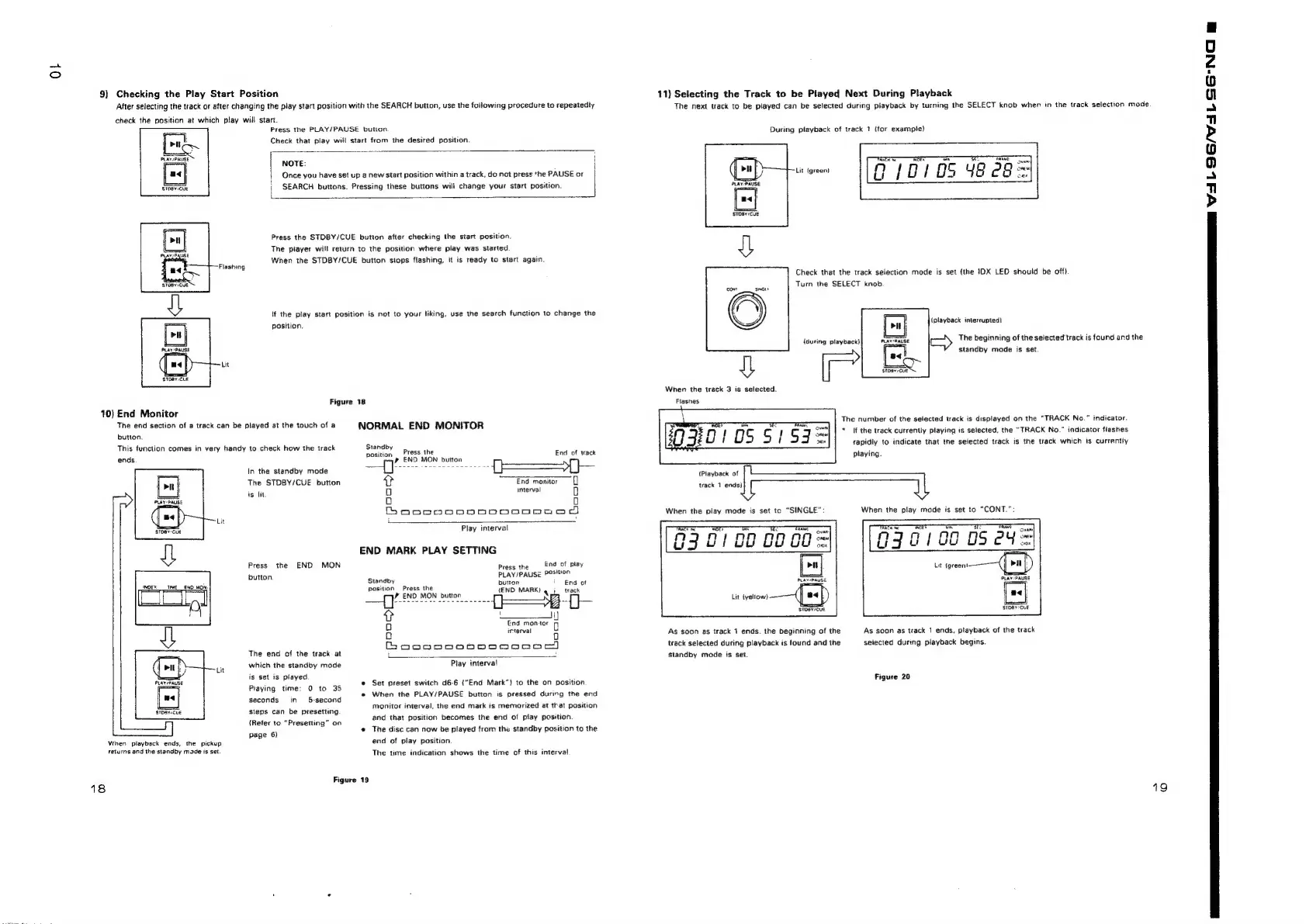
9)
Checking
the
Play
Start
Position
After
selecting
the
track
or
after
changing
the
play
start
position
with
the
SEARCH
button,
use
the
foilowing
procedure
to
repeatedly
check
the
position
at
which
play
will
start.
Press
the
PLAY/PAUSE
button
Check
that
play
will
start
from
the
desired
position.
NOTE:
Once
you
have
set
up
2
new
start
position
within
a
track,
do
not
press
the
PAUSE
or
i
SEARCH
buttons.
Pressing
these
buttons
wili
change
your
start
position.
l
position.
Figure
10)
End
Monitor
The
end
section
of
a
track
can
be
ptayed
at
the
touch
of
a
bution.
This
function
comes
in
very
handy
to
check
how
the
track
In
the
standby
mode
The
STDBY/CUE
button
is
lit.
Press
the
END
MON
button
ENO
MON
The
end
of
the
track
at
which
the
standby
mode
is
set
is
played
Playing
time:
0
to
35
seconds
in
5-second
PLAY/PAUSE
STDAY/CUE
steps
can
be
presetting.
(Refer
to
“Presetting”
on
page
6)
When
playback
ends,
the
pickup
returns
and
the
standby
made
is
set.
Press
the
STDBY/CUE
button
after
checking
the
stast
position.
The
piayer
will
return
to
the
position
where
play
was
started
When
the
STDBY/CUE
button
stops
flashing,
it
is
ready
to
start
again.
If
the
play
start
position
is
not
to
your
liking,
use
the
search
function
to
change
the
18
NORMAL
END
MONITOR
Standby
position
Press
the
End
of
track
eof
feo
sce
een
Orem
oe
Tt
End
monitor
q
o
interval
0
o
O
Boaoenonnon0oonDoGe
dd
Play
interval
END
MARK
PLAY
SETTING
Press
the
End
of
play
PLAY/PAUSE
Position
Standby
button
i
End
of
position
Press
the
(END
MARK)
aot,
track
—?’
END
MON
button
{_-=—3
if
?
___ii]
fa]
fod
manitors
fy
o
interval
o
Bocannpoob0omoroe)
t
Play
interval
Set
preset
switch
d6-6
("End
Mark”)
to
the
on
position
When
the
PLAY/PAUSE
button
is
pressed
during
the
end
monitor
interval,
the
end
mark
is
memorized
at
that
position
and
that
position
becomes
the
end
of
play
position.
@
The
disc
can
now
be
played
from
the
standby
position
to
the
end
of
play
position.
The
time
indication
shows
the
time
of
this
interval
Figure
19
18
11)
Selecting
the
Track
to
be
Played
Next
During
Playback
The
next
track
to
be
played
can
be
selected
during
playback
by
turning
the
SELECT
knob
when
in
the
track
selection
mode
During
playback
of
track
1
(for
example)
Lit
(green)
STOBY/CUE
Check
that
the
track
selection
mode
is
set
(the
IDX
LED
should
be
off}
RAE
a
cram
Fane]
0/0105
48e9=
Turn
the
SELECT
knob.
(during
playback}
{
When
the
track
3
is
selected.
Flasnes
ro
Ny0105
$159=
{Playback
of
track
1
ends)
When
the
play
mode
is
set
tc
“SINGLE”:
ovare
630100
00c0=
Lb]
PLAY/PAUSE,
Lit
{yellow)
As
soon
as
track
1
ends.
the
beginning
of
the
track
selected
during
playback
is
found
and
the
Standby
mode
is
set.
(playback
interrupted!
a<
EL
The
number
of
the
selected
track
is
displayed
on
the
“TRACK
No.”
indicator.
If
the
track
currently
playing
is
selected,
the
“TRACK
No.”
indicator
fiashes
tapidly
to
indicate
that
the
selected
track
is
the
track
which
is
currently
playing.
When
the
play
mode
is
set
to
“CONT.":
TREK
Ne
wee
Sean
9730100
DS
ey
=
PLAY
-PAUSE
[=|
STDBY:CUE
As
soon
as
track
1
ends,
playback
of
the
track
selected
during
playback
begins.
Figure
20
The
beginning
of
the
selected'track
is
found
and
the
standby
mode
is
set
19
ee
XL
SS/
VIL
SS
NC
@

Related product manuals