EasyManua.ls Logo

Denon DN-951FA - Page 11

Denon DN-951FA
92 pages
Print Icon
To Next Page IconTo Next Page
To Previous Page IconTo Previous Page
Loading...
ih
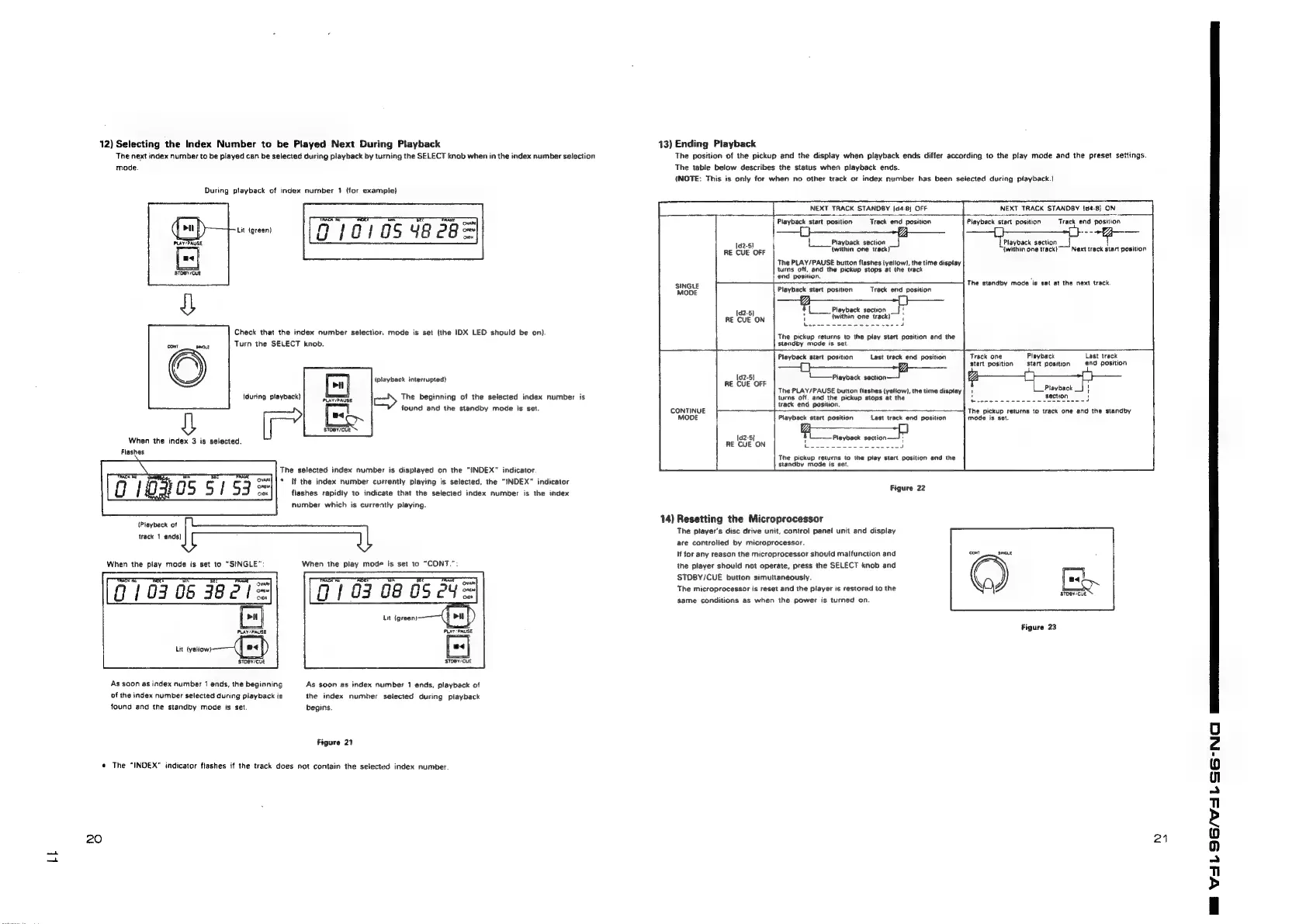
12)
Selecting
the
Index
Number
to
be
Played
Next
During
Playback
The
next
index
number
to
be
played
can
be
selected
during
playback
by
turning
the
SELECT
knab
when
in
the
index
number
selection
mode.
During
playback
of
index
number
1
(for
example}
Lit
igreen)
7
940105
48e8=
Check
that
the
index
number
selectior,
mode
is
set
(the
IDX
LED
should
be
on).
(during
playback)
When
the
index
3
is
selected.
Flashes
Turn
the
SELECT
knob.
(playback
interrupted)
The
beginning
of
the
selected
index
number
is
found
and
the
standby
mode
is
set.
SsTOeY/CUE
The
selected
index
number
is
displayed
on
the
“INDEX”
indicator
A
re
Rl
|
a
‘i
fi
‘i
we
q
i
os
S
|
53
peace)
If
the
index
purer
currently
playing
is
selected,
the
INDEX
indicator
g
OK
flashes
rapidity
to
indicate
that
the
selected
index
number
is
the
index
(Playback
of
track
1
ends)
When
the
piay
mode
is
set
to
“SINGLE”:
910308
3821=
Lit
{yeliow)
sTOBY/CUE
As
soon
as
index
number
1
ends,
the
beginning
of
the
index
number
selected
during
playback
is
found
and
the
standby
mode
is
set.
«
The
“INDEX"
indicator
flashes
if
the
track
does
20
number
which
is
currently
playing.
When
the
play
mode
is
set
to
“CONT.”:
‘ovam
03
08
05
ey
——
STOBY/CUE
As
soon
as
index
number
1
ends,
playback
of
the
index
number
selected
during
playback
begins.
Figure
21
Not
contain
the
selected
index
number.
13)
Ending
Playback
The
position
of
the
pickup
and
the
display
when
playback
ends
differ
according
to
the
play
mode
and
the
preset
settings.
The
table
below
describes
the
status
when
playback
ends.
(NOTE:
This
is
only
for
when
no
other
track
or
index
number
has
been
selected
during
playback.)
NEXT
TRACK
STANDBY
[04-8]
OFF
NEXT
TRACK
STANDBY
{d4-8]
ON
Playback
start
position
Track
end
position
Playback
section
|
(within
one
track}
Next
track
start
position
=
Playback
start
position
sas
i
{Playback
section
_}
(within
one
track)
Track
end
position
The
PLAY/PAUSE
button
flashes
(yellow),
the
time
display
turns
off,
and
the
pickup
stops
at
the
track
end
position.
:
The
standby
mode
is
set
at
the
next
track.
SINGLE
Playback
start
position
Track
end
position
f
Playback
section
“A
(within
one
track)
"
bees
adore
soedwsacu!
1d2-5}
RE
CUE
ON
The
pickup
returns
to
the
play
start
position
and
the
standby
mode
is
set.
a
Last
track
end
position
Track
one
Playback
Playback
start
position
Last
treck
end
position
start
position
start
position
1_§playback
Sac
The
PLAY/PAUSE
button
flashes
(yellow),
the
time
display
turns
off.
and
the
pickup
stops
at
the
Hae.
track
end
position.
[d2-5}
RE
CUE
OFF
Playback
_|
\
The
pickup
returns
to
track
one
and
the
standby
mode
is
set.
CONTINUE
MODE
Playback
start
position
Last
track
end
position
|d2-5}
f
ina
Seer
RE
CUE
ON
J
The
pickup
returns
to
the
play
start
position
and
the
standby
mode
is
set.
Figure
22
14)
Resetting
the
Microprocessor
The
player's
disc
drive
unit,
controt
panei
unit
and
display
are
controlied
by
microprocessor.
If
for
any
reason
the
microprocessor
should
malfunction
and
the
player
should
not
operate,
press
the
SELECT
knob
and
STDBY/CUE
button
simultaneously.
The
microprocessor
is
reset
and
the
player
is
restored
to
the
same
conditions
as
when
the
power
is
turned
on.
[eek
Ek
Figure
23
21
A
a
a
ee

Related product manuals