6
Before use
Connections
Basic
operations
Effector
function
Fader
Start function
USB settings
Troubleshooting
IndeX
specifications
System diagram
Part names and
functions
NOTE
• Do not plug in the power cord until all connections have been completed.
• When making connections, also refer to the operating instructions of the other components.
• Insert the plugs securely. Loose connections will result in the generation of noise.
• Be sure to connect the left and right channels properly (left with left, right with right).
• Connect the cables to the correct input and output terminals.
• Do not bundle power cords together with connection cables. Doing so can result in humming or noise.
Preparations
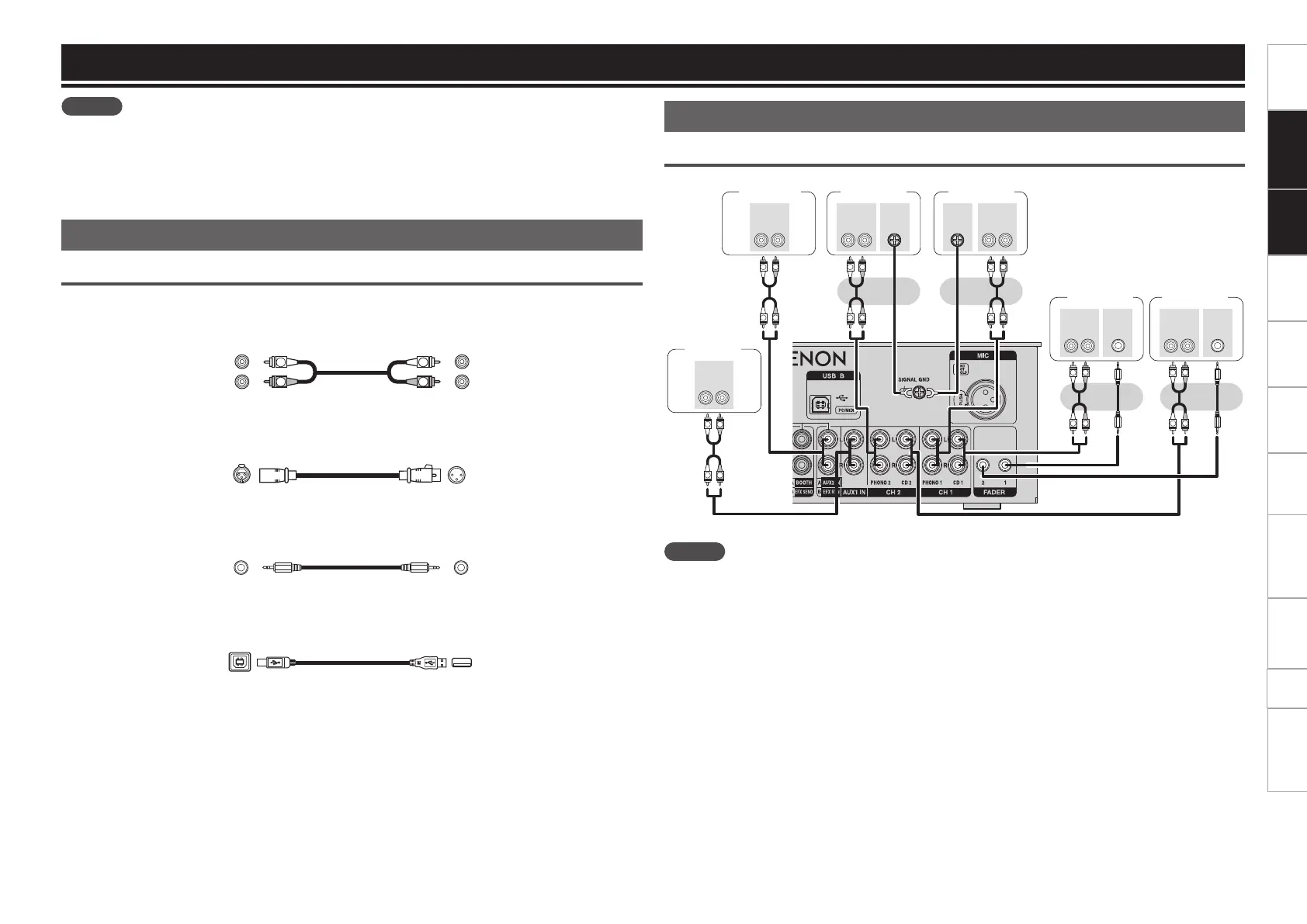
Cables used for connection
Select the cables according to the equipment being connected.
n For RCA input terminals
R
L
R
L
RCA pin plug cable (Sold separately))
n For XLR input/output terminals
Balanced cable (Sold separately)
n For FADER terminals
Stereo mini plug cable (Sold separately)
n For USB terminal
USB cable (Included)
Connections
Input terminal connection
Input from external devices
R
L
R
L
R
L
R
L
R
L
R
L
R
L
R
L
R
L
R
L
R
L
R
L
FADER
AUDIO
RL
OUT
FADER
AUDIO
RL
OUT
AUDIO
RL
OUT
SIGNAL
GND
AUDIO
RL
OUT
SIGNAL
GND
AUDIO
RL
OUT
AUDIO
RL
OUT
External
device 2
Turntable 2 Turntable 1
CD player 1 CD player 2
External
device 1
NOTE
• To use the AUX2/Effect/Return input terminal as the AUX2 input terminal, set the SELECT switch to ”A”.
• To connect a DJ CD player to this unit and use the fader start function, connect this unit to the FADER
terminal of the CD player.



 To Next Page