4
DP-300F
3. LEAD IN AND LEAD OUT ADJUSTMENT
(1) Lead in
(Test record: Hitachi HT-5 (30cm))
Check that the stylus lowers at 5 to 25 counts for both
17cm and 30cm records.
(2) Lead out
(Test record: Nippon Columbia EM-1001
(17cm))
Check that the pickup returns at 3 to 15 counts (3mm
pitch).
If the counts are off , adjust as follows:
(a) Fasten the pickup to the arm rest.
(b) Detach the Bottom board.
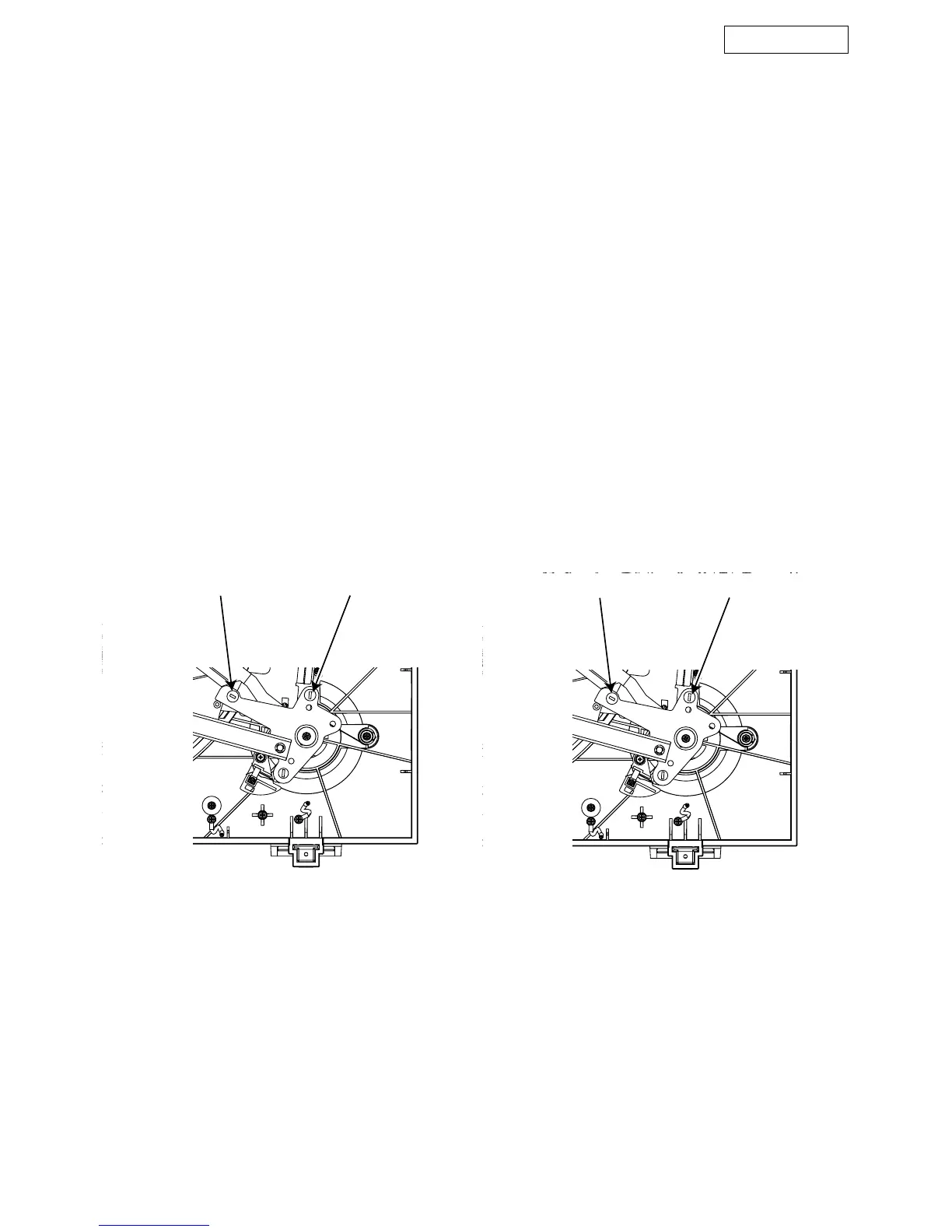
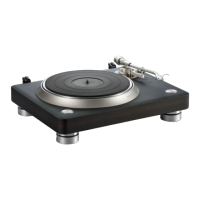
(c) Insert a screwdriver into the lead in or lead out
adjustment parts and adjust.
(d) After adjustment, fix it in Three Bond 1401B.
(e) Fix the Bottom board.
Lead in
• Count increases when turned clockwise
• Count decreases when turned counterclockwise
Lead out
• Count increases when turned clockwise
• Count decreases when turned counterclockwise
3. リードイン、リードアウトの調整
調整に際してはテストレコードの使用が望ましい。
(1) リードイン
[テストレコード:日立製 GES ー 3327 または HT ー5 (30cm
盤)]
17cm,30cm 共に 5 〜 25 カウントに落下すること。
(2) リードアウト
[テストレコード:コロムビア EM-1001(17cm 盤)]
3 〜 15 カウント(3mm ピッチ)でリターンすること。
上記でカウントを外れた場合は、次のように調整してく
ださい。
(イ)ピックアップをアームレストにのせ、固定します。
(ロ)ボトムをはずします。
(ハ)リードイン、リードアウト調整部に(ー)ドライ
バーを差し込み、リードイン、リードアウトの調整をお
こないます。
(ニ)調整後 スリーボンド製 1401B で固定します。
(ホ)ボトムを取り付けます。
リードイン
・ 時計方向に廻す(カウント大)
・ 反時計方向に廻す(カウント小)
リードアウト
・ 時計方向に廻す(カウント小)
・ 反時計方向に廻す(カウント大)
Lead in adjust part Lead out adjust part
リードイン調整部 リードアウト調整部




 To Next Page