EasyManua.ls Logo

Denon Exercise Freak AH-W150 - User Manual

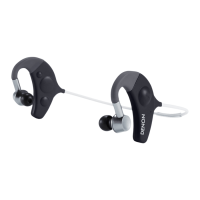
Denon Exercise Freak AH-W150
11 pages
Print Icon
To Next Page IconTo Next Page
Loading...
AH-W150
Bluetooth Headphones / In Ear Headphones
EXERCISE FREAK
TM
Owners Manual

Other manuals for Denon Exercise Freak AH-W150

Questions and Answers

  • J
    Jeffrey WalkerJul 31, 2025
    What to do if I cannot establish a Bluetooth connection with my Denon Exercise Freak AH-W150?
    • M
      Molly CamposJul 31, 2025
      If you're having trouble establishing a Bluetooth connection with your Denon Headphones, first, check that the headphone's Bluetooth function is turned on. Also, confirm that the Bluetooth device you're trying to connect is turned on, its Bluetooth function is enabled, and it is not in sleep mode. If problems persist, try pairing the devices again.
  • P
    pnealAug 9, 2025
    Why can't I hear sound through my Denon Headphones during Bluetooth connection?
    • K
      Katie PhamAug 9, 2025
      If you cannot hear sound through your Denon Headphones via Bluetooth, ensure that the headphone's Bluetooth function is on and the connected Bluetooth device is also turned on with its Bluetooth activated. Also, make sure the connected Bluetooth device's audio playback has started. Increase the volume level on both the headphones and the connected device. Select the A2DP profile on the transmitting Bluetooth device. If the issue persists, try pairing the devices again.
  • M
    Mallory WhitneyAug 20, 2025
    Why can't I hear the caller's voice on my Denon Exercise Freak AH-W150 during a phone call?
    • M
      Melissa ReedAug 21, 2025
      If you cannot hear the caller's voice through your Denon Headphones, and you were listening to music, press the call button to switch to call mode. Also, ensure that the headphone's Bluetooth function is turned on and the connected Bluetooth device is activated. Select the HSP or HFP profile on the transmitting Bluetooth device. Confirm that calls using the headphones are enabled on the connected Bluetooth device. Increase the call volume level, and if necessary, increase the volume on your Bluetooth-compatible mobile phone.

Summary

Getting Started

Preparation for Use

Essential steps before using the headphones, including charging and pairing.

Charging the battery

Instructions on how to charge the device using the USB cable.

Pairing with a Bluetooth device

Steps to establish a wireless connection with other devices.

Turning Bluetooth Wireless Connectivity On;Off

How to activate and deactivate the Bluetooth function.

Adjusting the fit of the headphones

Guidance on properly fitting the headphones for optimal comfort and sound.

Listening to Music

Listening to music using Bluetooth

How to stream audio wirelessly from a paired Bluetooth device.

Conducting Phone Calls

Making a call

Instructions for initiating phone calls using the headphones.

Answering and Ending Calls

Procedures for accepting and terminating phone conversations.

Call Waiting and Ignoring Calls

Managing multiple calls and handling incoming calls.

Switching Audio During Calls

How to switch audio between headphones and mobile phone during a call.

Other Call Operations

Details on additional call management features and redialing.

Additional Information

Overview of LED Indicator Patterns

Explains the meaning of different LED light indicators for status updates.

Troubleshooting Common Issues

Solutions for common operational problems encountered with the headphones.

Precautions and Warnings

Guidelines for safe and optimal use, including handling and environment.

Product Specifications

Lists technical data such as Bluetooth version, frequency band, and battery life.

Denon Exercise Freak AH-W150 Specifications

General IconGeneral
BrandDenon
ModelExercise Freak AH-W150
CategoryHeadphone
LanguageEnglish

Related product manuals