7. Output signal
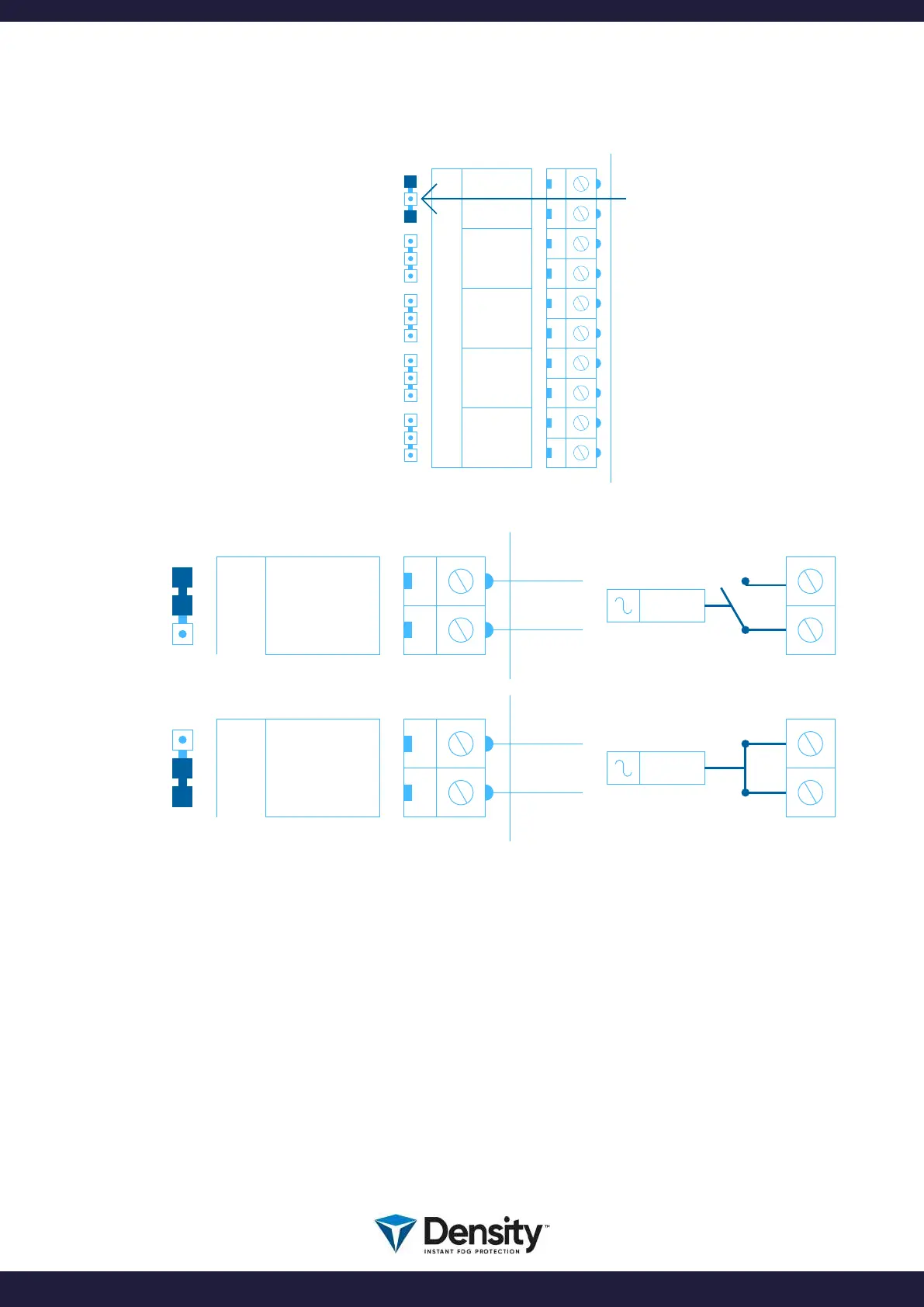
The fog machine has 5 RELAY
outputs.
EMP = Empty fog rell
FLT = Fault
TMP = Tamper switch open
FVL = SHOOT verication
AUX = For future use
Each output has a SHIFT relay
function.
You have the option of
choosing which relay function
you need.
By changing the position of a
JUMPER, you select the relay
output to be either NO (Normal
Open contact) or NC (Normal
Closed contact).
The standard setting of the relay function, is in Passive mode. When the output is not activated, the relay
will be passive. No voltage is applied to the relay. When the output is active, voltage is applied to the
relay and the relay output will change position.
On DIPSWICTH 4, you can change the relay to be in Active mode. When ON, all relays are activated in
rest. This means that all relay’s will be activated when the output is not active. In this way you will receive
an alarm signal, if the fog generator loses all power, as the error relay will change position in that case.
On DIPSWITCH 1 you can select the SHOOT verication relay to be activated only when the fog machine
is SHOOTING. When ON, the relay will be activated together with the SHOOT time selected.
NO
NC
EMPC
EMP
NO
NC
EMPC
EMP
W3
NO
NC
W4
NO
NC
W5
NO
NC
W6
NO
NC
W7
NO
NC
OUTPUT
EMPC
EMP
FLTC
FLT
TMPC
TMP
FVLC
FVL
AUXC
AUX
YOU CAN CHANGE
THE POSITION OF THE JUMPER
TO CHOOSE BETWEEN
NO OR NC FUNCTION
page 13/20
www.densityglobal.com | help@densityglobal.com
Version 1.1.4



 To Next Page