I
I
n
n
t
t
r
r
o
o
d
d
u
u
c
c
t
t
i
i
o
o
n
n
t
t
o
o
a
a
p
p
p
p
e
e
a
a
r
r
a
a
n
n
c
c
e
e
a
a
n
n
d
d
k
k
e
e
y
y
s
s
PC software:
http://www.denver-electronics.com/pc-software-for-denver-
acg-8050w-gps-action-cam/
S
S
t
t
a
a
r
r
t
t
u
u
s
s
i
i
n
n
g
g
_
_
_
_
_
_
_
_
_
_
_
_
_
_
1. Charge the built-in lithium battery
Connect the camera to the computer for charging, at this time, the
charging indicator will be in blue , and it will be off after charging.
Generally, it takes 2-4 hours to charge the battery.
2. Use the storage card
2.1. Push the Micro SD card into the slot till it is in place as per the
instruction in concavely engraved words by the storage card slot.
2.2. To take out the Micro SD card, press the tail of the storage card
inwardly softly and it will be popped out.
Please notice: UHS (ultra highspeed) cards doesn’t work, as they are not
100% backward compatible
Note: There’s no built-in memory unit in the camera, so make sure to
insert a storage card into it prior to use (it is recommended that a Micro
SD card of better quality be used).
3. Power on/off
3.1 Power on: Press Power key for 3 seconds, the screen will be on and
the camera will be started.
3.2. Power off: Hold on Power key for 3 seconds when the camera is in
the idle state to turn it off.
3.3. Auto screen off: The screen will be turned off automatically when
the time that the camera is in the idle state for automatic screen off to
save power. After that, the lamp for screen off will be on.
3.4. Power off when the camera is lack of electricity. When electrical
quantity of the battery is very low, an icon of will be displayed
on the LCD screen, prompting you to charge it in time. When the icon
turns red and flickers, the camera will be turned off automatically.
4. Shift among functional modes
The camera has 3 modes, namely video recording mode, shooting mode
and replay mode. After power is on, press Power key to shift among
them.
Video recording mode Shooting mode
5. Indicator
Busy indicator (red): When the camera is busy such as recording
videos, shooting photos and turning off screen automatically, the work
indicator will flicker.
Charging indicator (blue): When it is on, the user is prompted that the
camera is being charged and it will be off after charging is completed.
6. Video recording mode
After power is on, the video camera will enter video recording mode
directly and in preview mode, press Shutter key to start video recording;
Press it again to stop shooting. If the memory card is full or electrical
quantity is low, it will also stop shooting:
Taking a photo while recording: press the Power button during recording
to take a photo. When a photo is taken, the texts “CAPTURE DONE”
will display on the screen.
1. Icon of mode, indicating video recording mode;
2. Indicate quality of video;
3. Indicate size of video, and FHD 1080P (60FPS)
/ FHD 1080P (30FPS) / HD 720P (120FPS)
/ HD 720P (60FPS) / HD 720P (30FPS) is optional;
4. Recording time, indicating recordable length of time;
5. Icon of battery, indicating current electrical quantity;
( With maximum 29 minutes video recording and then stop.Must be
started manually on the camera again.)
7. Shooting mode
After power is on, press Power key twice to enter shooting mode, and
in preview state, press Shutter key to take a photo:
1. Icon of mode, indicating the current is shooting mode;
2. Size of video, and 5M/8M//12M/16MP is optional;
3. Icon of quality of pictures;
4. Counter, indicating number of photos to be taken;
5. Icon of electrical quantity of battery.
8.GPS Mode( )use introductions:
PC software:
http://www.denver-electronics.com/pc-softw are-for-denv er-
acg-8050w-gps-action-ca m/

 Need help?
 General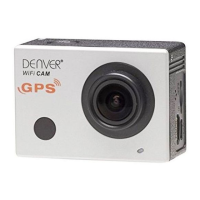

 To Next Page